Chapter 3: Setup and Configuration
Alarm/Buzzer
The S320 beeps under the following conditions:
Whenever you press a button
Position is lost
Differential position is achieved
Bluetooth device is connected/disconnected
Low memory for data storage (SD card almost full)
Both batteries are very low
If an alarm is sounding, you can silence the alarm by pressing the Power button.
Power and Battery Status/Charge
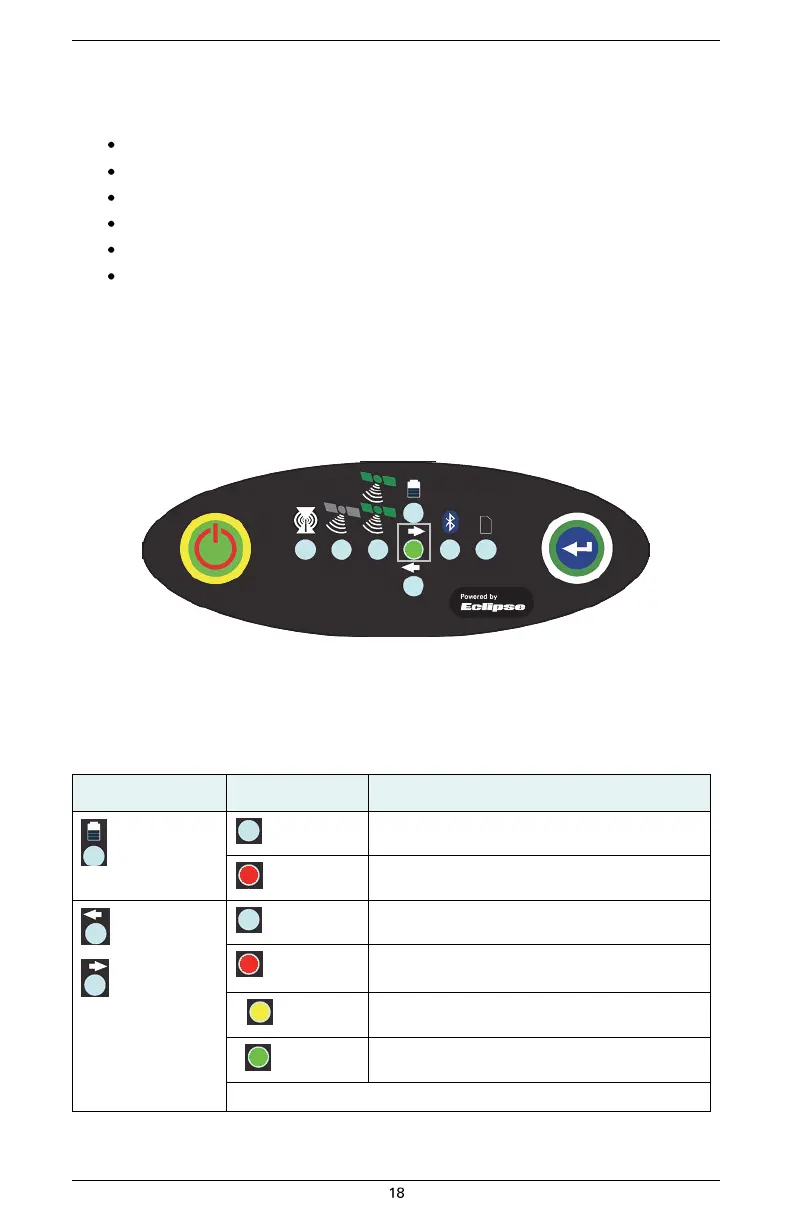
LEDs on the console provide power and battery status/charge information based on the color of the
LEDs. For example, Figure 3-2 indicates there is no external power, the right battery is fully charged,
and the left battery is not present (not in the unit).
Figure 3-2: No external power, right battery full, left battery not present
Table 3-5 describes what the power/battery LED colors indicate. The S320 prioritizes power usage to
use external power when available, regardless of the status of the internal batteries.
Table 3-5: Power/battery LED color descriptions


 To Next Page