Chapter 3: Setup and Configuration
Tilt Function Control
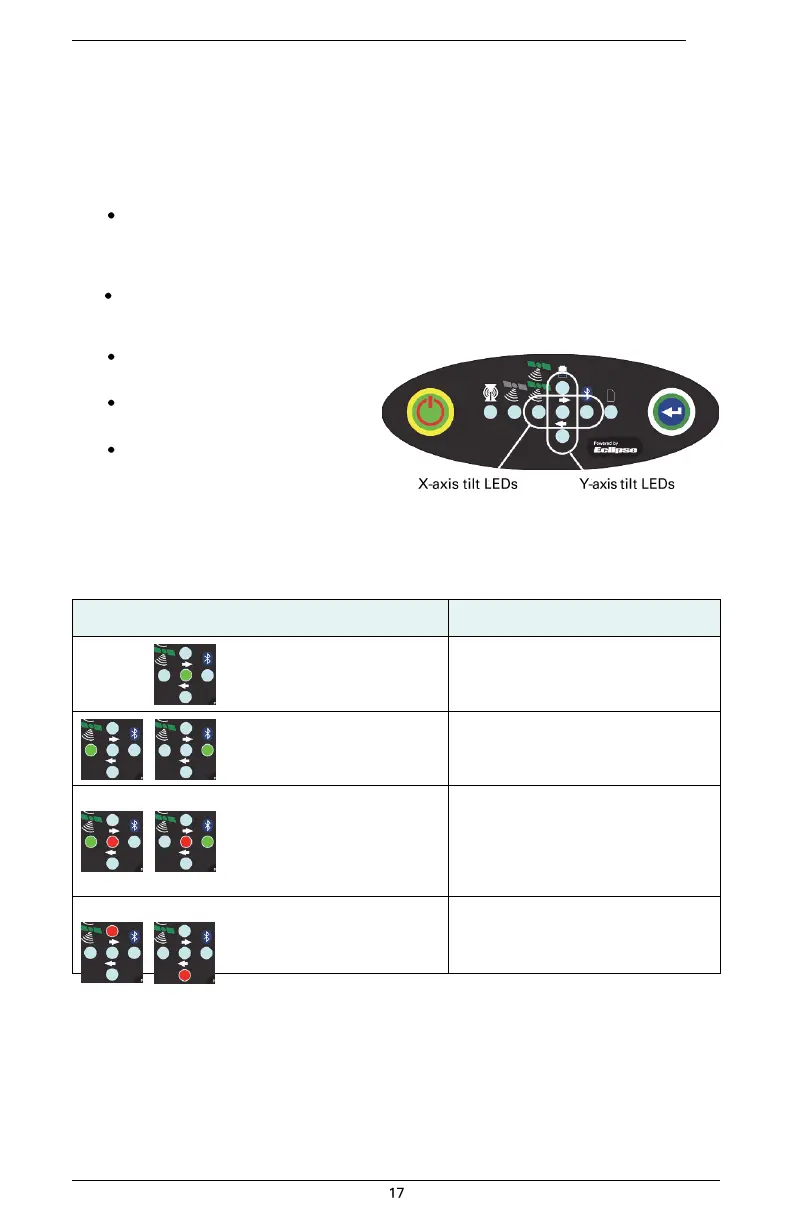
The S320 includes tilt control functionality that allows you to level your unit using five of the LED
indicators. When you activate tilt control you see the changes to the angle of the antenna in real
time (similar to a level).
To activate tilt control functionality:
Press the Power button and the Select button at the same time. The tilt of the unit is
displayed for a period of 1 minute or until you deactivate tilt control functionality.
To deactivate tilt control functionality (return to normal operation):
Press the Power button and the Select button at the same time. When tilt
control functionality is activated:
X-axis tilt is displayed along
three horizontal LEDs
Y-axis tilt is displayed along
three vertical LEDs
Each LED shows a 0.5° tilt
(user-configurable)
Table 3-4 illustrates the colors of the
LEDs depending on the tilt direction of the unit. These LED colors only apply if you have
activated tilt control.
Table 3-4: Tilt control LED colors


 To Next Page