Chapter 2: Installation
Connecting to a Power Source
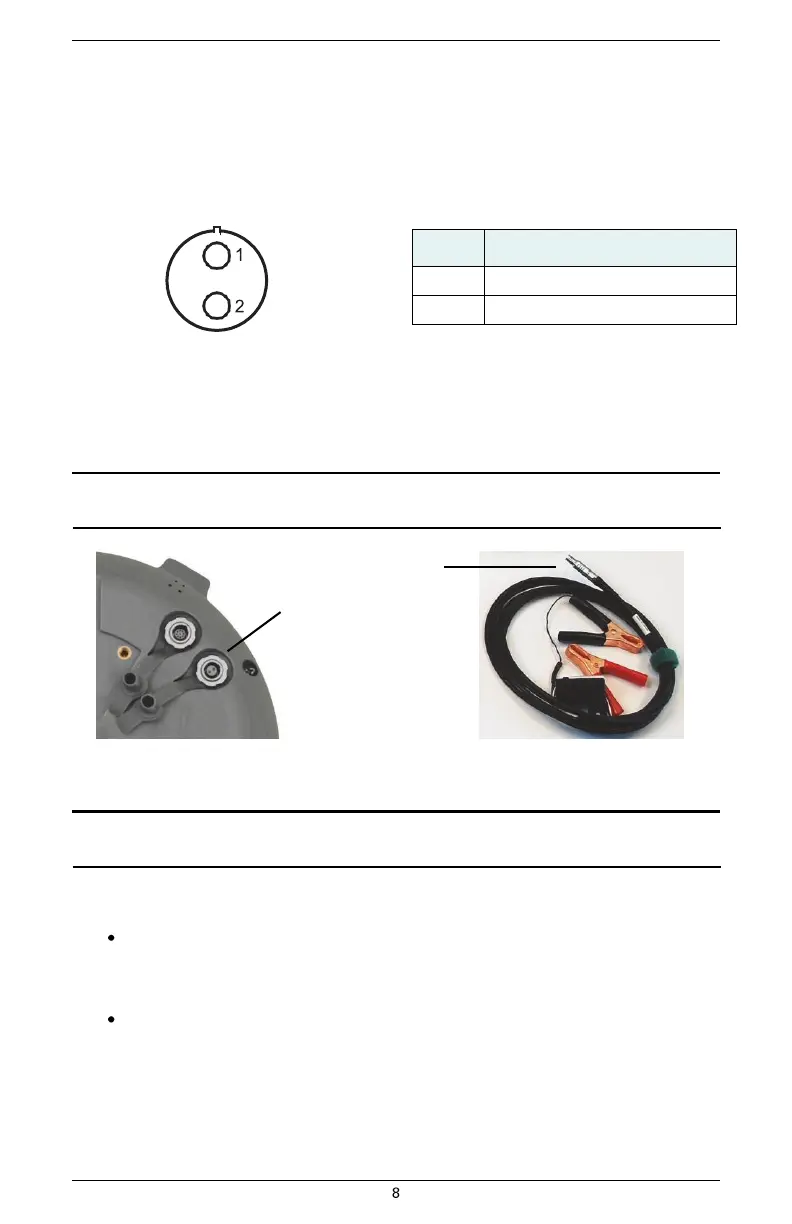
The S320 power cable has a circular connector (2-pin ODU) at one end and two clamps at the other
end (red clamp positive and black clamp negative). Figure 2-3 shows the power port pinout on the
S320 and Table 2-2 shows the pin descriptions.
Table 2-2: Power port pinouts
Figure 2-3: Power port pinout assignment
The power supply is a nominal 12 VDC power supply and maximum current consumption is < 1 A at
12 VDC.
Note: The power cable is included with the two-unit base/rover kit; it is not included in the single-unit
kit. See Table 1-1 on page 3 for information on the parts in each kit.
Power cable
end
Power port
Figure 2-4: Connecting the power cable
Note: Applying external power does not charge the Li-ion batteries in the battery trays. You must
use a suitable battery charger to charge the batteries.
To connect the power cable:
Line up the red dot on the power cable end with the red dot on the power port and
press into place.
To disconnect the power cable:
Slide the cable collar (at the connector end) away from the unit and gently remove the
cable.


 To Next Page