Chapter 2: Installation
Connecting to External Devices
You can connect the S320 to external devices via the serial and data ports on the bottom of the unit.
Serial Port Pinout Specifications
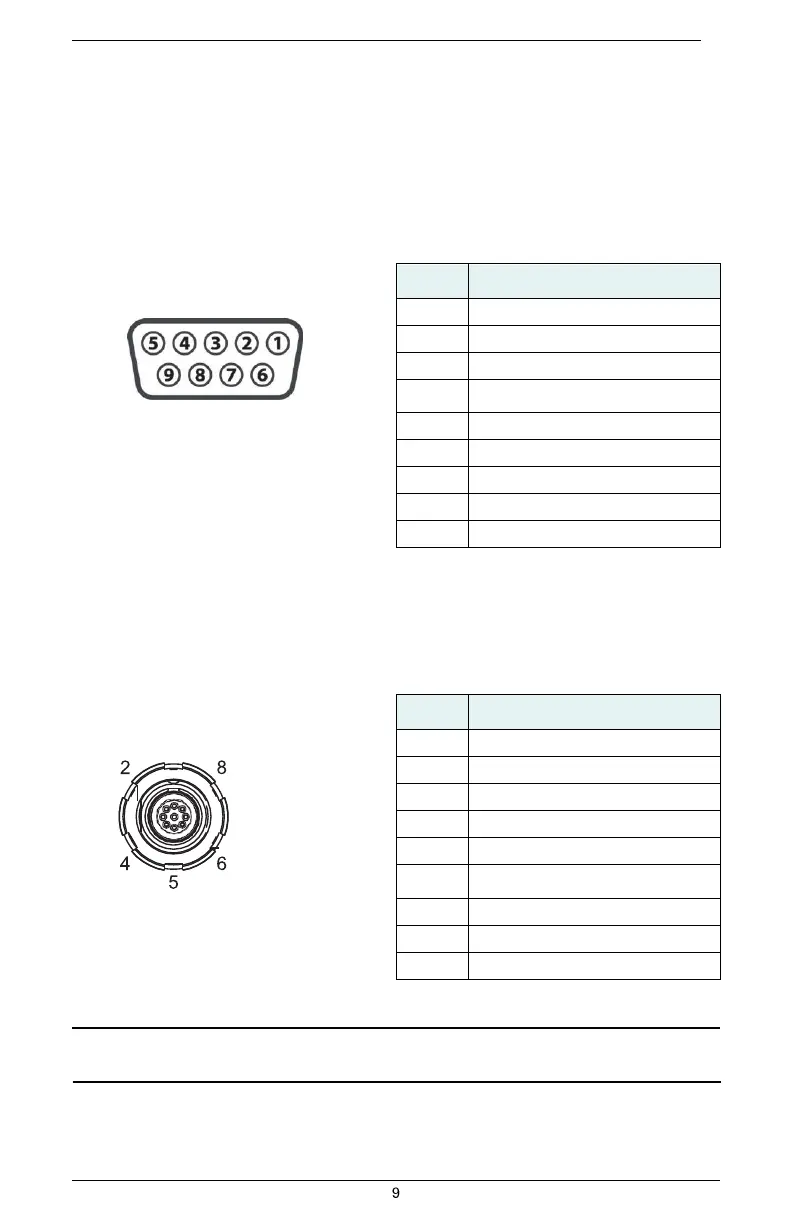
Figure 2-5 shows the DB9 serial port (female) pinout, while Table 2-3 shows the serial port pinout
specifications.
Table 2-3: Serial port pinouts
Figure 2-5: Serial port pinout
assignment
Data Port Pinout Specifications
Figure 2-6 shows the data port (ODU 9-pin) pinout, while Table 2-4 shows the data port pinout
specifications.
Table 2-4: Data port pinouts
1
9
(center pin)
3 7
Figure 2-6: Data port pinout
assignment
Note: When using the USB device end of the included data cable (Item H in Table 1-1) to connect to a
USB port on an external device make sure the S320 is already powered on.


 To Next Page