32
Pair
XXXXXX
PIN
•
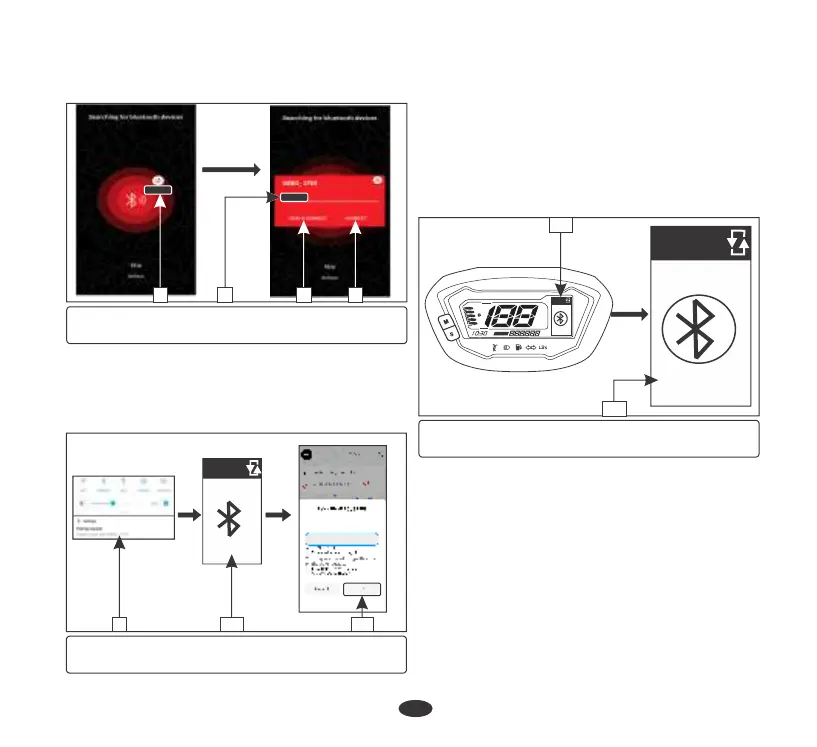
Update your name (6) (if required) and
select either save and connect (7) or
connect (8) to proceed.
(5) Select your device (6) Update your name
(7) Save and connect (8) Connect
5 6 7 8
(9) Pairing request notification
(10) Pin (11) “OK”
10 119
•
Now application will send paring request
notification (9). Click on the notification.
•
Now meter console will display paring pin
(10).
(12) Bluetooth connected
(13) Bluetooth mode
F
FF
E
EE
SERVICE
ODO
km
km /h
AM
Pair
Connected
Pair
Connected
12
13
•
Now meter console will display paring pin
(10).
•
On pairing, meter console displays
“Connected” (12) below bluetooth symbol
in bluetooth mode (13).
•
Now application will send paring request
notification (9). Click on the notification.
•
Enter the pin in navigation screen and select
“OK” (11).
• If any error occurs during the course of
pairing process, then meter console will
display “Not found” (14) below bluetooth
symbol. Repeat the above steps and keep
your smartphone closer to the vehicle to
reconnect.


 To Next Page