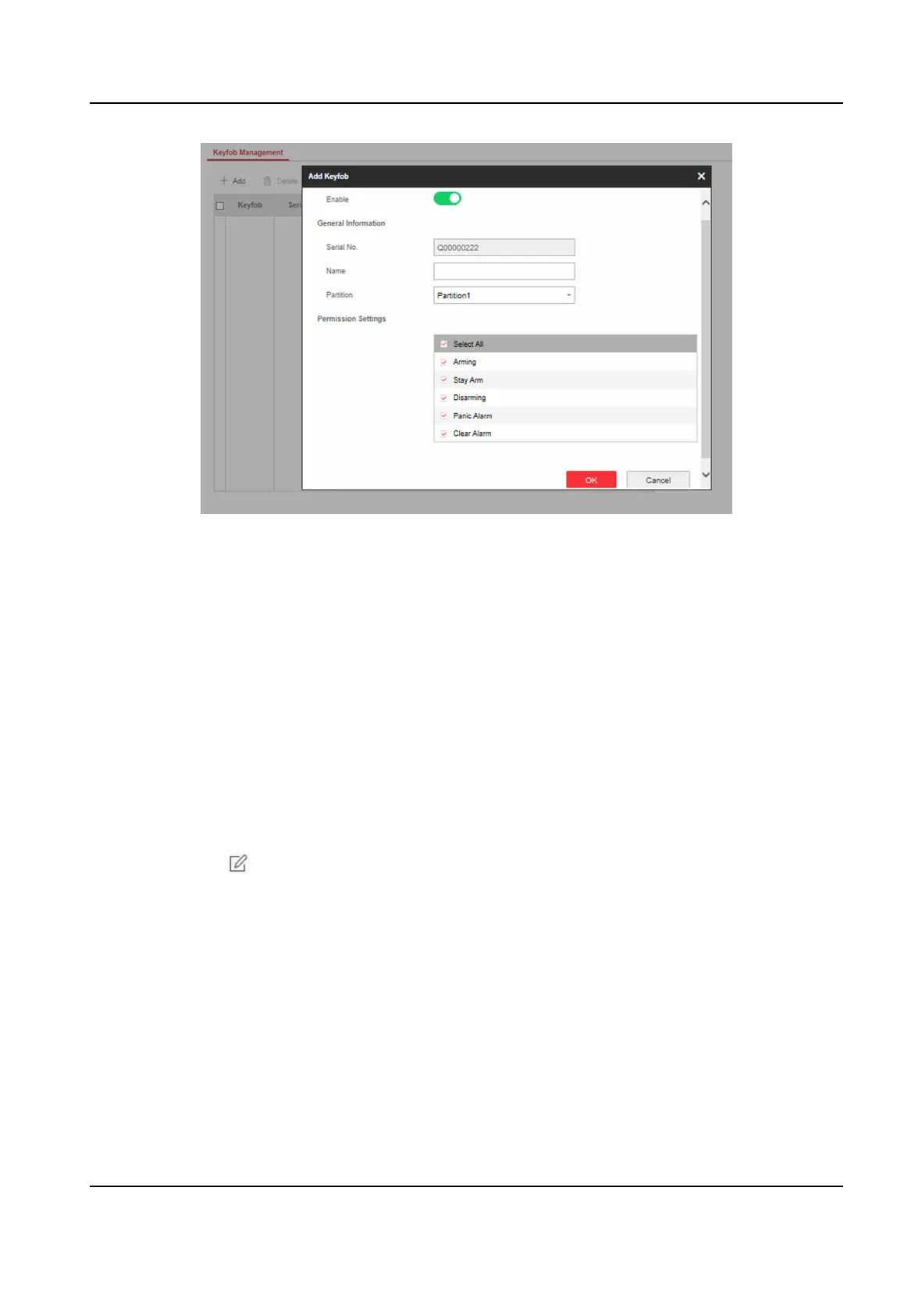
Figure 4-28 Keyfob Management
2. Click Add and press any key on the keyfob.
3. Set the keyfob parameters.
Name
Customize a name for the keyfob.
Permission
Sengs
Check dierent items to assign permissions.
Single Key
Sengs
Select from the drop-down list to set I key and II key's funcons
Combinaon Keys Sengs
Select from the drop-down list to set combinaon keys' funcons.
4. Click OK.
5. Oponal: Click to edit the keyfob informaon.
6. Oponal: Delete a single keyfob or check mulple keyfobs and click Delete to delete the keyfobs
in batch.
Add/Edit/Delete Card
You can add tag to the security control panel and you can use the card to arm/disarm the zone. You
can also edit the tag informaon or delete the tag from the security control panel.
Steps
1. Click User Management → Card to enter the management page.
2. Click Add and place a card on the card area of the control panel.
AX Security Control Panel
49



 To Next Page
 Loading...