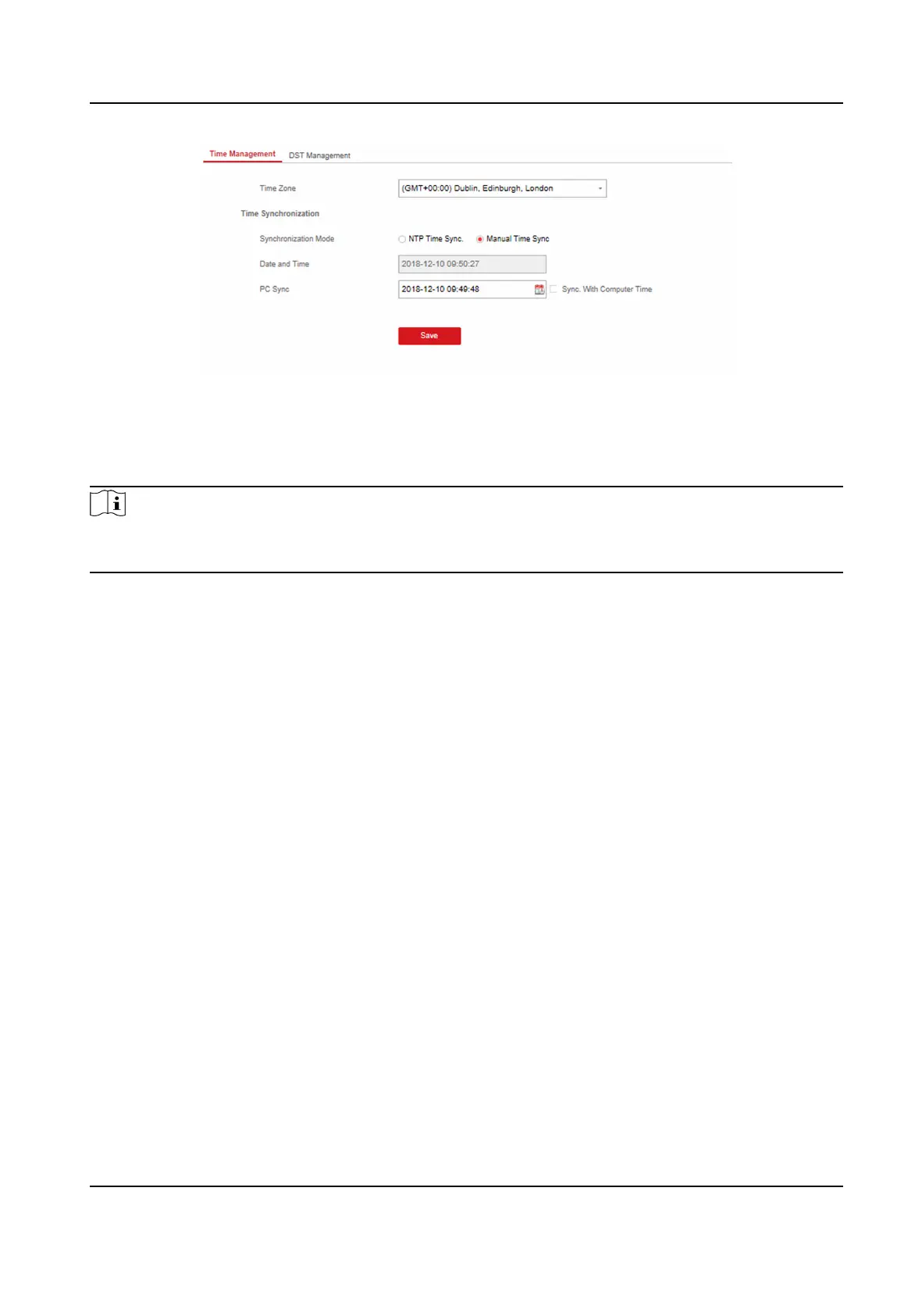
Figure 4-30 Time Management
You can select a me zone from the drop-down list.
You can synchronize the device
me manually. Or check Sync. with Computer Time to synchronize
the device me with the computer me.
Note
While you synchronize the me manually or with the computer me, the system records the log
"SDK Synchronizaon".
DST Management
Click System → Date and Time → DST Management to enter the Time Management page.
You can enable the DST and set the DST bias, DST start me, and DST end me.
Security
Sengs
SSH Sengs
Enable or disable SSH (Secure Shell) according to your actual needs.
Click System → Security → SSH Sengs to enter the SSH Sengs page and you can enable or
disable the SSH
funcon.
Locking User
Sengs
Set user locking. You can view the locked user or unlock a user and set the user locked duraon.
Steps
1. Click System → Security → Locking User
Sengs to enter the Locking User Sengs page.
2. Set the following parameters.
Max. Failure
Aempts
AX Security Control Panel
55



 To Next Page
 Loading...