3.2 Detailed Conguraon
3.2.1 Set Applicaon Mode
If you want to trigger capture of the passing vehicle informaon at the entrance or exit, set the
applicaon mode.
Before You Start
The device has been installed at the
specic locaon, and the lens has been debugged.
Steps
1.
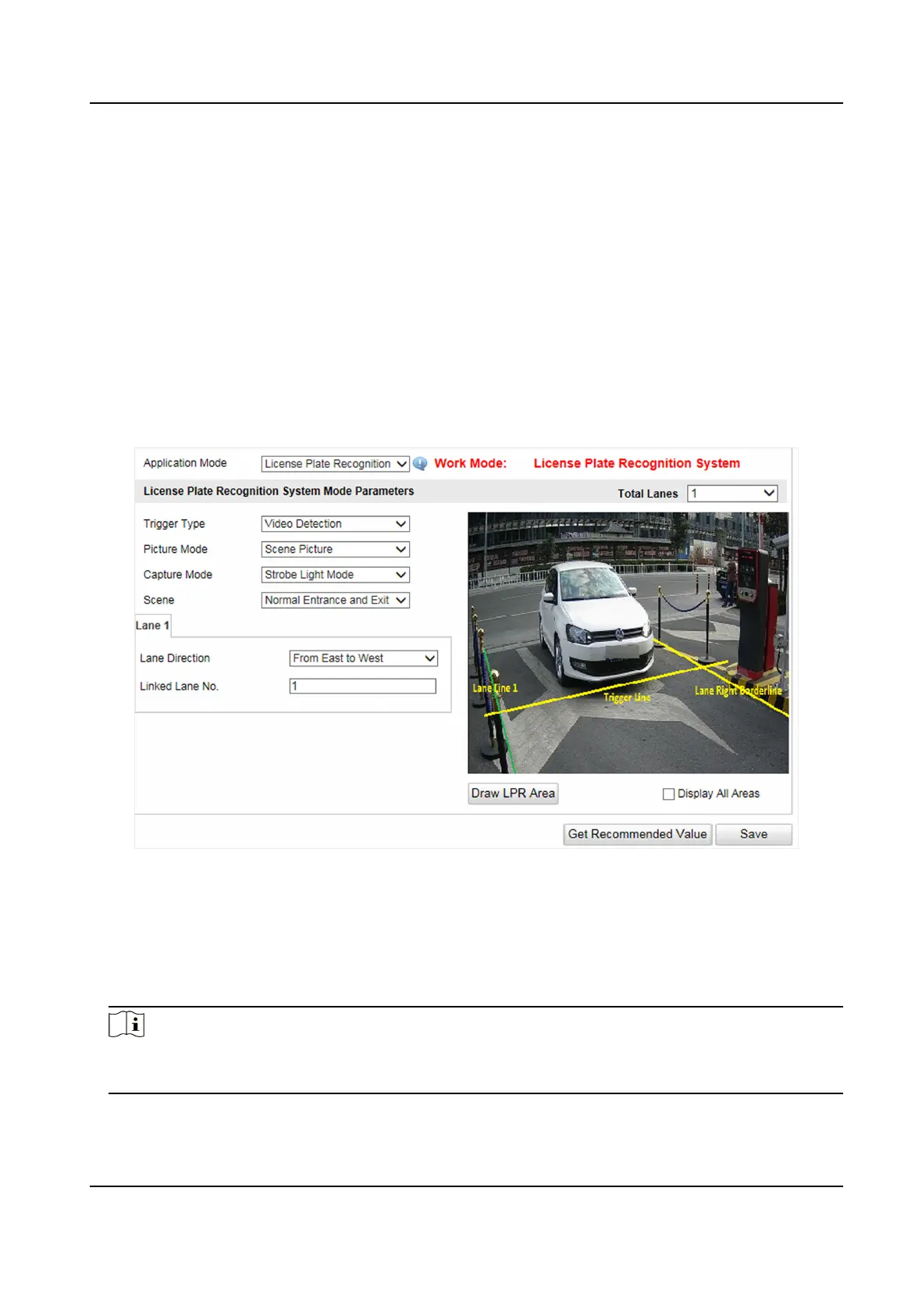
Go to Conguraon → Device Conguraon → Applicaon Mode .
Figure 3-2 Set Applicaon Mode
2.
Click Draw LPR Area to draw the lines.
1) Check the lane line, lane right limit, or trigger line.
2) Drag the endpoint to adjust the
posion and length of the line, or drag the line to adjust its
posion.
3) Click OK to save the sengs.
Note
It is recommended to draw the trigger line at the posion which is 1/3 to 1/4 of the lane line.
The license plate pixel should be between 120 to 180 at the capture posion.
3.
Select Trigger Type.
Entrance and Exit Capture Camera User Manual
7


 To Next Page
 Loading...