Page 26 213960EN(1) - P290 Mattress Instructions for Use
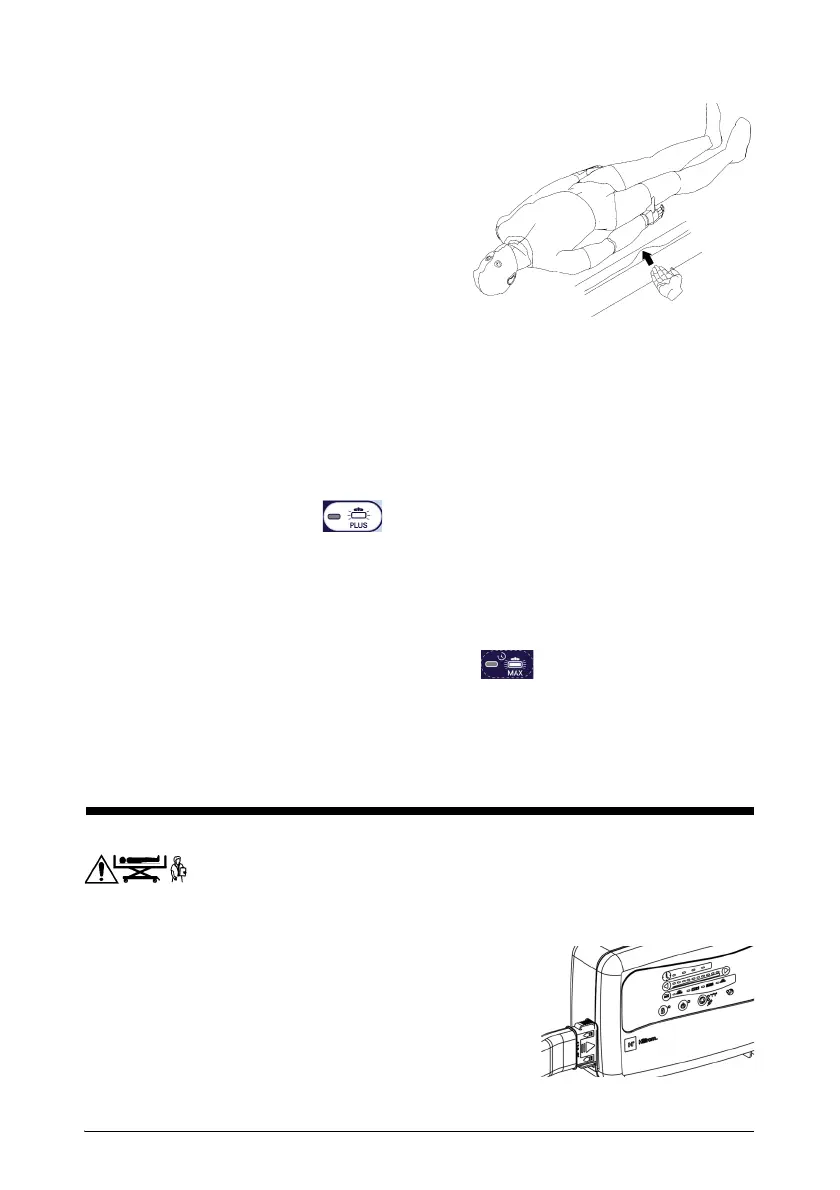
To Check Manually the Pressure of the Device:
1. Slide your hand under the air cushions
beneath the patient's sacrum, with the
palm facing upwards.
2. Raise your hand: there must be a
2 or 3 cm gap under the sacrum.
3. If this is not the case, increase or decrease
the pressure accordingly.
For reference only, in theory, the level 1 comfort setting corresponds to 30 kg and
level 10 corresponds to 140 kg.
Over-Inflation (PLUS)
This function increases the firmness of the mattress when the patient is placed in the
raised position (adjustable head section at more than 30°) by increasing the pressure
slightly. It works in both the alternating low-pressure and continuous low-pressure
modes.
The indicator light near the symbol comes on, in addition to the light of the
selected operating mode.
This mode should not be used when the angle of the adjustable head section is less
than 30°.
Maximum Inflation (P-Max)
When connected to the mains power supply for the first time, the P290 automatically
inflates to P-Max and the indicator light near the symbol comes on.
It then returns to the default mode:
Comfort Setting “5”, “Alternating Low Pressure” Mode, 10 minute cycle.
The device can be fully inflated manually when the patient is being moved or
repositioned or wants to leave the bed. The device then returns to the previously
selected operating mode after 30 minutes.
Activating the CPR
Never allow an unqualified person to operate this function and ensure that no
obstacles (e.g., limbs, accessories, objects, power cords) or persons are under the
head section.
The CPR valve can be easily identified by the red and
yellow hose connector on the left of the control unit.












 To Next Page