213960EN(1) - P290 Mattress Instructions for Use Page 41
Disinfecting
Servicing
Troubleshooting
The device is designed to adjust automatically, therefore troubleshooting is limited to
a few checks.
Always disconnect the device before troubleshooting.
If an electric power supply problem occurs, check the following:
• The connection to the mains is correct;
• The power cord is not damaged;
• The fuse is in working order.
If a pressure problem occurs, check the following:
• The hose is intact and securely connected to the control unit and the air bladders;
• The device is not damaged (tears or cuts);
• The air filter on the rear of the control unit is clean.
Refer to the P290 Mattress Service Manual for detailed troubleshooting instructions.
Replacing the Fuse
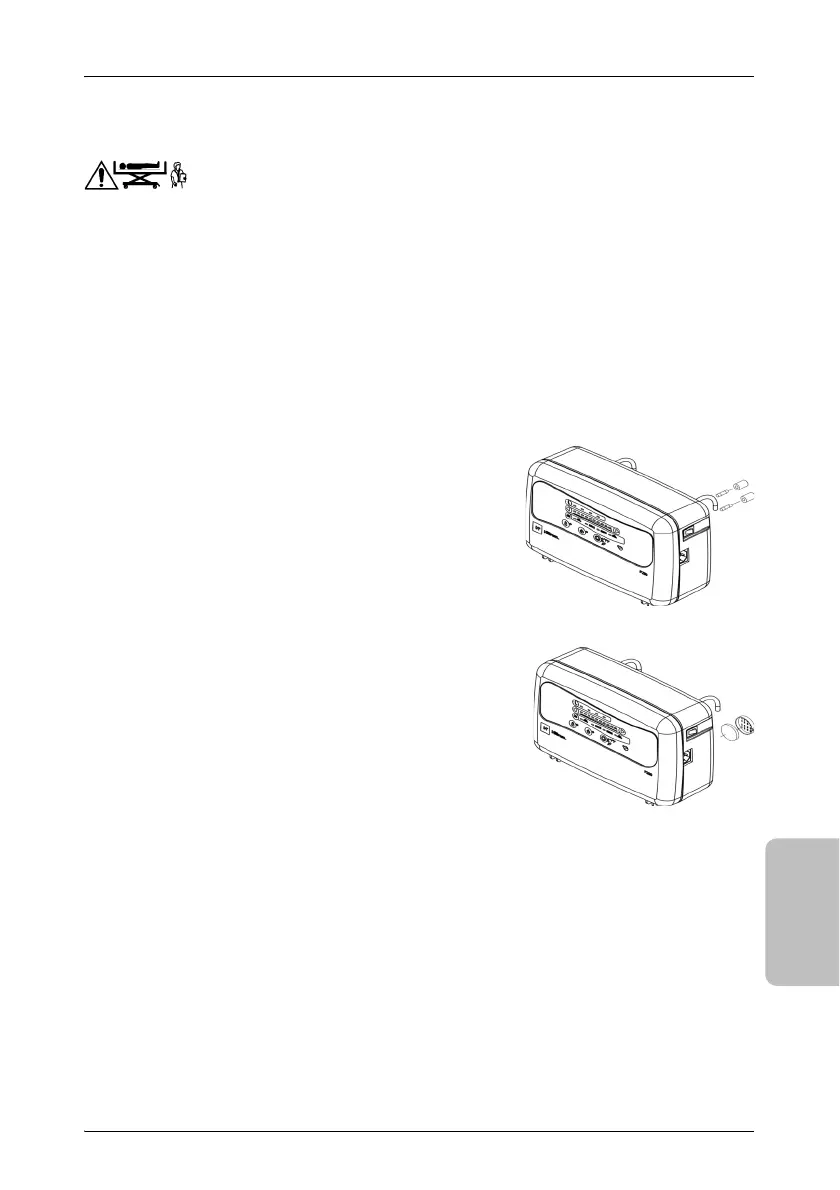
1. Remove the cover of the fuse box on the rear of
the control unit using a small screwdriver.
2. Check that the characteristics of the new fuse
matches the characteristics of the label and
meets the IEC 60269-1 standard.
3. Replace the faulty fuse.
4. Securely close the fuse box.
Cleaning and Replacing the Air Filter
1. Remove the air filter cover on the rear of the
control unit.
The air filter can be cleaned with water and a
cleaning agent and re-used.Thoroughly clean and
dry the air filter.
2. Install the filter and its cover.
The air filter can be ordered separately. For more
information, refer to the Spare Parts List of the P290 Mattress.
If the problem is not resolved, contact your local Hill-Rom representative (see back of
manual). Indicate the serial number of the device, which can be found on the control
unit, when requesting repairs.












 To Next Page