Configuring the Switch
3-138
3
Command Attributes
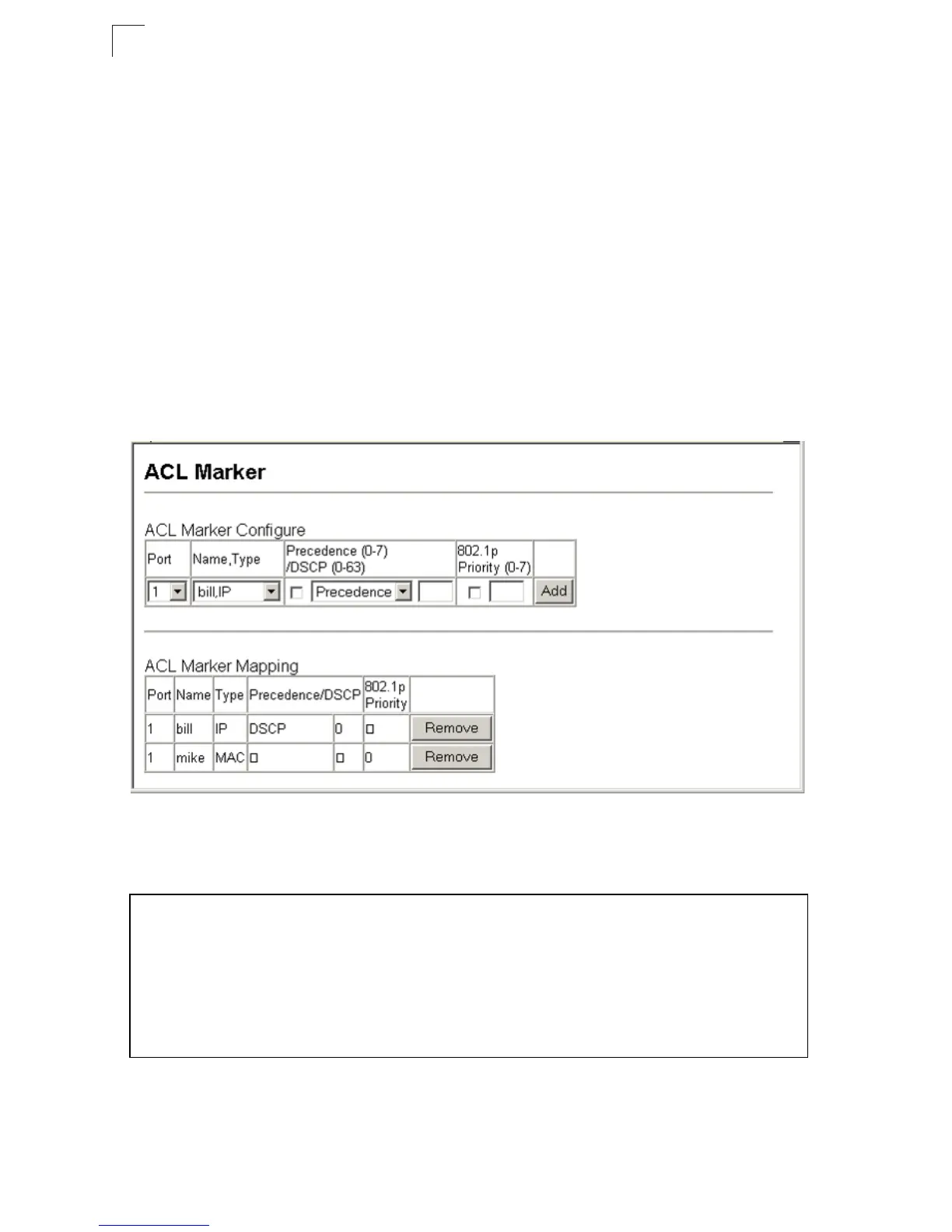
• Port – Port identifier.
•Name* – Name of ACL.
• Type – Type of ACL (IP or MAC).
• Precedence – IP Precedence value. (Range: 0-7)
• DSCP – Differentiated Services Code Point value. (Range: 0-63)
• 802.1p Priority – Class of Service value in the IEEE 802.1p priority tag.
(Range: 0-7; 7 is the highest priority)
* For information on configuring ACLs, see page 3-52.
Web – Click Priority, ACL Marker. Select a port and an ACL rule. To specify a ToS
priority, mark the Precedence/DSCP check box, select Precedence or DSCP from
the scroll-down box, and enter a priority. To specify an 802.1p priority, mark the
802.1p Priority check box, and enter a priority. Then click Add.
Figure 3-82. ACL Marker
CLI – This example changes the DSCP priority for packets matching an IP ACL rule,
and the 802.1p priority for packets matching a MAC ACL rule.
Console(config)#interface ethernet 1/1 4-123
Console(config-if)#match access-list ip bill set dscp 0 4-99
Console(config-if)#match access-list mac mike set priority 0 4-110
Console(config-if)#end
Console#show marking 4-100
Interface ethernet 1/1
match access-list IP bill set DSCP 0
match access-list MAC a set priority 0
Console#



 To Next Page