12
Step 2
After going to heat recovery, the wire controller
maintains the original state, the heating icon and the
domestic hot water icon flash at 1 Hz. This means
the machine is at the state of heat recovery.
Step 3
After heat recovery starts, under the following
conditions, quit from heat recovery run
(1) All indoor units stop cooling and standby.
(2) The water tank temperature reaches the upper
limit set for heat recovery (default upper limit of
temperature is 40°C, 5.1.7 In-situ Settings “J8”).
5.1.3.7 Sterilization
Step 1
2 methods for going to the sterilization:
Method 1: Automatic run each week
Before sterilization, go to 5.1.7 In-situ Settings “C7”
and activate “Sterilization” and set as follows
(1) Beginning time (“C8”).
(2) On which day of each week (“C9”).
(3) Continuous running time (“CA”).
(4) Highest temperature default as 70°C (“Cb”).
After setting, the machine sterilize once each week,
without the need of manual operation.
Method 2: Manual operation
At the standby state, press the sterilization key
①
for 3 seconds, and go to sterilization.
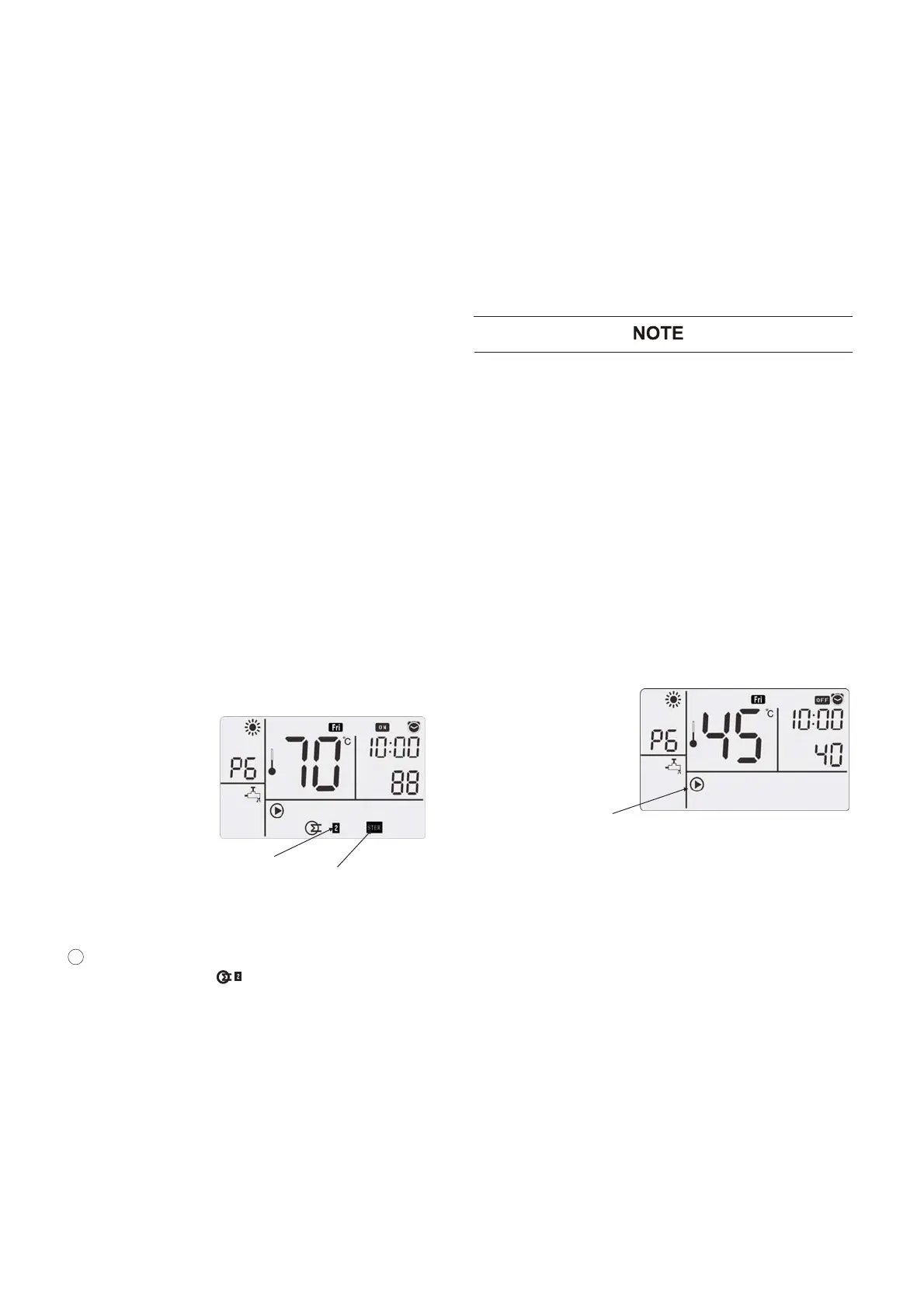
Electric heater 2
flashes at 1 Hz
Sterilization
Step 2
After going to sterilization function, sterilization icon
lights up, electric heating of water tank starts,
electric heating icon flashes at 1 Hz. This
means high temperature sterilization is running.
23
Step 3
After sterilization starts, by different ways of going
to sterilization function, there are 2 ways of quitting.
Method 1: Automatic quit
Heat the water in the water tank to the set
temperature for sterilization (5.1.7 In-situ Settings
“Cb” set value) and maintain the set time (5.1.7
In-situ Settings “CA” set value), and then
automatically quit from sterilization.
Method 2: Manual quit
(1) Press the sterilization key ① for 3 seconds
under “Sterilization” function.
⑧, the machine stops
running.
5.1.4 Miscellaneous Running
5.1.4.1 Water Pump Anticorrosion Running
● When the machine is not used for long, to
prevent rusting of circulating parts of water
pump, the machine automatically starts water
pump at a fixed time interval.
●
Conditions for startup
At the standby state, the automatic startup is
already set during ex-factory. This function
may be stopped, but it is not recommended to
stop (5.1.7 In-situ Settings “G1”).
Water Pump Running
●
The default time for automatic running of
anticorrosion is 0:00 (5.1.7 In-situ Settings “G2”)
of each Saturday (5.1.7 In-situ Settings “G3”).
Anticorrosion continues for 1 minute and then
automatically quit to shutdown state.
● After anticorrosion is started, under the following
3 conditions, quit from the water pump
anticorrosion
(1) Running time is 1 minute.
(2) Timed function starts.
(3) With manual operation for interference.
(2) Press the key
ON/OFF
Either automaticlly or manually entered into the
sterilization, after reaching the automatic quit, it
can manually quit.




 To Next Page