CHECK
Mode 1
updated
20
5.2 Stop Operation
⑧, system stops running,
and the LED lamp will also be off.
5.3 Other Indications
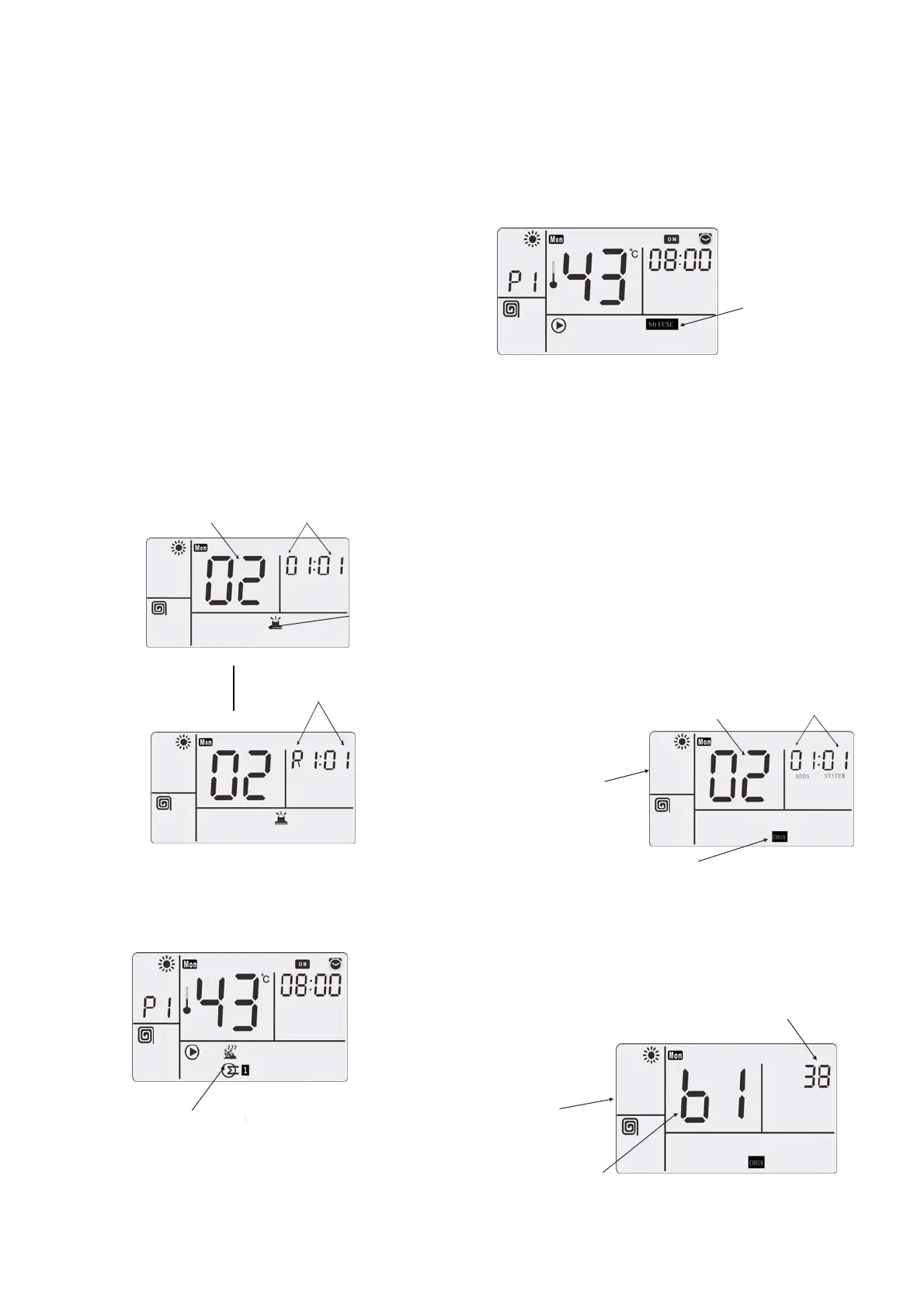
● Abnormal “alarm” indication appears in case of
abnormality
If the abnormal situations occur to protective
device and “ ” indication lamp, the
“alarm” icon will appear on the LCD screen. Then
detect the cause of abnormality and make
adjustment. Press the ON /OFF key ⑧ or reset
key ⑤ once, the alarm on the wire remote
controller is canceled. When the “alarm” appears
on the LCD screen, the cause of abnormality and
number of abnormal machine will appear on the
temperature indication zone of the screen. In this
case, consult your local dealer.
Water Module
A ddress &Refrigerant
System
Failure Code
Alarm
Circulating
Display Every 1s
Water Module
T ype C ode
● “Defrosting” icon
When the heating turns to the defrosting, the
“defrosting” icon appears on the screen.
Defrosting
● “Function Not Available” icon
The wire remote controller is a universal
component. If any function not available for
water module is operated, “Function Not
Available” will display on the screen and flashes
for 5 times.
“Function Not
Available”
flashes 5 times
5.4
alarm and stored in EEPROM.
Step 1
④ for 3 seconds and
Most Recent
Alarm Code
Wate Module
Selection Mode
Step 2
④ or wait for 7
Value Displayed
ON/OFF
Water Module
A ddress &Refrigerant
System
Press the
ON/OFF
key
CHECK
modes include [
CHECK
CHECK
Mode 1]
and
[
Mode 2]:
CHECK
●
Mode 1: It displays the sensor
●
Mode 2: It displays data prior to
5.4.1
Mode 1
Press the key
go to water module selection state of the
mode.
CHECK
CHECK
every 30 seconds.
data
CHECK
CHECK
CHECK
CHECK
Press the
key
Data Format for 1], and to the data
display state of the
1.
CHECK
Item Code
CHECK
seconds,
and go to the communication of [Required
CHECK
CHECK




 To Next Page