careful while using.
T(TG T)
……
TT TTT
……
……
22
30
key
④
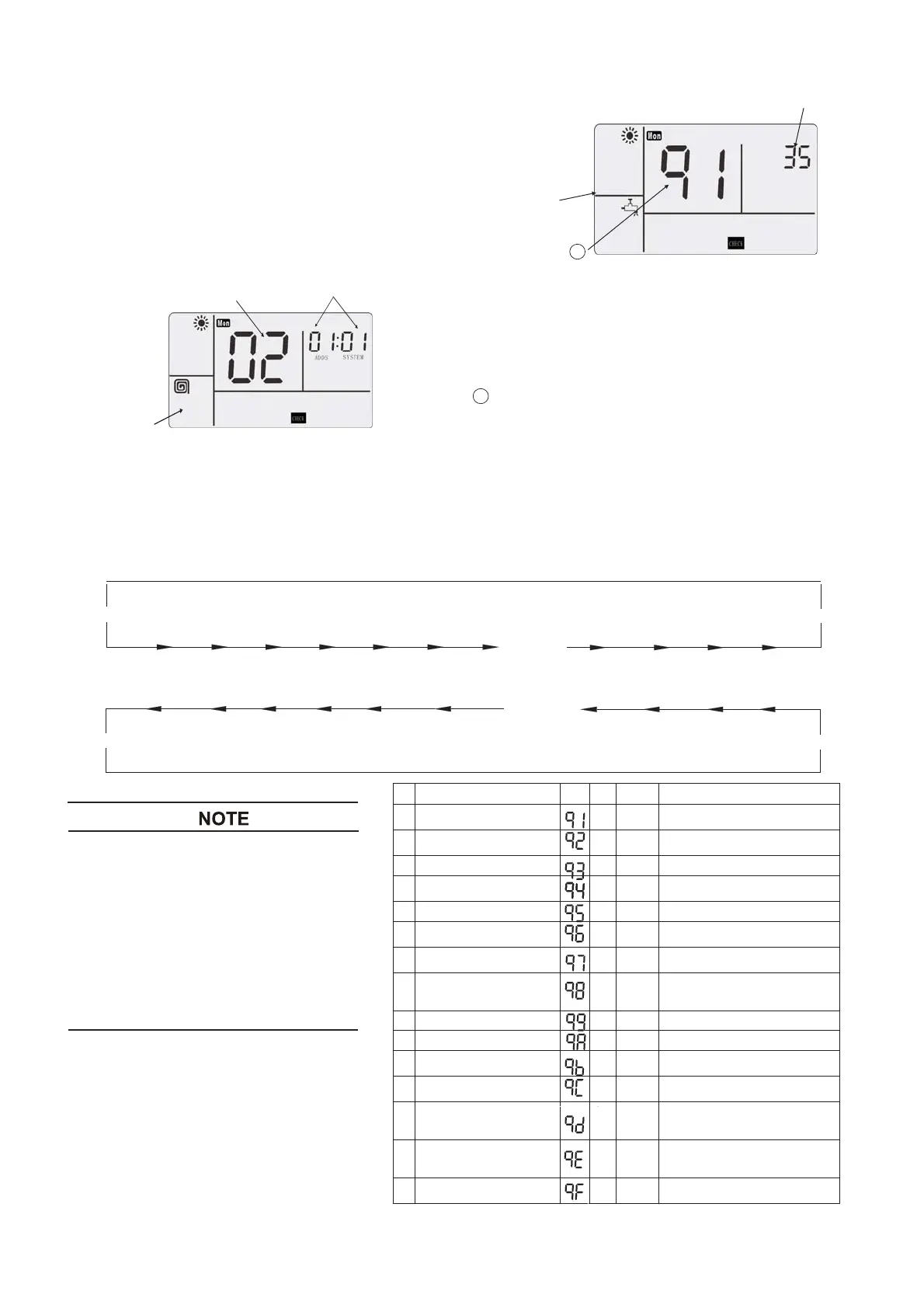
for 3 seconds to water module
selection state.
Step 2
④ or wait for 7 seconds,
and go to communication of [Required Data Format
Value Displayed
Mode 2
Display Z one
Step 3
temperature regulation key ③ “Ģ” and “ġ”, and
code.
Step 4
④
30
[ Temperature Control ġ ] Key
[ Temperature Control Ģ ] Key
●
:
No. Items for Code Unit Example Notes to Parameters
°C 30
actually measured temperature
°C 35
actually measured temperature
3 liquid pipe temperature
°C 45
actually measured temperature
4
outdoor environmental
°C 25
actually measured temperature
temperature
5 gas pipe temperature
°C 40
actually measured temperature
6
outdoor unit evaporation
temperature
°C 8
actually measured temperature
temperature
°C 8
actually measured temperature
8
top vent temperature of
compressor
°C 60
actually measured temperature
9
air vent pressure
MPa 23
outdoor unit pressure 10 times value
10
air suction pressure
MPa 6
outdoor unit pressure 10 times value
11
target frequency of water
module
Hz 135 -
12
running frequency of
compressor
Hz 55 -
13
expansion valve opening of
% 5
according to maximum opening
14
expansion valve opening of
% 10
according to maximum opening
15
working current of
compressor
A 5 -
Most Recent
Alarm Code
Wate Module
Selection Mode
Water Module
A ddress &Refrigerant
System
5.4.2
CHECK
Mode 2
Step 1
Go to
CHECK
mode 1 before proceeding
to
the
CHECK
mode 2.
In the
CHECK
mode 1, press the
CHECK
Press
key
CHECK
for
2], and to data display state of
2.
CHECK CHECK
(
Item Code)
At
data display state, press
switch display items. Display zone
of set temperature will display
item
In
mode 2, press
key
, quit from
. Or in
automatically quits from the
CHECK
CHECK
CHECK
CHECK
CHECK
CHECK
CHECK
CHECK
CHECK
mode 1 or 2, without any
operations in 2 hours, it
CHECK.
Refer to the table in the right for the
“
CHECK Mode 2” data.
● Explanations for table of “
Modes 1, 2”
More codes will appear during
but not for this model. The
CHECK
CHECK,
table gives
no
more explanation.
Be
CHECK
1
water module water inlet
temperature
2
water module water outlet
temperature
7
heat exchanger water outlet
water module
water module
percentage
percentage




 To Next Page