–
31
–
EN
2C15
English
You can make copies of videotapes made by friends or relatives for your own enjoyment.
WARNING:
Unauthorized recordings of copyrighted video tapes may be an infringement of copyright laws.
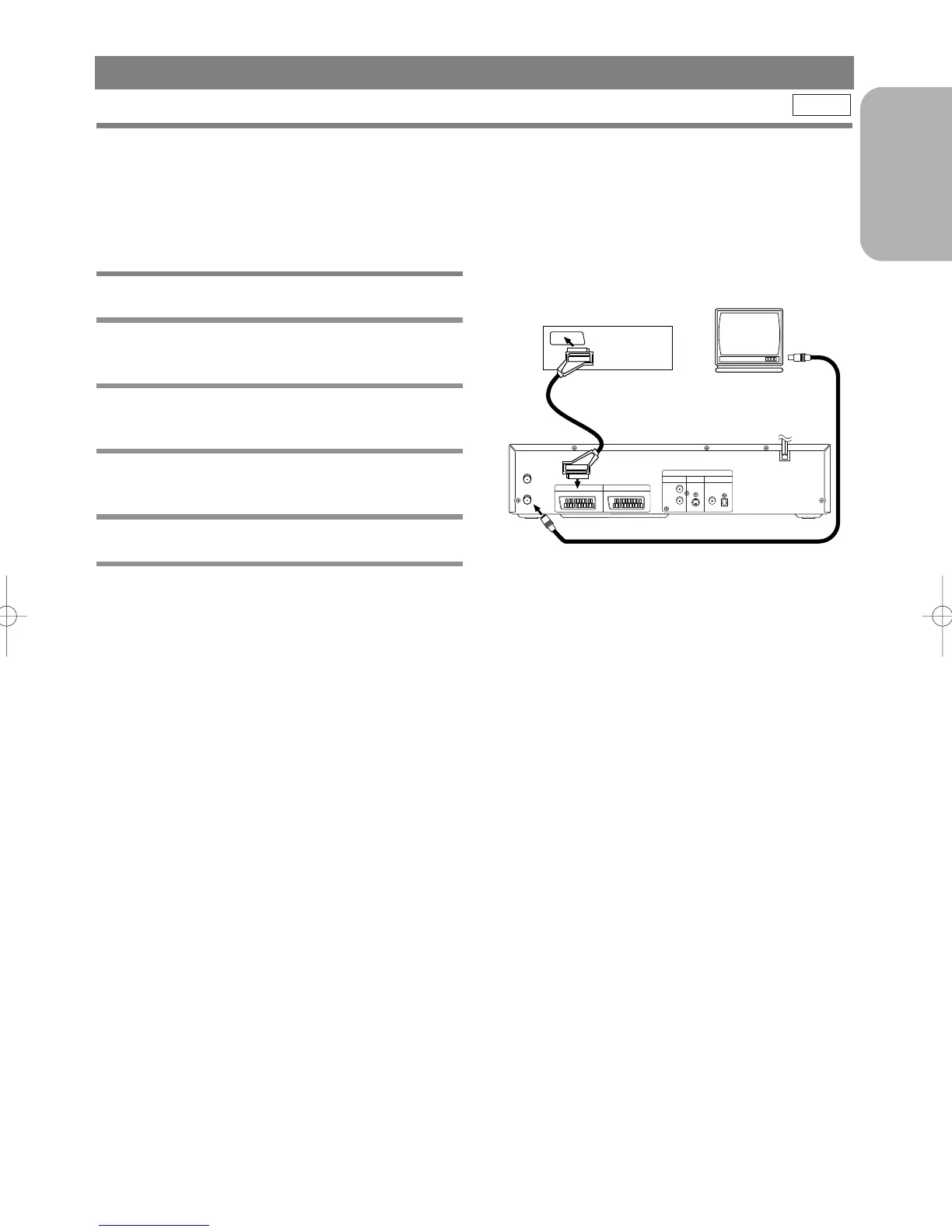
Connect the recording DVD/VCR (this unit), playing VCR (another VCR) and your TV as outline in the following
diagram.
VCR
1 Insert a pre-recorded video cassette into
the playing VCR.
2 Insert a blank video cassette, or one you
want to record over, into the cassette com-
partment of the recording DVD/VCR.
3 Press the SPEED Button on the remote
control to select the desired recording
speed (SP/LP).
4 Select “AV2” position on the recording
DVD/VCR. See “Other Connections” on
page 17.
5 Press the REC Button on the recording
DVD/VCR.
6 Begin playback of the tape in the playback
VCR.
Turn on the TV and select the video channel on the TV.
Notes
• For best results during dubbing, use the DVD/VCR’s front panel controls whenever possible. The remote con-
trol might affect the playback DVD/VCR's operation.
• Always use video-quality shielded cables with RCA-type connectors. Standard audio cables are not recom-
mended.
• If video or colour fades in and out, you may be copying a copy guarded video tape.
COPYING A VIDEO TAPE
TO MONITOR THE RECORDING



 To Next Page