–
38
–
EN
2C15
Notes
¡Adding programs is not possible during programme
playback. You must stop the current playback before
such operations can be carried out.
¡Press the CLEAR/C. RESET Button to cancel a pro-
gram. The most recently entered programme will
then be deleted.
¡Up to 99 programs can be entered.
¡Playback from a desired track and random playback
are not available during programme playback.
¡programme settings are cleared when the power is
turned off or the disc loading tray is opened.
¡Press the MODE Button to check the programmed
setting.
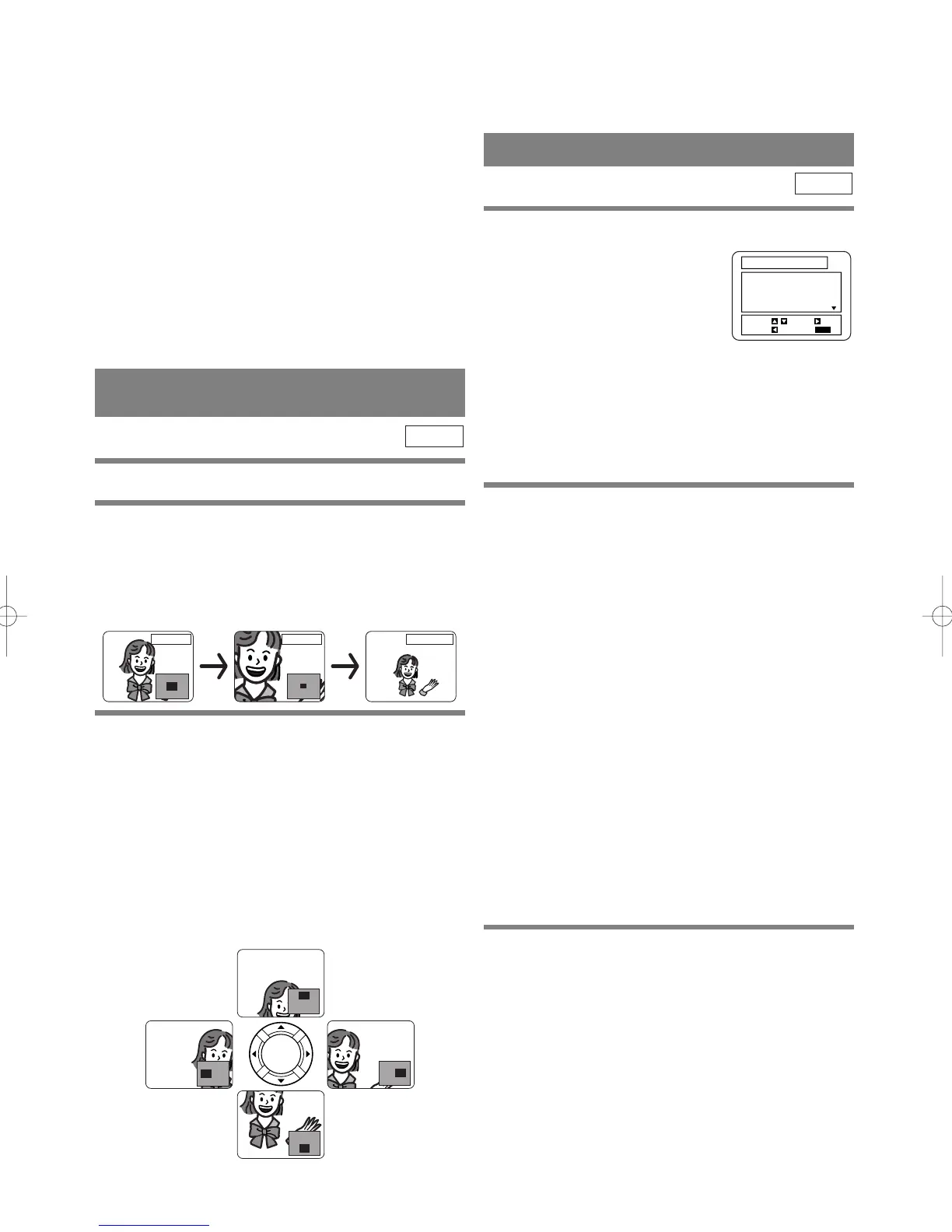
ZOOM PLAYBACK
(enlargement on-screen)
Images can be enlarged on the screen to your taste.
1 Press the ZOOM Button during playback.
¡An image will be enlarged at the center of the
screen.
¡Pressing the ZOOM Button cycles the zooming
images in two steps.
DVD
ZOOM [x4]ZOOM [x2] ZOOM [OFF]
2 When the Arrow Buttons (K/L/s / B) is
pressed during zoom play, the part to be
zoomed moves.
¡The zooming frame can be moved from the center
.... 4 steps to the right. 4 steps to the left. 4 steps to
the top. 4 steps to the bottom when 2 time zooming,
and 6 steps each when 4 time zooming.
¡Current position will be displayed on the right-bot-
tom of the screen. Press the ENTER Button, and the
display disappears.
Note
¡Zooming function does not work while disc menu is
shown.
PLAYING AN MP3 DISC
1
Insert an MP3 file-recorded disc.
¡The MP3 menu screen shows up.
¡“+” appears at the head of the
album name.
¡The player can recognise 255
ALBUMS and TRACKS altogether.
¡If all the TRACKS cannot be displayed at once on
the screen, “L” appears to go to the next page. If
there is a previous page, “K” appears on-screen. On
the left of “L”, the current page and the total num-
ber of pages are displayed.
2 Press the B Button after the following oper-
ation.
[FIRST PLAY]
Select FIRST PLAY with the Arrow Buttons (K/L).
[TRACK]
Select the desired TRACK with the Arrow Buttons
(K/L).
[ALBUM]
Select the desired ALBUM with the Arrow Buttons
(K/L), and call the TRACKs with ENTER Button.
¡Press the ENTER or the Arrow Button (B) to go to
the next hierarchy.
¡Press the Arrow Button (s) to go back to the previ-
ous hierarchy.
¡Press the TOP MENU Button to go back to the top
hierarchy.
¡ALBUMS can be played up to the 8th hierarchy.
3 To stop the play, press the C Button.
MP3
FIRST PLAY
+ALBUM01
+ALBUM02
+ALBUM03
+ALBUM04
RETURN:
1/15
START: PLAY
ALBUM NAME
SELECT:
/
ENTER:



 To Next Page