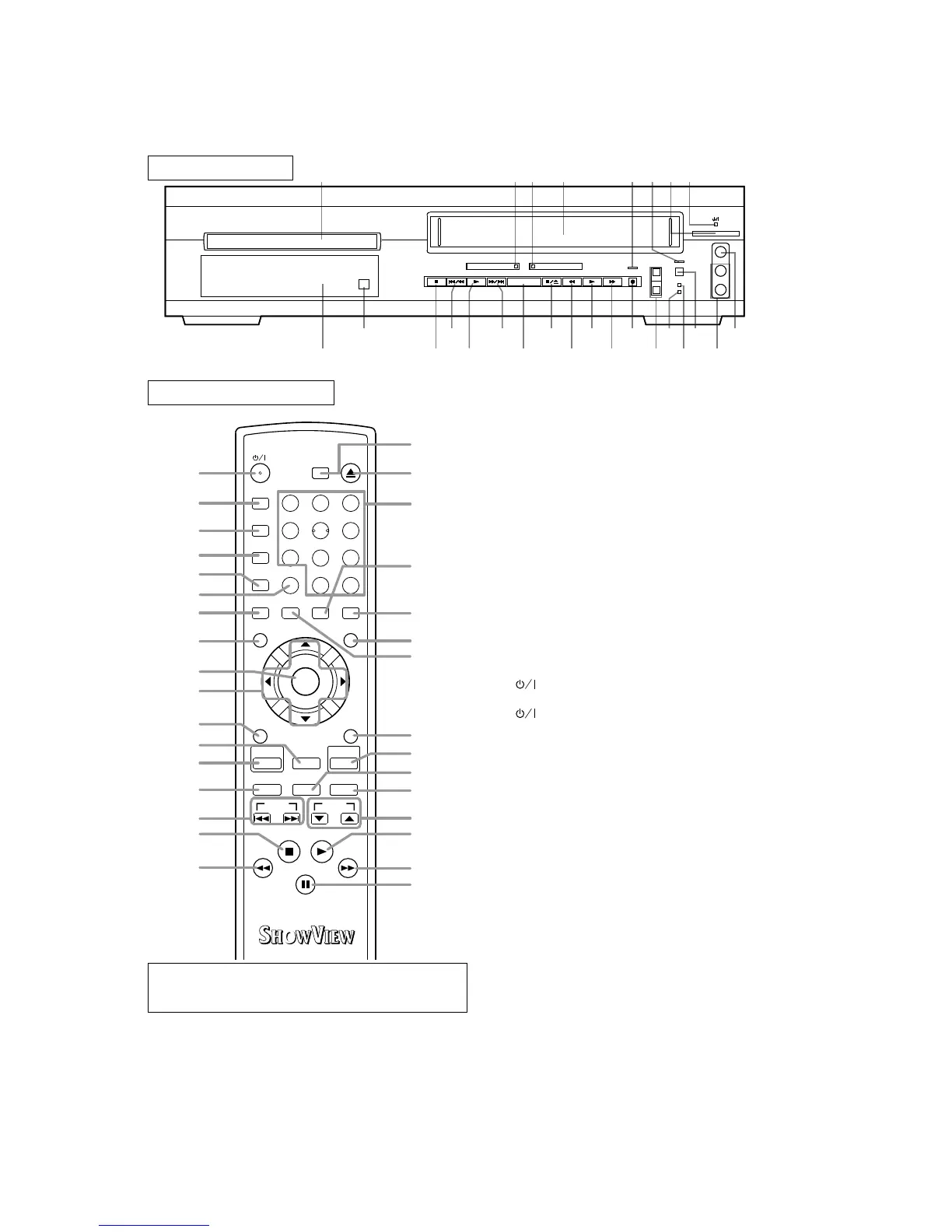
FRONT PANEL
REMOTE CONTROL
+10
CLOSE
3
QUICK-FIND
2
SEARCH MODE/
OPEN/
9
ZOOM
DISPLAY
8
AUDIO
0
SETUP
SKIP CH
5 6
1
A-B REPEAT
REPEAT
7
SUBTITLE
MODE
ANGLE
DVD
SURROUND
VCR
SLOW SPEED REC
RETURN
MENU
4
ENTER
TOP MENU/S
HOW
V
IEW
DAILY/WEEKLY
INDEX SEARCH TIME SEARCH
MENU SELECT
ENTER
CLEAR/C.RESET
27
28
29
30
31
32
33
34
35
36
37
57
58
56
52
53
54
55
39
42
41
50
48
49
51
47
46
43
45
44
40
38
1. Disc loading tray
2. DVD OUTPUT Light (Green)
This light appears when the DVD output mode is select-
ed. You can only watch DVDs when the green DVD
OPEN/
CLOSE
DVD VCR
TIMER SET
STANDBY
CST.IN
OUTPUT
CHANNEL
VIDEO IN
L
(mono)
R
AUDIO IN
1 2 3 64 5 87
9
26
25
24
23
22
21
20
19
18
17
16
15
14
13
10
11
12
OPEN/
CLOSE
DVD VCR
TIMER SET
STANDBY
CST.IN
OUTPUT
CHANNEL
VIDEO IN
L
(mono)
R
AUDIO IN
OUTPUT Light is on. To make the green DVD OUT-
PUT light come on, press the DVD Button on the
remote control or the OUTPUT Button on the front
panel.
3. VCR OUTPUT Light (Green)
This light appears when the VCR output mode is
selected. You can only watch tapes when the green
VCR OUTPUT light is on. To make the green VCR
OUTPUT light come on, the VCR Button on the
remote control or the OUTPUT Button on the front
panel.
4. CASSETTE COMPARTMENT
5. REC/OTR Light
Lights up during recording.
6. TIMER SET Light
This light glows when the DVD/VCR is in standby
mode or off for a timer recording or during a One-
Touch Recording. It flashes if the TIMER SET
Button is pressed for a timer recording, but there is
no tape in the DVD/VCR. It flashes when all timer
recordings or One Touch Recording are finished.
7. (Standby/Power ON) Button
Press to turn the power on and off.
8. (Standby/Power ON) Light
Lights up when the power is on.
9. VIDEO In Jack
Connect a video cable coming from the video out
jack of a camcorder, another VCR, or a video source
(laser disc player, etc.) here.
10. AUDIO In Jacks
Connect audio cables coming from the audio out jacks
of a camcorder, another VCR, or an audio source here.
11. TIMER SET Button
Press to put the DVD/VCR into standby mode for a
timer recording.
12. STANDBY Light
Lights up when the DVD/VCR is plugged in.
13. CST. IN Light
Lights up when a cassette is in the DVD/VCR.
14. CHANNEL Buttons
In VCR mode, press to change TV channels on the
DVD/VCR; press to adjust the tracking during nor-
mal or slow motion playback; press to remove verti-
cal jitter in a Still picture.
15. REC/OTR Button (VCR)
Press once to start a recording. Press repeatedly to
start an One Touch Recording Timer.
VCR operation Buttons : Blue
DVD operation Buttons : Green
Common operation Buttons : White
2



 To Next Page