EasyManua.ls Logo

Hitachi VIV-E553LE - Demonstration (Demo) Mode

Hitachi VIV-E553LE
118 pages
Print Icon
To Next Page IconTo Next Page
To Previous Page IconTo Previous Page
Loading...
2.
Demonstration
(Demo)
Mode
This
camera/recorder
has
a
demonstration
(demo)
mode
function.
2.1
Setting
the
Demo
Mode
The
camera/recorder
can
be
set
to
the
demo mode
following
the
procedure
below:
2.1.1
Setting
Conditions
1)
Connect
the
AC
adapter/charger
or
a
fully
charged
battery
pack.
2)
Set
the
power
switch
to
"OFF".
3)
Do
not
insert
a
cassette.
2.1.2
Setting
Procedure
Hold
the
PLAY
button
down
and
set
thepower
switch
to
"CAM".
Note:
The
camera/recorder
also
enters
the
Demo
mode
in
the
following
status:
If
the
power
switch
ts
set
to
"CAM"
for
more
than
10
minutes
when
the
date
has
not
been
set.
2.2
Exiting
the
Demo
Mode
Perform
either
of
the
following
to
finish
(release)
the
demo
mode:
1)
Disconnect
the
AC
adapter/charger
or
battery.
2)
Insert
a
cassette.
3)
Set
the
power
switch
to
"CAM".
2
DIGITAL
4
5
DEMO
6
EIS
EIS
indicator
and
OFF
at
center
INST.ZOOM
(Instant
Zoom)
1.ZOOM
indicator
White
fade
indicator
Wipe
fade
indicator
Mosaic
fade
indicator
Art
fade
indicator
Order_|Demomode
|
On-screendisplay
__—_—i|
Picture
|
i
{|
|
Nodisplay
|
Continuesonesecond.
|
Cd
3
DIGITAL
(Blue
back)
DEMONSTRATION
J
4
|
Nodisplay
|
C—~—C—‘CSC*d
CGoonntinues
alfa
second.
continues
to
flash.
Shakes
noticeably
in
the
vertical
direction.
Shaking
lessens.
Shakes
noticeably
in
the
horizontal
direction.
Shaking
lessens.
For
2
seconds
INST.
ZOOM
1s
OFF
For
2
seconds
White
fade
in
White
fade
out
Wipe
fade
in
Wipe
fade
out
Mosaic
fade
out
Art
fade
in
Art
fade
out
2.3
Operation
During
the
Demo
Mode
Cautions:
1)
The
following
buttons
and
switches
cannot
be
used
in
the
demo
mode:
VCR
system:
PLAY,
F.FWD,
REW,
REC
START/STOP
Camera
system:
EIS,
FADE,
DIGITAL
EFFECT,
FOCUS,
INST.ZOOM
2)
If
the
AC
input
cable
is
connected
while
in
the
demo
mode,
the
demo
mode
wi
Il
be
interrupted,
and
the
operation
mode
when
the
cable
has
been
connected
will
be
maintained.
3)
When
the
power
switch
is
set
to
"VCR"
during
the
demo
mode,
the
demo
mode
will
be
interrupted,
and
the
operation
mode
when
the
switch
has
been
changed
will
be
maintained.
2.3.1
Operation
sequence
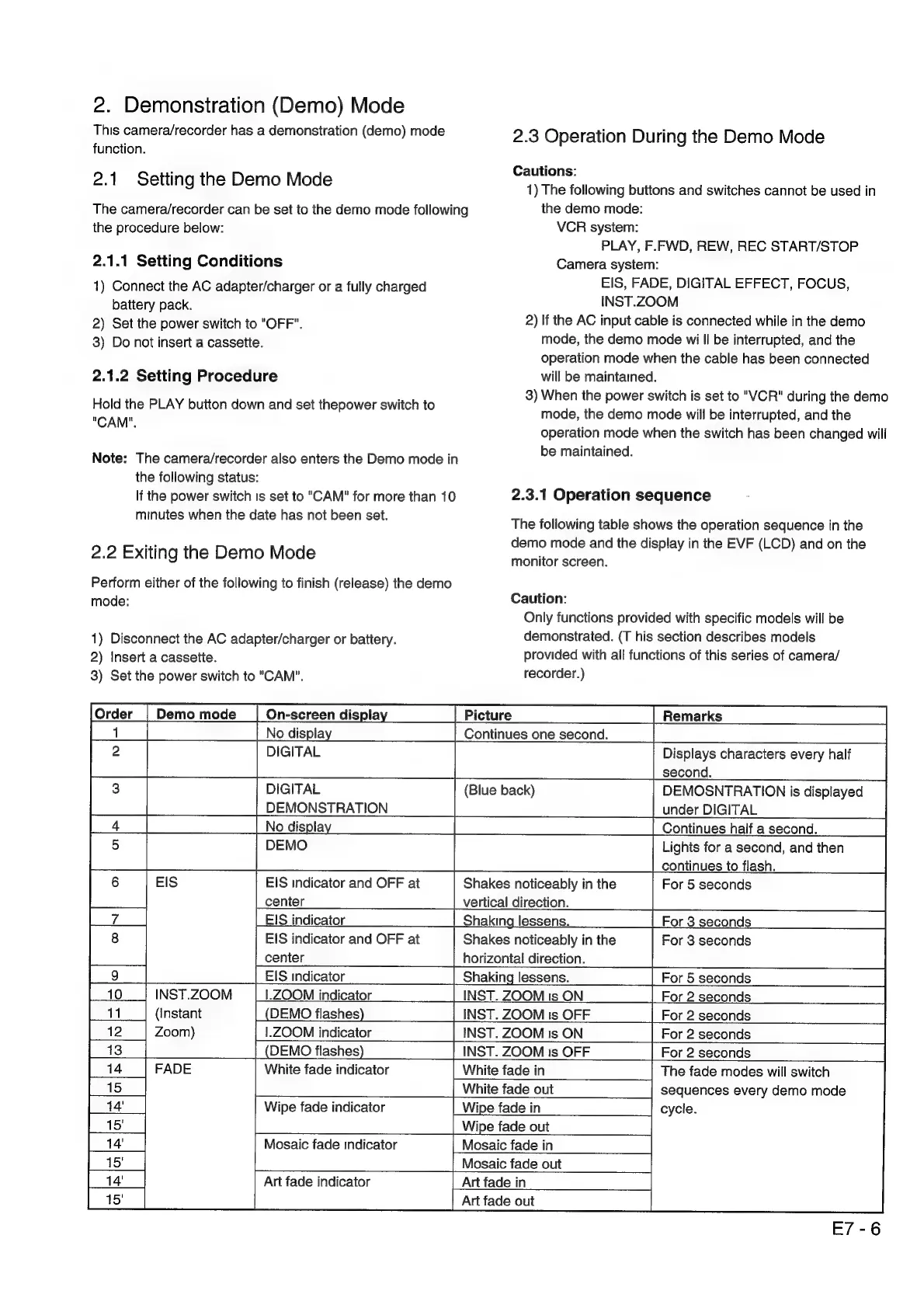
The
following
table
shows
the
operation
sequence
in
the
demo
mode
and
the
display
in
the
EVF
(LCD)
and
on
the
monitor
screen.
Caution:
Only
functions
provided
with
specific
models
will
be
demonstrated.
(T
his
section
describes
models
provided
with
all
functions
of
this
series
of
camera/
recorder.)
Displays
characters
every
half
second.
DEMOSNTRATION
is
displayed
under
DIGITAL
For
5
seconds
For
3
seconds
For
5
seconds
The
fade
modes
will
switch
sequences
every
demo
mode
cycle.
E7-6

Related product manuals