EasyManua.ls Logo

Hitachi VIV-E553LE - Check after Replacing Major Components in the Camera Section; Stabilizer Adjustment; Adjustment Procedure

Hitachi VIV-E553LE
118 pages
Print Icon
To Next Page IconTo Next Page
To Previous Page IconTo Previous Page
Loading...
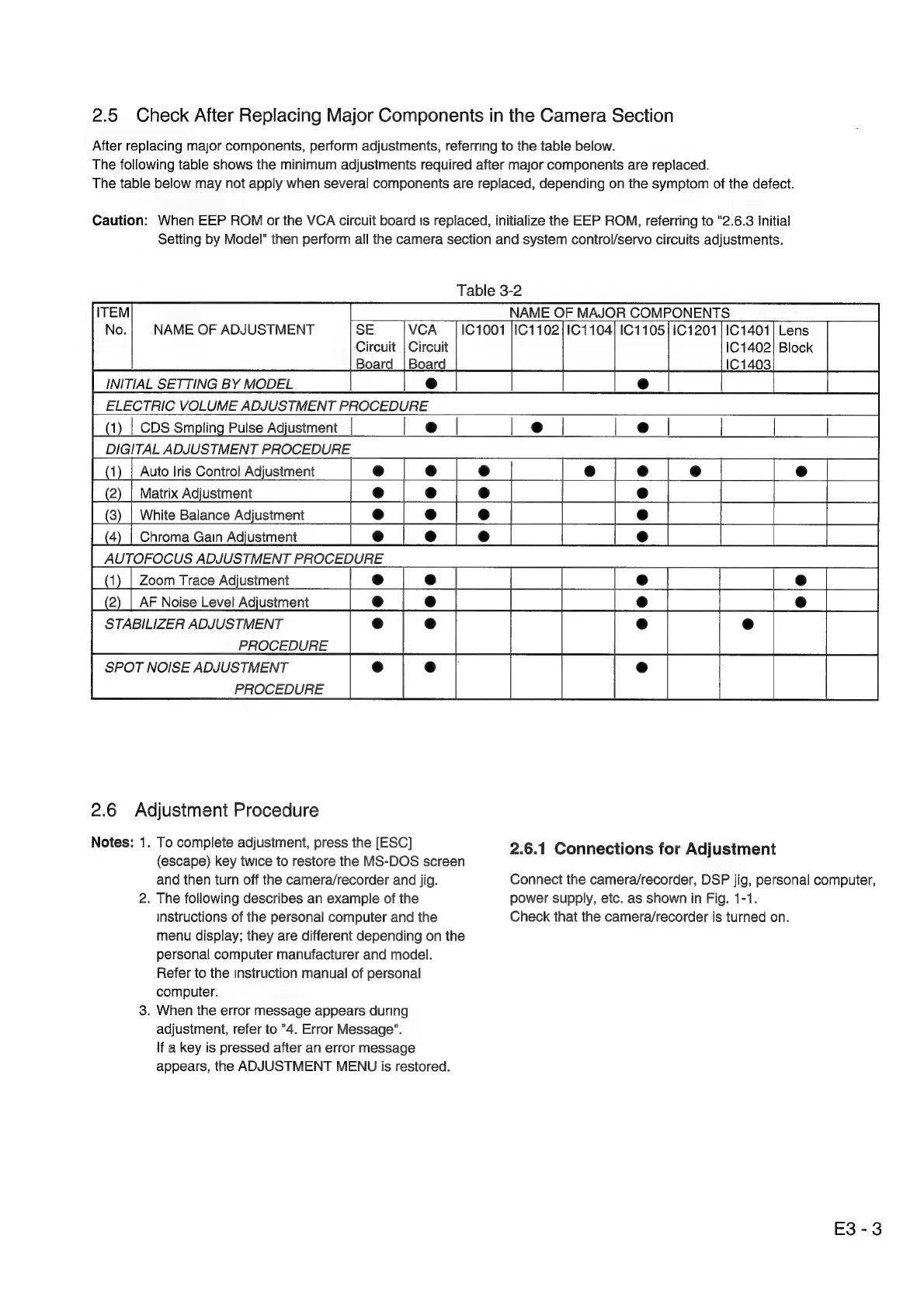
2.5
Check
After
Replacing
Major
Components
in
the
Camera
Section
After
replacing
major
components,
perform
adjustments,
referring
to
the
table
below.
The
following
table
shows
the
minimum
adjustments
required
after
major
components
are
replaced.
The
table
below
may
not
apply
when
several
components
are
replaced,
depending
on
the
symptom
of
the
defect.
Caution:
When
EEP
ROM
or
the
VCA
circuit
board
ts
replaced,
initialize
the
EEP
ROM,
referring
to
"2.6.3
Initial
Setting
by
Model"
then
perform
all
the
camera
section
and
system
control/servo
circuits
adjustments.
Table
3-2
NAME
OF
MAJOR
COMPONENTS
NAME
OF
ADJUSTMENT
SE
VCA_
|
101001
}1C1102/1C1104]
1C1105|1C1201
|
1C1401}
Lens
Circuit
|
Circuit
iC
1402!
Block
Board
|
Board
IC
1403
INITIAL
SETTING
BY
MODEL
e
ELECTRIC
VOLUME
ADJUSTMENT
PROCEDURE
CDS
Smpling
Pulse
Adjustment
ITAL
ADJUSTMENT
PROCEDURE
Auto
Iris
Control
Adjustment
Matrix
Adjustment
White
Balance
Adjustment
Chroma
Gain
Adjustment
STABILIZER
ADJUSTMENT
PROCEDURE
SPOT
NOISE
ADJUSTMENT
PROCEDURE
2.6
Adjustment
Procedure
Notes:
1.
To
complete
adjustment,
press
the
[ESC]
2.6.1
Connections
for
Adjustment
(escape)
key
twice
to
restore
the
MS-DOS
screen
and
then
turn
off
the
camera/recorder
and
jig.
Connect
the
camera/recorder,
DSP
jig,
personal
computer,
2.
The
following
describes
an
example
of
the
power
supply,
etc.
as
shown
in
Fig.
1-1.
instructions
of
the
personal
computer
and
the
Check
that
the
camera/recorder
is
turned
on.
menu
display;
they
are
different
depending
on
the
personal
computer
manufacturer
and
model.
Refer
to
the
instruction
manual
of
personal
computer.
3.
When
the
error
message
appears
during
adjustment,
refer
to
"4.
Error
Message”.
lf
a
key
is
pressed
after
an
error
message
appears,
the
ADJUSTMENT
MENU
is
restored.
E3-3

Related product manuals