EasyManua.ls Logo

Hitachi VIV-E553LE - Rough Adjustment

Hitachi VIV-E553LE
118 pages
Print Icon
To Next Page IconTo Next Page
To Previous Page IconTo Previous Page
Loading...
(1)
Auto
Iris
Control
Adjustment
Purpose:
To
set
the
iris
control
data.
Incompleted
Phenomenon:
The
picture
becomes
too
bright.
The
picture
becomes
too
dark.
Condition:
Point
the
camera
at
the
light
box
without
a
chart
to
full
the
screen
(at
wide-angle).
Procedure:
1)
Refer
to
display
5-1.
2)
Press
1
key.
Perform
adjustment
according
to
the
computer
display
hereafter.
See
"4.
Error
Messages"
if
an
error
message
appears
on
the
compuier
display.
3)
Refer
to
display
5-2.
4)
Press
any
key
to
return
to
ADJUSTMENT
MENU
display.
5)
Turn
the
power
off
for
5
seconds
and
then
on
again.
(2)
Matrix
Adjustment
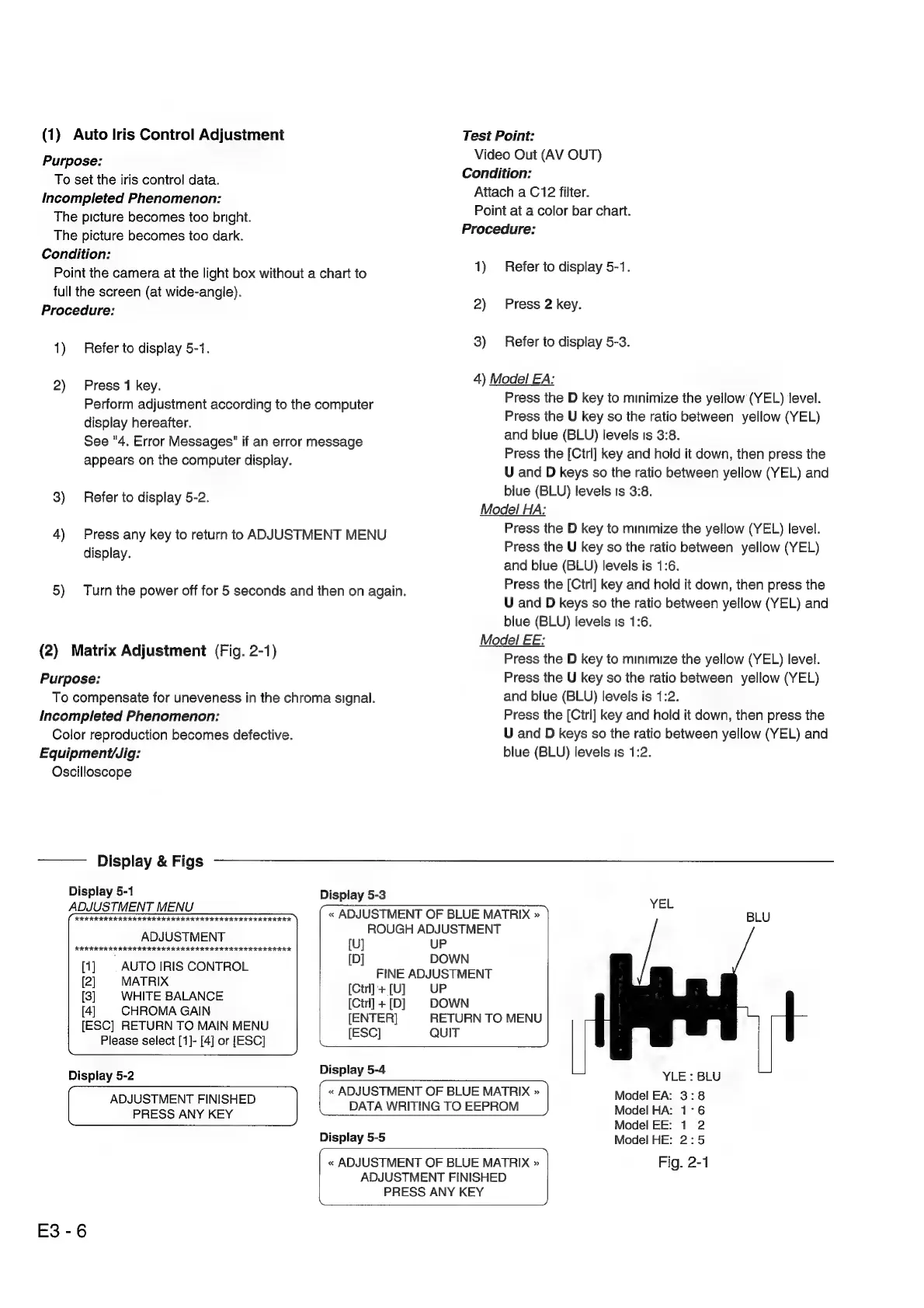
(Fig.
2-1)
Purpose:
To
compensate
for
uneveness
in
the
chroma
signal.
Incompleted
Phenomenon:
Color
reproduction
becomes
defective.
Test
Point:
Video
Out
(AV
OUT)
Condition:
Attach
a
C12
filter.
Point
at
a
color
bar
chart.
Procedure:
1)
Refer
to
display
5-1.
2)
Press
2
key.
3)
Refer
to
display
5-3.
4)
Model
EA:
Press
the
D
key
to
minimize
the
yellow
(YEL)
level.
Press
the
U
key
so
the
ratio
between
yellow
(YEL)
and
blue
(BLU)
levels
Is
3:8.
Press
the
[Ctrl]
key
and
hold
it
down,
then
press
the
U
and
D
keys
so
the
ratio
between
yellow
(YEL)
and
blue
(BLU)
levels
is
3:8.
Model
HA:
Press
the
D
key
to
minimize
the
yellow
(YEL)
level.
Press
the
U
key
so
the
ratio
between
yellow
(YEL)
and
blue
(BLU)
levels
is
1:6.
Press
the
[Cirl]
key
and
hold
it
down,
then
press
the
U
and
D
keys
so
the
ratio
between
yellow
(YEL)
and
blue
(BLU)
levels
Is
1:6.
Model
EE:
Press
the
D
key
to
minimize
the
yellow
(YEL)
level.
Press
the
U
key
so
the
ratio
between
yellow
(YEL)
and
blue
(BLU)
levels
is
1:2.
Press
the
[Cirl]
key
and
hold
it
down,
then
press
the
U
and
D
keys
so
the
ratio
between
yellow
(YEL)
and
E3-6
Equipment/Jig:
blue
(BLU)
levels
is
1:2.
Oscilloscope
Display
&
Figs
Display
5-1
Display
5-3
YEL
(aoennnnensemnmn)
{
<ADJUSTMENT
OF
BLUE
MATRIX
> |
BLU
pores
-
ROUGH
ADJUSTMENT
[1]
|
AUTO
IRIS
CONTROL
1D]
eee
wees
Le),
«
MATIX
[Ctrl]+[U]
UP
a
ale
Sepia
[Ctrl]
+[D]
DOWN
4
HROMA
GAIN
[ESC]
RETURN
TO
MAIN
MENU
a
aa
TOMENY
Please
select
[1]-
[4]
or
[ESC]
a
_)
Display
5-2
Debley24
YLE
:
BLU
«
ADJUSTMENT
OF
BLUE
MATRIX
»
Model
EA:
3:8
ADJUSTMENT
FINISHED
SEEM
WEIING
TOEEPHOR
eee
PRESS
ANY
KEY
aoe:
ee
ode!
:,
Display
5-5
Model
HE:
2:5
«
ADJUSTMENT
OF
BLUE
MATRIX
»
Fig.
2-1
ADJUSTMENT
FINISHED
PRESS
ANY
KEY

Related product manuals