EasyManua.ls Logo

Hitachi VIV-E553LE - Stabilizer Adjustment Procedure; Spot Noise Adjustment Procedure

Hitachi VIV-E553LE
118 pages
Print Icon
To Next Page IconTo Next Page
To Previous Page IconTo Previous Page
Loading...
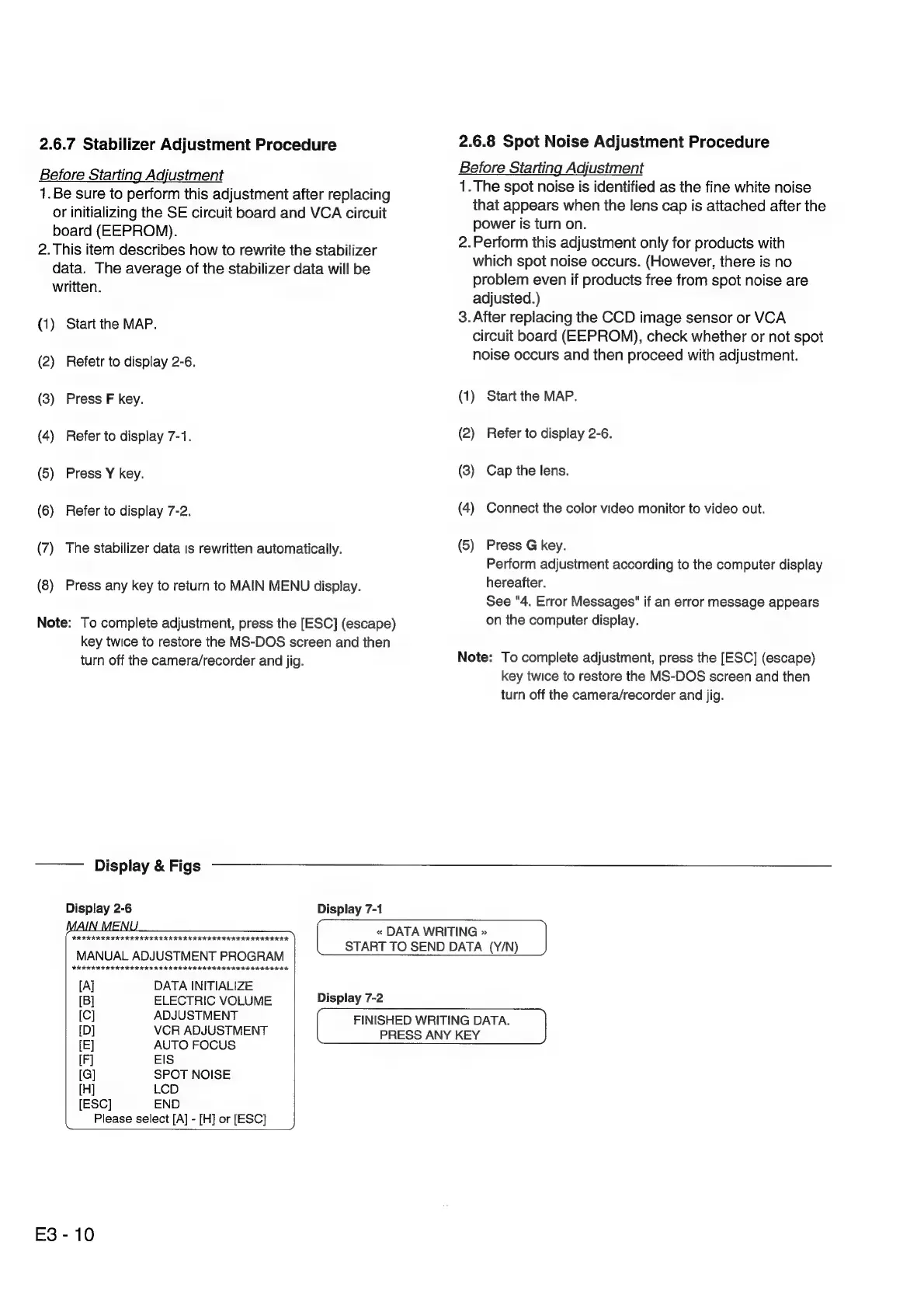
2.6.7
Stabilizer
Adjustment
Procedure
Before
Starting
Adjustment
1.Be
sure
to
perform
this
adjustment
after
replacing
or
initializing
the
SE
circuit
board
and
VCA
circuit
board
(EEPROM).
2.
This
item
describes
how
to
rewrite
the
stabilizer
data.
The
average
of
the
stabilizer
data
will
be
written.
(1)
Start
the
MAP.
(2)
Refetr
to
display
2-6.
(3)
Press
F
key.
(4)
Refer
to
display
7-1.
(5)
Press
Y
key.
(6)
Refer
to
display
7-2.
(7)
The
stabilizer
data
is
rewritten
automatically.
(8)
Press
any
key
to
return
to
MAIN
MENU
display.
Note:
To
complete
adjustment,
press
the
[ESC]
(escape)
key
twice
to
restore
the
MS-DOS
screen
and
then
turn
off
the
camera/recorder
and
jig.
2.6.8
Spot
Noise
Adjustment
Procedure
Before
Starting
Adjustment
1.
The
spot
noise
is
identified
as
the
fine
white
noise
that
appears
when
the
lens
cap
is
attached
after
the
power
is
turn
on.
2.Perform
this
adjustment
only
for
products
with
which
spot
noise
occurs.
(However,
there
is
no
problem
even
if
products
free
from
spot
noise
are
adjusted.)
3.
After
replacing
the
CCD
image
sensor
or
VCA
circuit
board
(EEPROM),
check
whether
or
not
spot
noise
occurs
and
then
proceed
with
adjustment.
(1)
Start
the
MAP.
(2)
Refer
to
display
2-6.
(3)
Cap
the
lens.
(4)
Connect
the
color
video
monitor
to
video
out.
(5)
Press
G
key.
Perform
adjustment
according
to
the
computer
display
hereafter.
See
"4.
Error
Messages"
if
an
error
message
appears
on
the
computer
display.
Note:
To
complete
adjustment,
press
the
[ESC]
(escape)
key
twice
to
restore
the
MS-DOS
screen
and
then
turn
off
the
camera/recorder
and
jig.
«
DATA
WRITING
»
|
START
TO
SEND
DATA
(Y/N)
Display
&
Figs
Display
2-6
Display
7-1
FEES
SETHE
ESSE
eke
)
L
MANUAL
ADJUSTMENT
PROGRAM
[Al
DATA
INITIALIZE
[B]
ELECTRIC
VOLUME
Display
7-2
[C]
ADJUSTMENT
{[D]
VCR
ADJUSTMENT
[E]
AUTO
FOCUS
IF]
EIS
[G]
SPOT
NOISE
[H]
LCD
[ESC]
END
Please
select
[A]
-
[H]
or
[ESC]
E3
-
10
FINISHED
WRITING
DATA.
PRESS
ANY
KEY

Related product manuals