EasyManua.ls Logo

Hitachi VIV-E553LE - Autofocus Adjustment Procedure

Hitachi VIV-E553LE
118 pages
Print Icon
To Next Page IconTo Next Page
To Previous Page IconTo Previous Page
Loading...
3)
Rerer
to
dispaly
5-8.
2.6.6
Autofocus
Adjustment
Procedure
Before
Starting
Adjustment
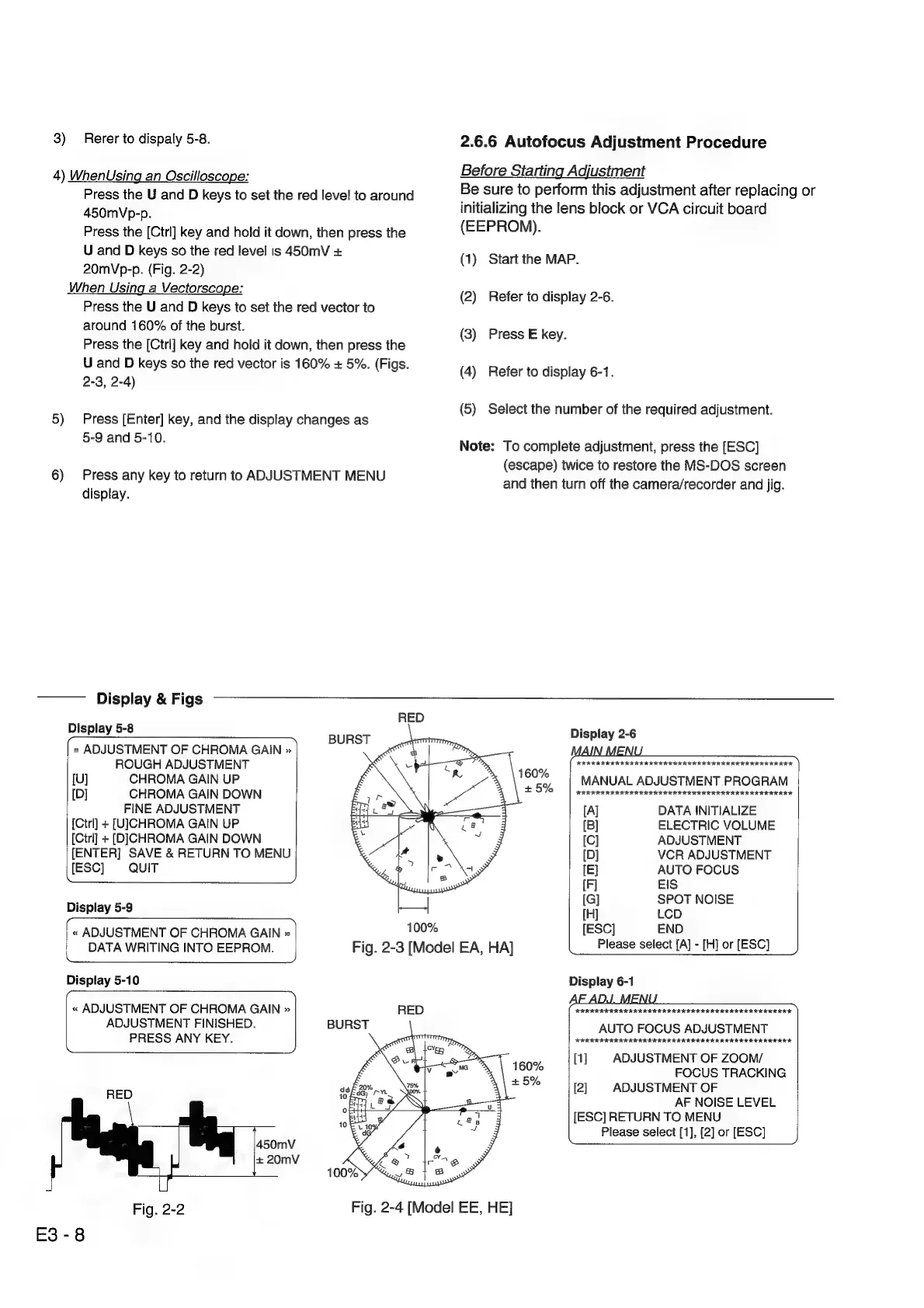
4)
WhenUsing
an
Oscilloscope:
; ; .
Be
sure
to
perform
this
adjustment
after
replacing
or
Press
the
U
and
D
keys
to
set
the
red
level
to
around
initializing
the
lens
block
or
VCA
circuit
board
450mVp-p.
Press
the
[Ctrl]
key
and
hold
it
down,
then
press
the
(EEPROM).
U
and
D
keys
so
the red
level
is
450mV
+
(1)
Start
the
MAP
20mVp-p.
(Fig.
2-2)
When
Using
a
Vectorscope:
(2)
Press
the
U
and
D
keys
to
set
the
red
vector
to
around
160%
of
the
burst.
Refer
to
display
2-6.
;
(3)
Press
E
key.
Press
the
[Ctrl]
key
and
hold
it
down,
then
press
the
;
2
:
U
and
D
keys
so
the
red
vector
is
160%
+
5%.
(Figs.
(4)
Refer
to
display
6-1.
2-3,
2-4)
;
(5)
Select
the
number
of
the
required
adjustment.
5)
Press
[Enter]
key,
and
the
display
changes
as
5-9
and
5-10.
Note:
To
complete
adjustment,
press
the
[ESC]
p
k
ADJUSTM
MEN
(escape)
twice
to
restore
the
MS-DOS
screen
6)
Fess
any
Keyto
Fetany:.tO
USTMENT
U
and
then
turn
off
the
camera/recorder
and
jig.
display.
Display
&
Figs
RED
Display
5-8
<
Display
2-6
«
ADJUSTMENT
OF
CHROMA
GAIN
»
ROUGH
ADJUSTMENT
HR
EER
IKIKRRIK
RIKKI
IEREREREREREERK
[U]
CHROMA
GAIN
UP
MANUAL
ADJUSTMENT
PROGRAM
[D]
CHROMA
GAIN
DOWN
RRR
EE
KRIKIIKI
KEKE
KEKE
ERE
ERERERE
EERE
IK
FINE
ADJUSTMENT
[A]
DATA
INITIALIZE
[Ctrl]
+
[UJCHROMA
GAIN
UP
[B]
ELECTRIC
VOLUME
[Ctrl]
+
[DJCHROMA
GAIN
DOWN
[C]
ADJUSTMENT
[ENTER]
SAVE
&
RETURN
TO
MENU
[D]
VCR
ADJUSTMENT
[ESC]
QUIT
[E}
AUTO
FOCUS
[F]
EIS
.
[G]
SPOT
NOISE
Display
5-9
[H]
LCD
>
9,
«
ADJUSTMENT
OF
CHROMA
GAIN
»
1002s
[ESC]
END
DATA
WRITING
INTO
EEPROM.
Fig.
2-3
[Model
EA,
HA]
Please
select
[A]
-
[H]
or
[ESC]
Ne
Display
5-10
Display
6-1
«
ADJUSTMENT
OF
CHROMA
GAIN
»
RED
HHKERERERE
EKER
KAIRIE
RII
IIT
ERIE
III
SERIA.
ADJUSTMENT
FINISHED.
AUTO
FOCUS
ADJUSTMENT
PRESS
ANY
KEY.
KKKKREREEEKKEREREREEEKKEKEKERE
EE
ERK
EERE
[1]
ADJUSTMENT
OF
ZOOM/
FOCUS
TRACKING
RED
[2]
ADJUSTMENT
OF
AF
NOISE
LEVEL
[ESC]
RETURN
TO
MENU
Please
select
[1],
[2]
or
[ESC]
450mV
—=
+
20mV
Fig.
2-2
E3-8
Fig.
2-4
[Model
EE,
HE]

Related product manuals