EasyManua.ls Logo

Hitachi VIV-E553LE - Initial Setting by Model

Hitachi VIV-E553LE
118 pages
Print Icon
To Next Page IconTo Next Page
To Previous Page IconTo Previous Page
Loading...
2.6.2
How
to
Start
the
MAP
(1)
Turn
the
personal
computer
on
and
start
the
MS-DOS
system.
Note:
Refer
to
the
instruction
manual
of
the
personal
computer
for
how
to
start
computer.
(2)
Load
the
adjustment
floppy
disk
in
to
disk
drive
A
and
press
A:
[ENTER].
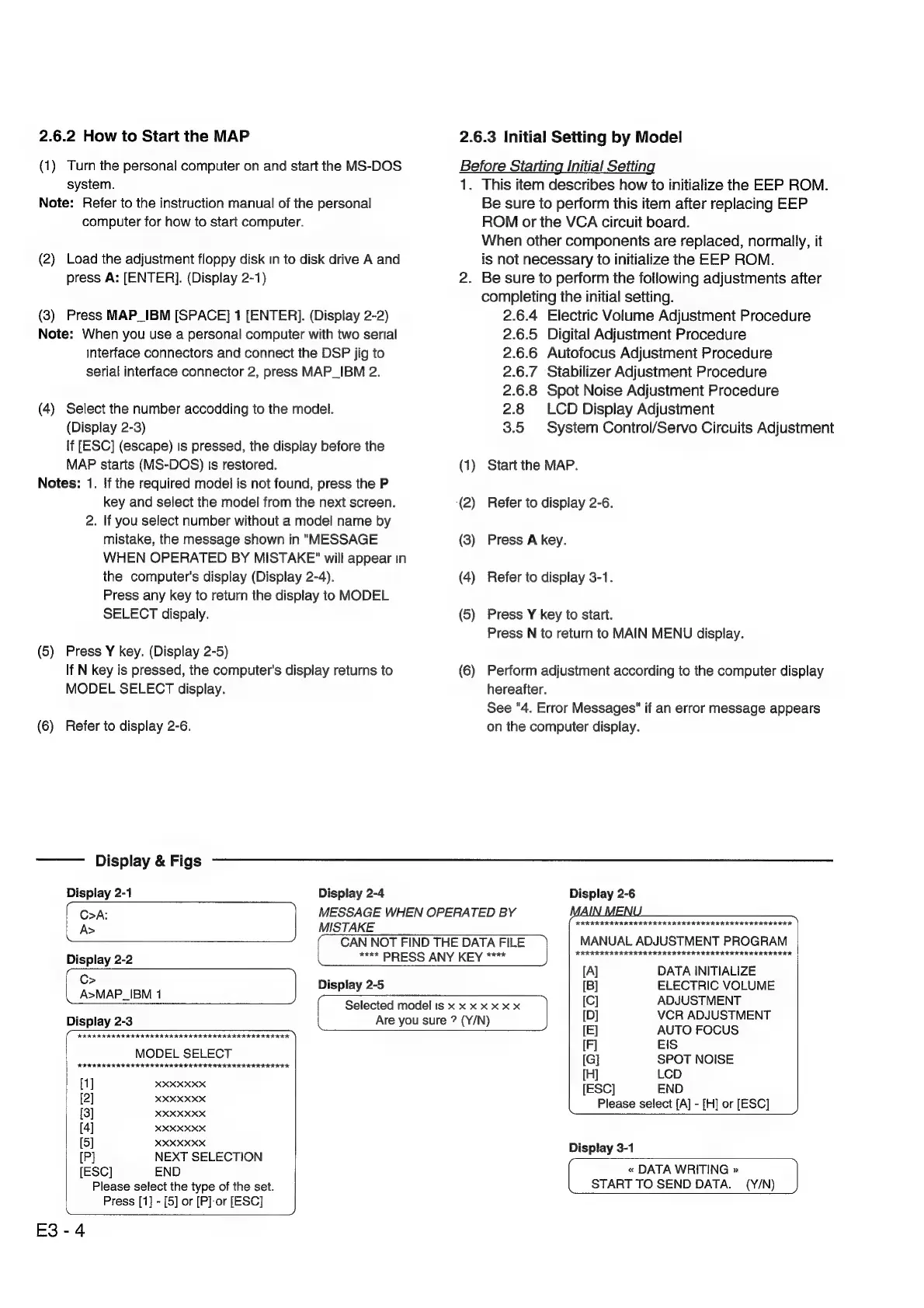
(Display
2-1)
(3)
Press
MAP_IBM
[SPACE]
1
[ENTER].
(Display
2-2)
Note:
When
you
use
a
personal
computer
with
two
serial
interface
connectors
and
connect
the
DSP
jig
to
serial
interface
connector
2,
press
MAP_IBM
2.
(4)
Select
the
number
accodding
to
the
model.
(Display
2-3)
If
[ESC]
(escape)
Is
pressed,
the
display
before
the
MAP
starts
(MS-DOS)
ts
restored.
Notes:
1.
If
the
required
model
is
not
found,
press
the
P
key
and
select
the
model
from
the
next
screen.
2.
If
you
select
number
without
a
model
name
by
mistake,
the
message
shown
in
"MESSAGE
WHEN
OPERATED
BY
MISTAKE"
will
appear
in
the
computer's
display
(Display
2-4).
Press
any
key
to
return
the
display
to
MODEL
SELECT
dispaly.
(5)
Press
Y
key.
(Display
2-5)
If
N
key
is
pressed,
the
computer's
display
returns
to
MODEL
SELECT
display.
(6)
Refer
to
display
2-6.
2.6.3
Initial
Setting
by
Model
Before
Starting
Initial
Setting
1.
This
item
describes
how
to
initialize
the
EEP
ROM.
Be
sure
to
perform
this
item
after
replacing
EEP
ROM
or
the
VCA
circuit
board.
When
other
components
are
replaced,
normaily,
it
is
not
necessary
to
initialize
the
EEP
ROM.
2.
Be
sure
to
perform
the
following
adjustments
after
completing
the
initial
setting.
2.6.4
Electric
Volume
Adjustment
Procedure
2.6.5
Digital
Adjustment
Procedure
2.6.6
Autofocus
Adjustment
Procedure
2.6.7
Stabilizer
Adjustment
Procedure
2.6.8
Spot
Noise
Adjustment
Procedure
2.8
LCD
Display
Adjustment
3.5
System
Control/Servo
Circuits
Adjustment
(1)
Start
the
MAP.
(2)
Refer
to
display
2-6.
(3)
Press
A
key.
(4)
Refer
to
display
3-1.
(5)
Press
Y
key
to
start.
Press
N
to
return
to
MAIN
MENU
display.
(6)
Perform
adjustment
according
to
the
computer
display
hereafter.
See
"4.
Error
Messages"
if
an
error
message
appears
on
the
computer
display.
Display
&
Figs
Display
2-1
Display
2-4
Display
2-6
(
Opa:
‘|
MESSAGE
WHEN
OPERATED
BY
MAIN MENU
A>
MISTAKE
KKKEKKEREERERERERRERE
ERE
EERE
CAN
NOT
FIND
THE
DATA
FILE
|
MANUAL
ADJUSTMENT
PROGRAM
Display
2.2
kee
PRESS
ANY
KEY
KEKE
KRKEREREREEKR
EERE
EERE
RE
REKEKREEEEEEREER
~
[A]
DATA
INITIALIZE
oe
IBM
1
Display
2-5
[B]
ELECTRIC
VOLUME
>
2
Selected
model
is
x
x x
x
x
x x
$e
Pee
We
AER
Display
2-3
Are
you
sure
?
(Y/N)
a
AUTO
FOCUS
KKK
KKEKEEKEREKRIEKREKR
EK
EEK
IKE
RE
EEREREKREERERESE
(F]
EIS
PRE
er
i
ctetae
iar
acr
eee
[Gi]
SPOT
NOISE
[H]
LCD
[1]
XXXXXXX
[ESC]
END
[2]
seusaes
Please
select
[A]
-
[H]
or
[ESC]
[3]
XXXXXXX
[4]
XXXXXXX
[5]
XXXXXXX
Display
3-1
[P]
NEXT
SELECTION
tat
[ESC]
END
«
DATA
WRITING
»
Please
select
the
type
of
the
set.
START
TO
SEND
DATA.
(Y/N)
Press
[1]
-
[5]
or
[PJ
or
[ESC]
E3-4

Related product manuals