EasyManua.ls Logo

Hitachi VIV-E553LE - Page 27

Hitachi VIV-E553LE
118 pages
Print Icon
To Next Page IconTo Next Page
To Previous Page IconTo Previous Page
Loading...
2.6.4
Electric
Volume
Adjustment
Procedure
Before
Starting
Adjstment
When
EEP
ROM
or
the
VCA
circuit
board
is
replaced,
initialize
the
EEP
ROM,
referring
to
"2.6.3
Initial
Setting
By
Model”
then
perform
all
the
electric
volume
adjustments.
(1)
Start
the
MAP.
(2)
Refer
to
display
2-6.
(3)
Press
B
key.
(4)
Refer
to
display
4-1.
Notes:
1.
If
[ESC]
(escape)
is
pressed,
the
computer's
display
returns
to
MAIN
MENU
display.
2.
To
complete
adjustment,
press
the
[ESC]
(escape)
key
twice
to
restore
the
MS-DOS
screen
and
then
turn
off
the
camera/recorder
and
jig.
(1)
CDS
Sampling
Pulse
Adjustment
Purpose:
To
suppress
noise
in
the
CCD
sensor
output
signal
and
maximize
the
signal
level.
Incompleted
Phenomenon:
Diagonal
beats
and
horizontal
noise
occur.
Condition:
Leave
the
camera/recorder
for
more
than
2
minutes
untill
the
circuits
are
stabilized
after
turing
it
on,
then
start
adjustment.
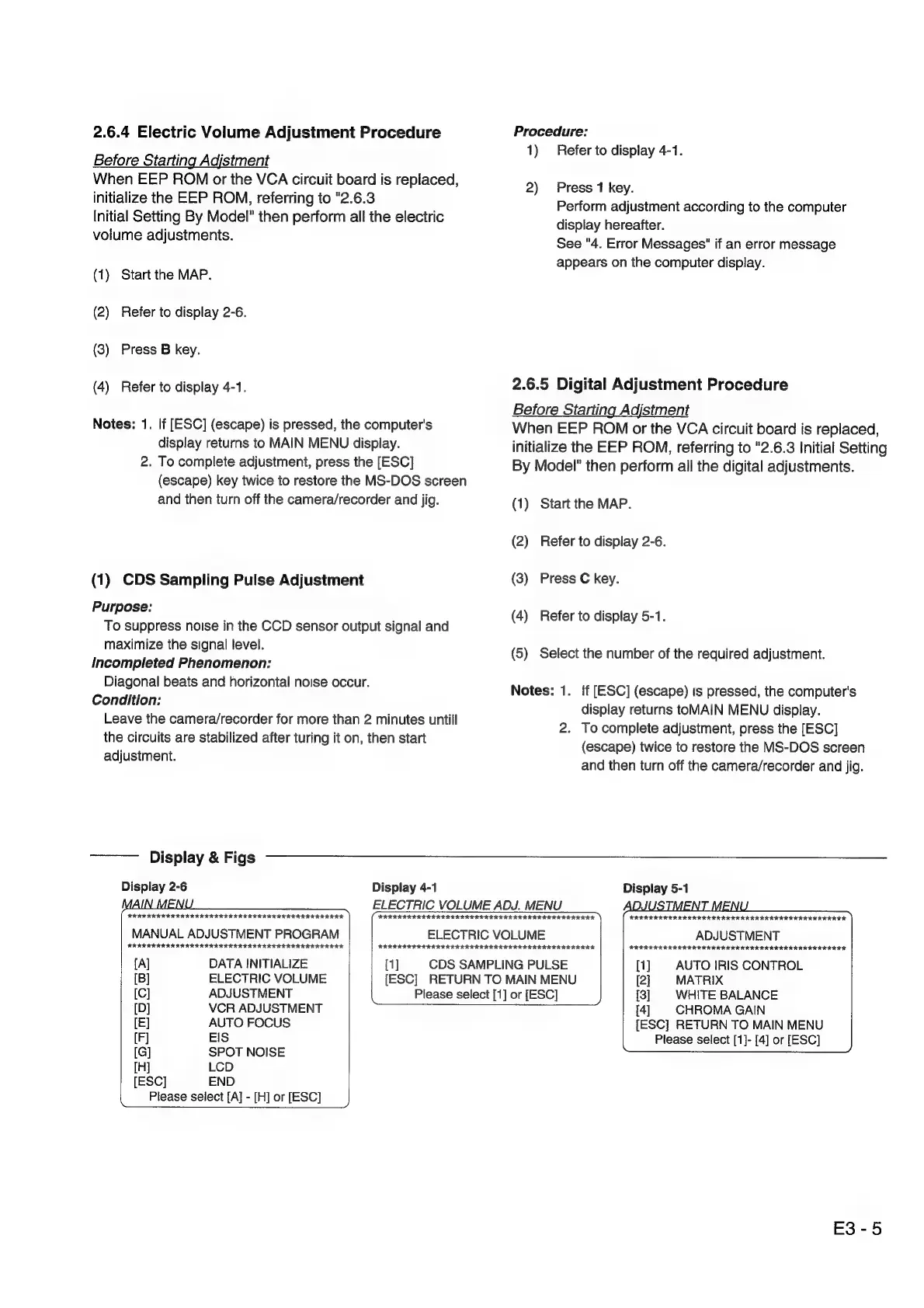
Display
&
Figs
Display
2-6
Display
4-1
ELECTRIC
VOLUME
ADJ.
MENU
Procedure:
1)
Refer
to
display
4-1.
2)
Press
1
key.
Perform
adjustment
according
to
the
computer
display
hereafter.
See
"4.
Error
Messages"
if
an
error
message
appears
on
the
computer
display.
2.6.5
Digital
Adjustment
Procedure
Before
Starting
Adjstment
When
EEP
ROM
or
the
VCA
circuit
board
is
replaced,
initialize
the
EEP
ROM,
referring
to
"2.6.3
Initial
Setting
By
Model"
then
perform
all
the
digital
adjustments.
(1)
Start
the
MAP.
(2)
Refer
to
display
2-6.
(3)
Press
C
key.
(4)
Refer
to
display
5-1.
(5)
Select
the
number
of
the
required
adjustment.
Notes:
1.
{if
[ESC]
(escape)
is
pressed,
the
computer's
display
returns
toMAIN
MENU
display.
2.
To
complete
adjustment,
press
the
[ESC]
(escape)
twice
to
restore
the
MS-DOS
screen
and
then
turn
off
the
camera/recorder
and
jig.
Display
5-1
IKK
IK
IRR
IIR
IRIE
IRIS
I
IAI
III
II
III
IIIS
IS
IIS
MANUAL
ADJUSTMENT
PROGRAM
HARI
IKI
RIA
KIKI
IRI
II
IK
IIIA
IIASA
IRA
ASA
I.
[Al
DATA
INITIALIZE
[1]
ARIE
RIKER
ERIKA
AIA
IA
ISA
ISIS
AIIA
ISIS
SII
IAA.
ELECTRIC
VOLUME
CDS
SAMPLING
PULSE
[B]
ELECTRIC
VOLUME
[ESC]
RETURN
TO
MAIN
MENU
Please
select
[1]
or
[ESC]
ERR
IR
IHR
KR
KIS
IR
EI
III
KEI
IEIIII
ISIS
SIAR.
ADJUSTMENT
[1]
AUTO
IRIS
CONTROL
[2]
MATRIX
[3]
WHITE
BALANCE
[C]
ADJUSTMENT
[D]
VCR
ADJUSTMENT
[E]
AUTO
FOCUS
(F]
EIS
[G]
SPOT
NOISE
[H]
LCD
[ESC]
END
Please
select
[A]
-
[H]
or
[ESC]
[4]
CHROMA
GAIN
[ESC]
RETURN
TO
MAIN
MENU
Please
select
[1]-
[4]
or
[ESC]
F3-5

Related product manuals