EasyManua.ls Logo

Hitachi VIV-E553LE - System Control;Servo Circuits Adjustment

Hitachi VIV-E553LE
118 pages
Print Icon
To Next Page IconTo Next Page
To Previous Page IconTo Previous Page
Loading...
3.5
System
Control/Servo
Circuits
Adjustment
Before
Starting
Adjustment
1.
System
control/servo
circuits
adjustment
also
needs
a
personal
computer.
Connect
the
camera/
recorder,
jigs,
power
supply,
etc.
in
the
same
way
as
in
camera
section
adjustment.
2.
Be
sure
to
perform
this
adjustment
after
replaceing
or
initializing
the
EEP
ROM
and
VCA
circuit
board.
3.
When
an
error
message
appears
during
adjustment,
refer
to
"4.
Error
Massage".
4.
If
[ESC]
(escape)
is
pressed,
the
computer's
display
returns
to
MAIN
MENU
display.
5.
To
complete
adjustment,
pres
to
[ESC]
(escape)
key
twice
to
restore
the
MS-DOS
screen
and
then
turn
off
the
camera/recorder
and
jigs.
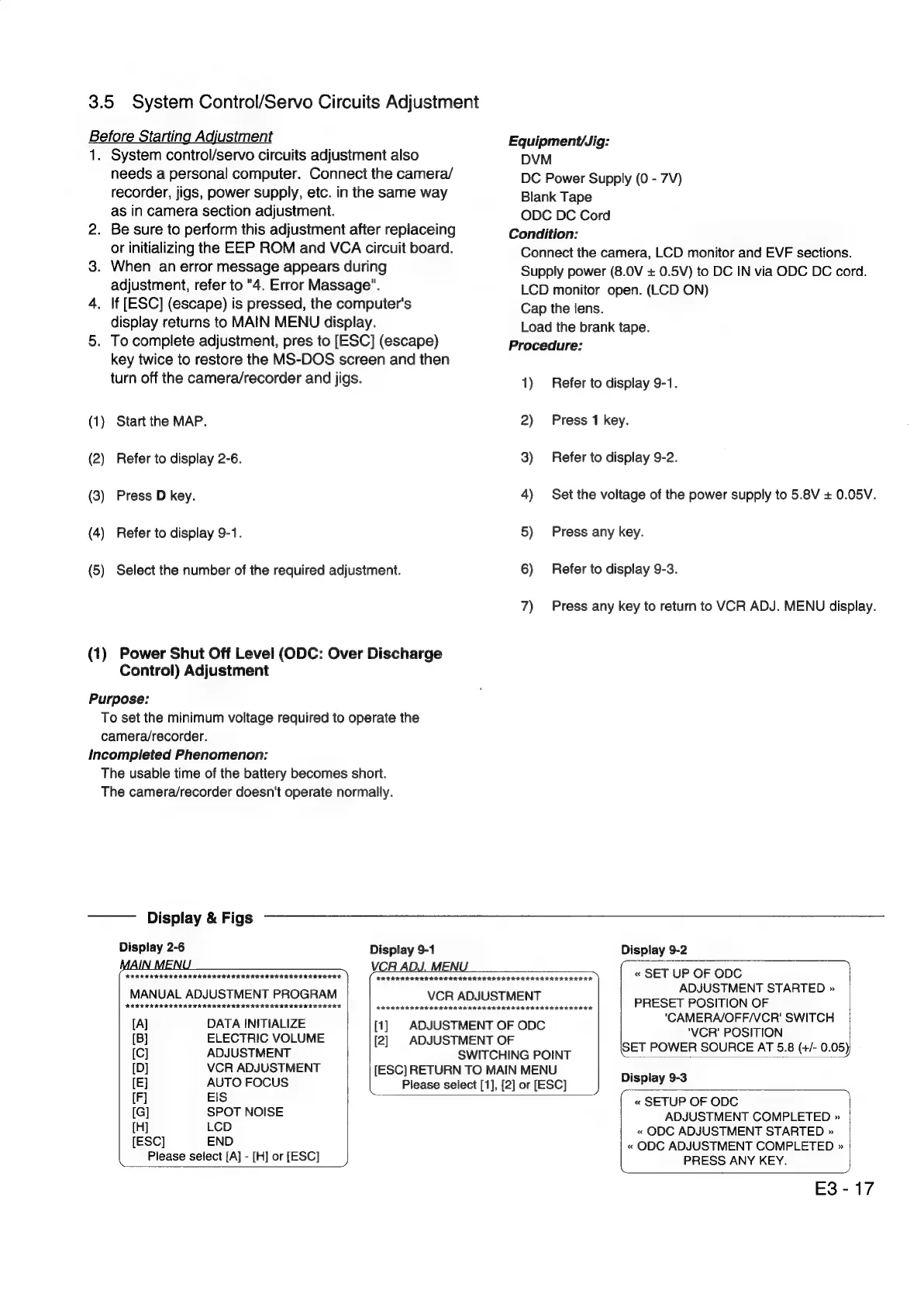
(1)
Start
the
MAP.
(2)
Refer
to
display
2-6.
(3)
Press
D
key.
(4)
Refer
to
display
9-1.
(5)
Select
the
number
of
the
required
adjustment.
(1)
Power
Shut
Off
Level
(ODC:
Over
Discharge
Control)
Adjustment
Purpose:
To
set
the
minimum
voltage
required
to
operate
the
camera/recorder.
Incompleted
Phenomenon:
The
usable
time
of
the
battery
becomes
short.
The
camera/recorder
doesn't
operate
normally.
Equipment/Jig:
DVM
DC
Power
Supply
(0
-
7V)
Blank
Tape
ODC
DC
Cord
Condition:
Connect
the
camera,
LCD
monitor
and
EVF
sections.
Supply
power
(8.0V
+
0.5V)
to
DC
IN
via
ODC
DC
cord.
LCD
monitor
open.
(LCD
ON)
Cap
the
lens.
Load
the
brank
tape.
Procedure:
1)
Refer
to
display
9-1.
2)
Press
1
key.
3)
Refer
to
display
9-2.
4)
Set
the
voltage
of
the
power
supply
to
5.8V
+
0.05V.
5)
Press
any
key.
6)
Refer
to
display
9-3.
7)
Press
any
key
to
return
to
VCR
ADJ.
MENU
display.
Display
&
Figs
Display
2-6
Display
9-1
Display
9-2
i
FEE
EIKO
ISIE
TODA
O
To
etceiack
)
VCR
ADJ.
MENU
___—__
«
SET
UP
OF
ODC
ADJUSTMENT
STARTED
»
see
elect
mere
[elec
MSUSIMEN
ca!
“1
BRESEY
POSIUON
OF
IA]
DATA
INITIALIZE
[1]
ADJUSTMENT
OF
ODC
pares
pails
antes
[B]
ELECTRIC
VOLUME
[2]
ADJUSTMENT
OF
icy
ADJUSTMENT
SWTCHINGEOINE
SET
POWER
SOURCE
AT
5.8
(+/-
0.05)
[D]
VCR
ADJUSTMENT
[ESC]
RETURN
TO
MAIN
MENU
Display
9-3
[E]
AUTO
FOCUS
Please
select
[1],
[2]
or
[ESC]
play
[F]
EIS
«
SETUP
OF
ODC
[G]
SPOT
NOISE
ADJUSTMENT
COMPLETED
»
[H]
LCD
«
ODC
ADJUSTMENT
STARTED
»
[ESC]
END
«
ODC
ADJUSTMENT
COMPLETED
»
Please
select
[A]
-
[H]
or
[ESC]
PRESS
ANY
KEY.
E3-17

Related product manuals