OPERATING THE MACHINE
5-8
WORK MODE
Five work modes can be selected for most appropriate hydrau-
lic circuit and pump flow rate for the front attachment.
When the engine is started, the digging mode is automatically
set. Each time work mode switch is pressed, the five following
modes are selected alternately.
• Digging Mode
• Breaker 1
• Breaker 2
• Pulverizer 1
• Crusher 1
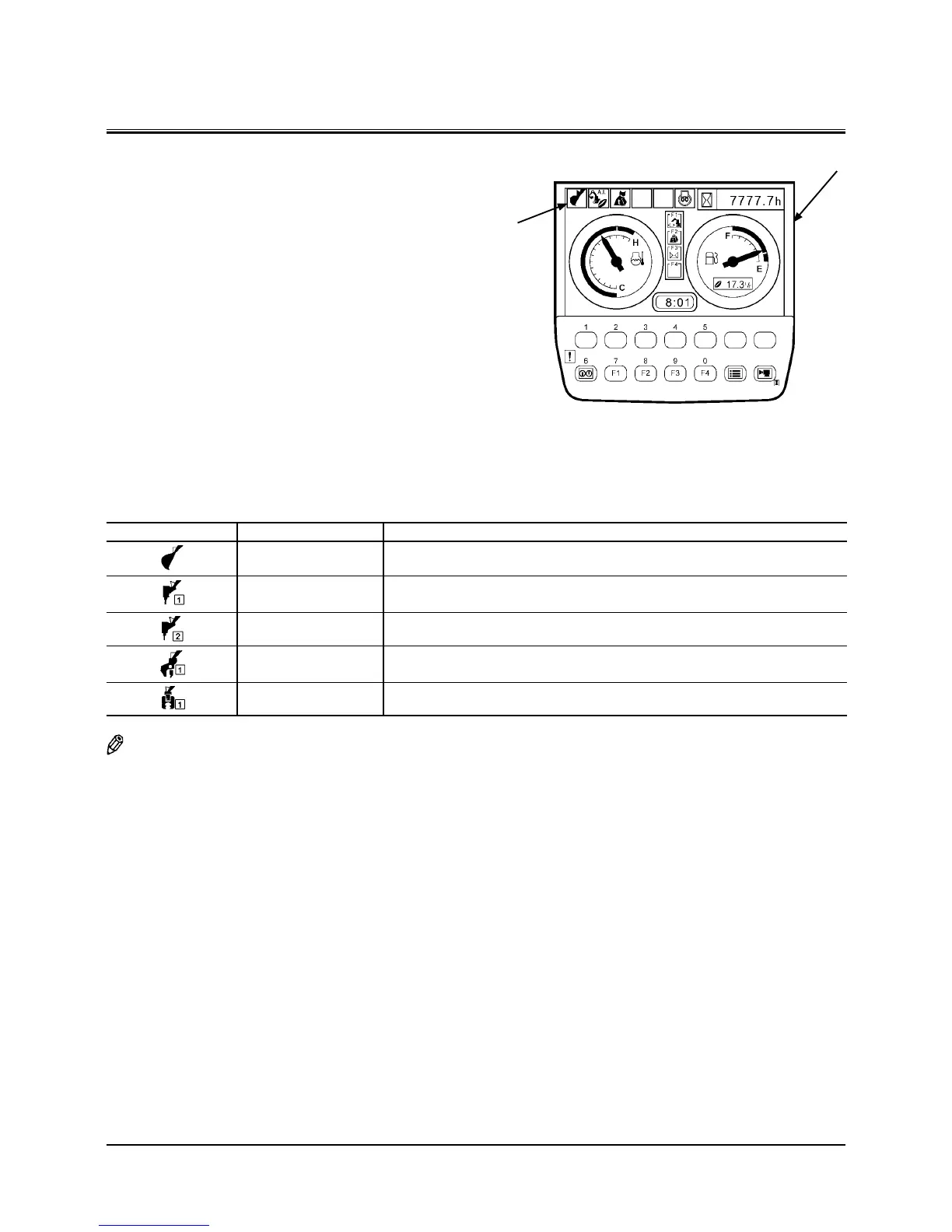
The selected work mode is indicated by attachment mode
indicator (2) of basic screen (1). Select the work mode corre-
sponding to the work in which the machine is engaged while
referring to the table below.
Work Mode Description
Digging Mode Select this mode when using bucket or fork grapple.
Breaker 1 Mode Select this mode when using breakers other than NPK breaker.
Breaker 2 Mode Select this mode when using NPK breaker.
Pulverizer 1 Mode Select this mode when using pulverizer.
Crusher 1 Mode Select this mode when using crusher.
NOTE: Five work modes shown above are designated as the
standard specifications. Up to five attachment modes
other than the digging mode can be designated. Con-
sult your nearest Hitachi dealer for adding or changing
the designation of the attachment modes.
M1U1-01-004
1
2


 To Next Page
 Loading...