OPERATOR'S STATION
1-20
ATTACHMENT SELECTION
(Only Machines Equipped with Optional Parts)
IMPORTANT: Select the attachments from the work mode
screen.
In order to display the work mode screen,
push work mode selection key F1 after basic
screen displays, or select from main menu.
Selecting an Attachment by Using Work Mode Selection
Key F1
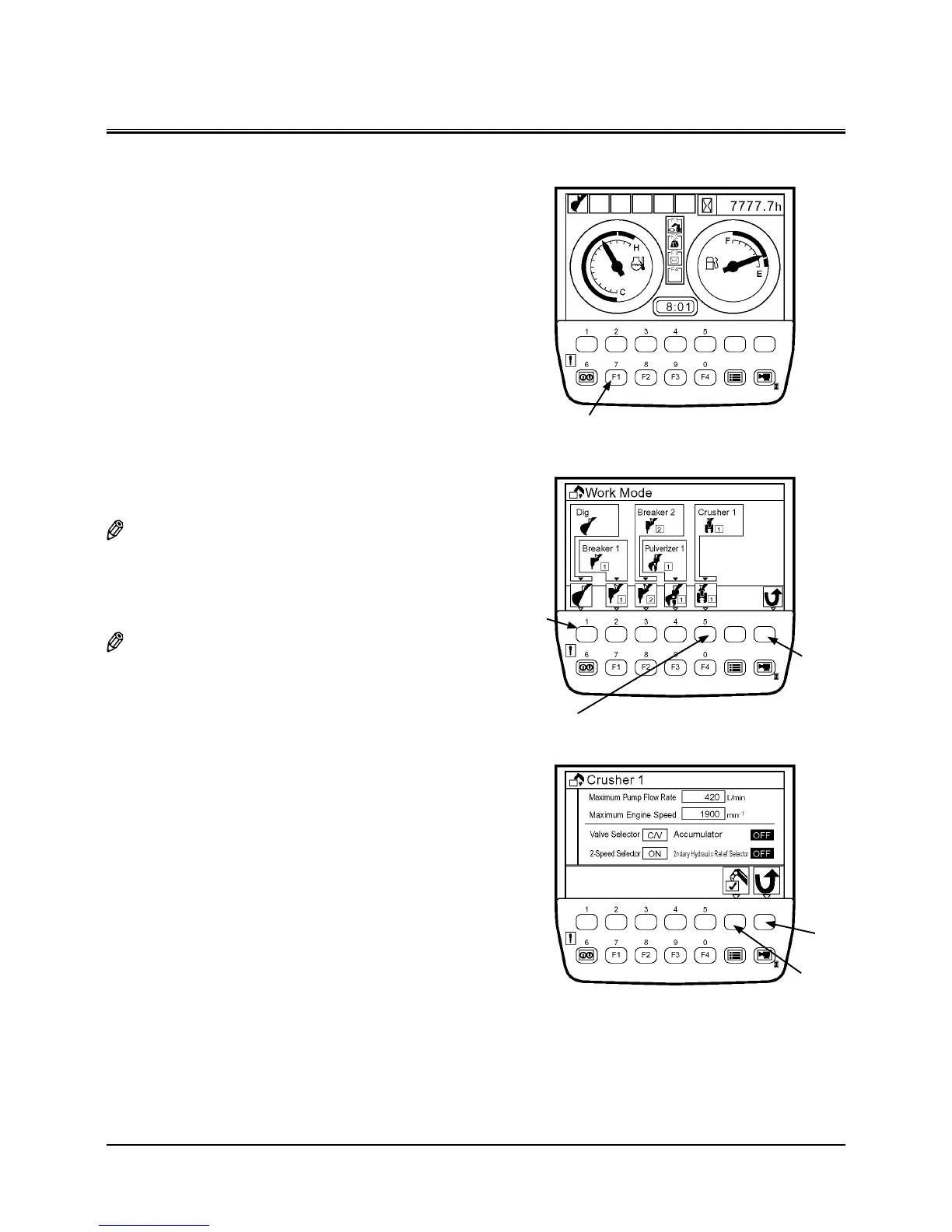
1. When the basic screen displays, push work mode selec
-
tion key F1 and display the work mode screen.
2. Push a key located under an attachment mark to be used
in order to select the attachment.
(In the right example, Crusher 1 is selected.)
NOTE: When selecting Digging, return to the basic screen.
3. On the attachment specification screen, confirm if speci
-
fication of the installed attachment agrees with that
displayed on the screen.
NOTE: When pushing the back key, return to the previous
screen.
4. Push the determination key, and the basic screen dis-
plays.
Key F1
Back Key
Back Key
Determination
key
Digging
Select Crusher 1
T1V1-05-01-123
T1V5-05-01-109
T1V5-05-01-028
Basic Screen
Work Mode Screen
Attachment Specification Screen


 To Next Page
 Loading...