OPERATOR'S STATION
1-41
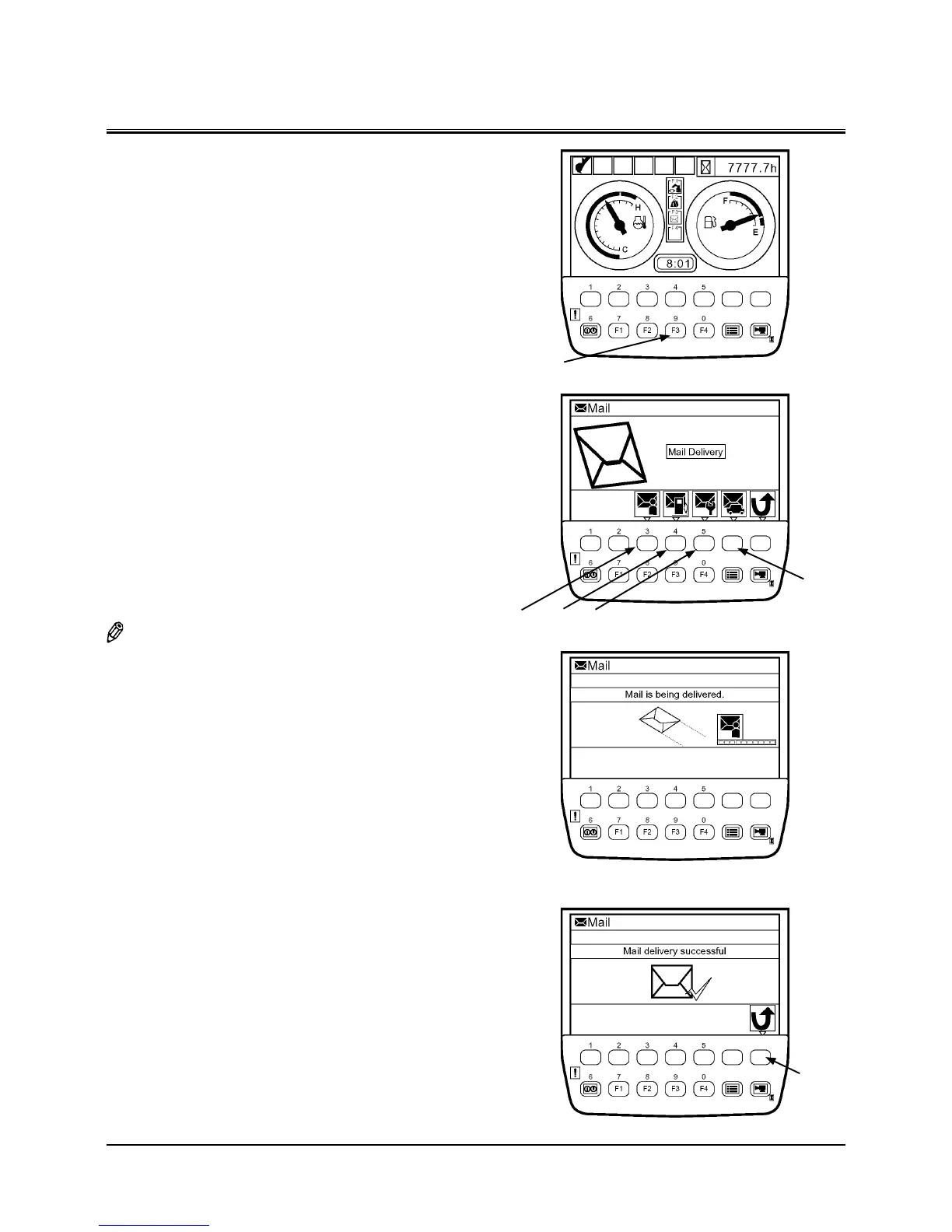
Mailing Screen
Key F3
Back Key
T1V1-05-01-123
Mail
(Optional)
IMPORTANT: This function is available only to a machine
equipped with a satellite terminal.
When using the mail function, consult your
nearest Hitachi dealer.
1. When the basic screen displays, push mail selection key
F3 and display mail screen.
2. If pushing a relevant request key, mail information is sent
to ICF.
1 - General Request
2 - Fuel Replenishment Request
3 - Service Maintenance Request
4 - Forwarding Request
3. While mail information is sent to ICF, the message “Mail is
being delivered.” is displayed on the screen.
4. When ICF completes receives mail information, the mes
-
sage “Mail delivery successful.” is displayed on the screen.
When pushing the back key, return to the mail screen.
5. Then, a mail is sent from the satellite terminal to the cen
-
tral server via the satellite.
NOTE: Depending on machine’s operating environment or
position of the satellite on its orbit, the mail may not be
sent.
T1V5-05-01-037
T1V5-05-01-038
T1V5-05-01-039
2 31
4
Basic Screen


 To Next Page
 Loading...