Chapter 6: Alarms and messages 73
Priority Audible
alarm
Info LED
status
Cause Correction
1 This alarm is only possible if at least one of the alarms “Max. FiO
2
” or “Min. FiO
2
” is activated.
2 Nominal battery value
= Muting = Inactive (can be disabled) = Can be deleted by pressing the MFK
Fixed inactive alarms
The “Internal battery error” and “FiO
2
sensor error” alarms can be disabled by pressing
the alarm button as long as the alarm condition still exists.
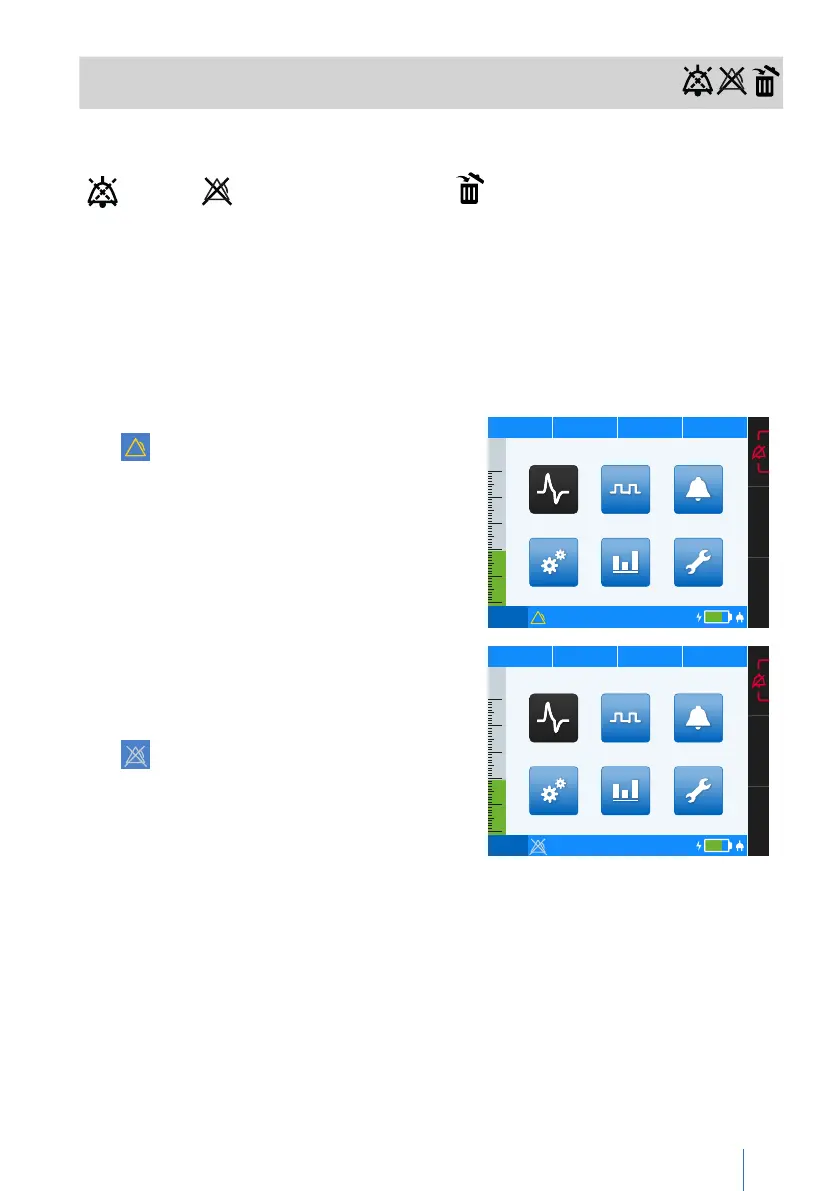
If one of these alarms appears on your device’s toolbar, proceed as follows:
1.
First, the respective alarm is shown with the
symbol and the corresponding error text.
PCV
75%
50
40
30
20
10
0
p 19.8 hPa f
12 bpm V
I
0.570 lI:E 1:1.5
Error internal battery
Statistics
Parameter Event Log
Service
Monitoring
Thursday I 19.05.2016 I 23:10
System
2.
Press the alarm button to disable the alarm.
Please note: After the alarm has been dis-
abled by pressing the alarm button, it is
still shown on the toolbar with the symbol
and the corresponding error message.
PCV
75%
50
40
30
20
10
0
p 19.8 hPa f
12 bpm V
I
0.570 lI:E 1:1.5
Error internal battery
Statistics
Parameter Event Log
Service
Monitoring
Thursday I 19.05.2016 I 23:10
System
3. The alarm is only deleted after the error has been eliminated. For more informa-
tion on eliminating the error, go to page 70.
Please note: If the problem persists, please contact your service partner.


 To Next Page