Document No: C-41-02490-9
14
3.6 Detection condition
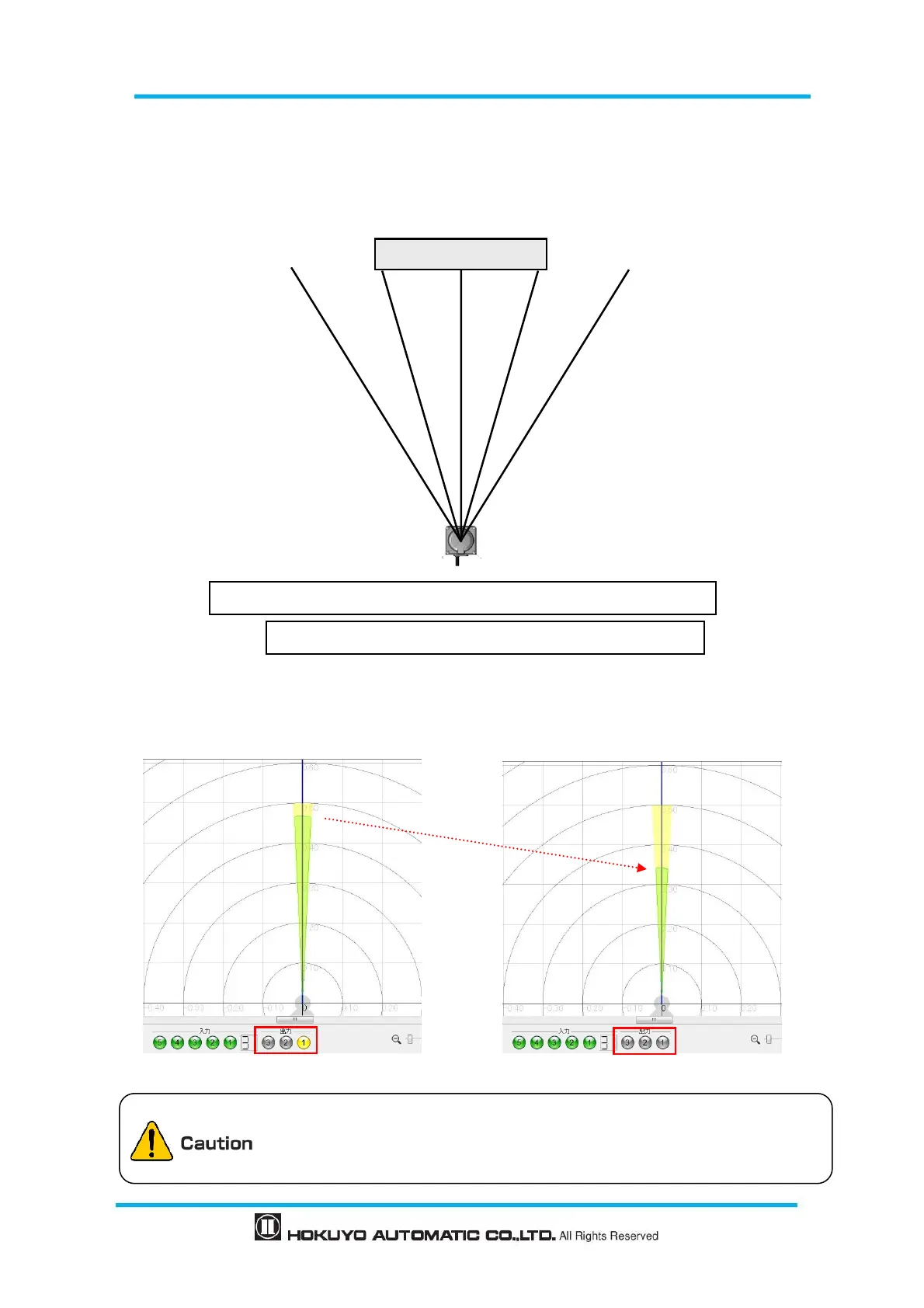
In the configured area, if the detectable size (width) is more than the minimum detectable objects, an
output signal is displayed (for setting refer to section 3.9). The width of detectable object can be calculated
as shown in figure 3-8.
Figure 3-8 Schematic diagrams for the calculation of detection width
If the area is configured with a narrow width below the minimum detectable size, be careful that the
output signal may not be displayed for a short distance as shown in figure 3-9
Figure 3-9 Caution of area configurations when minimum detectable size
Detection width W = (d2+ d3+ d4)×2π/720
d:Distance value of each step
Detection width W > Minimum detectable size
Depending upon the laser spot, environment and detection object, the
actual width of detected objects may differ from the width measured.
User should verify detection capability before using actual object.
Min detectable size :High
Area of distance 500mm and width 50mm


 To Next Page