28
To “Conguring the settings” (P.8)
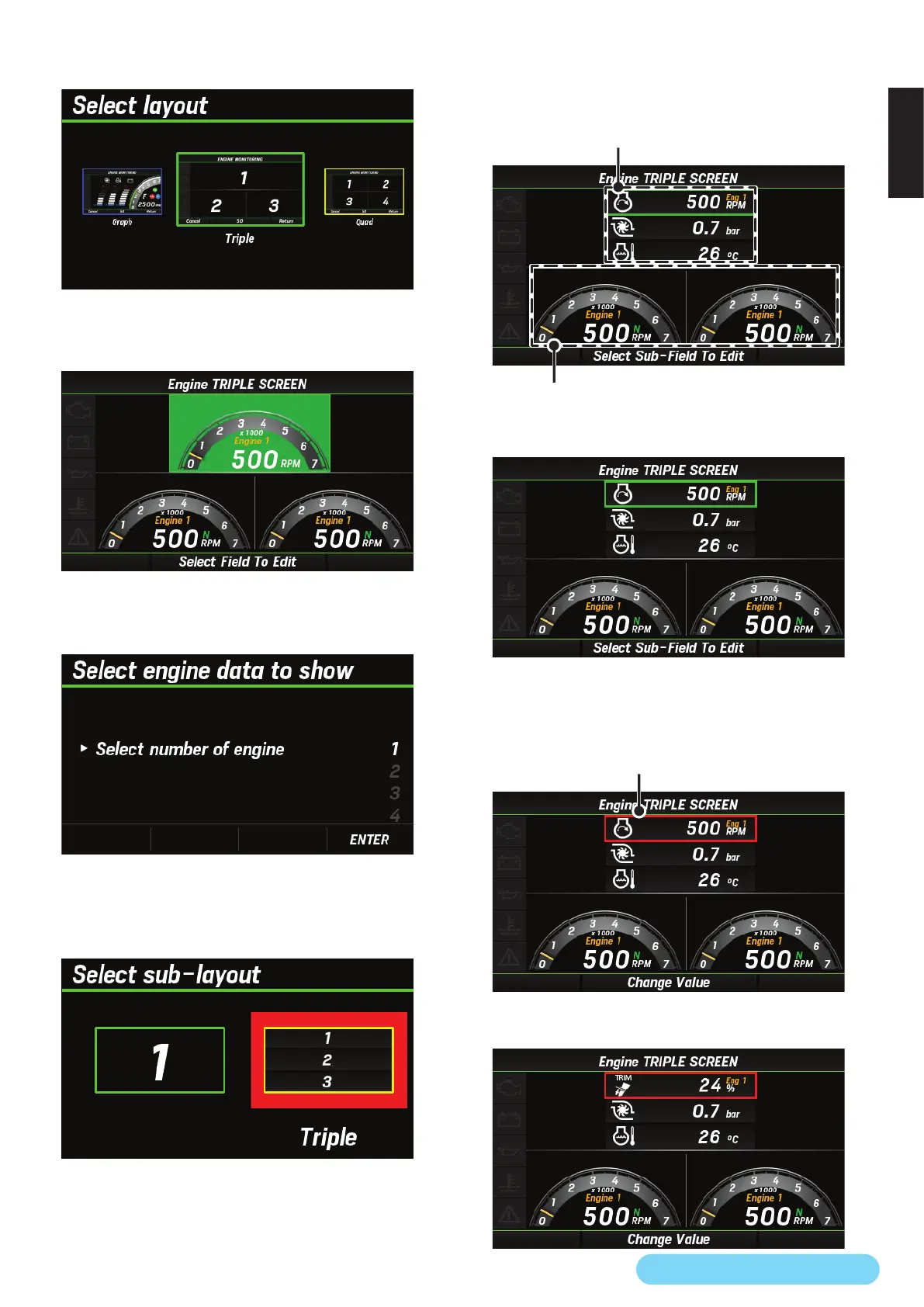
4. Use the [
∧
] or [
∨
] button to select the basic screen layout
and press the [ENTER] button.
* If you select the single screen layout, go to step 6.
5. Use the [
∧
] or [
∨
] button to select the area you want to
edit and press the [ENTER] button.
6. Use the [
∧
] or [
∨
] button to select the engine on which
you want to display the information and press the [ENTER]
button.
* If you select the single screen layout in step 4, go to step 9.
7. Use the [
∧
] or [
∨
] button to select the number of
information pieces you want to display and press the
[ENTER] button.
• When single is selected, only one piece of information is
displayed.
• When triple is selected, you can select three pieces of
information to display.
When triple is selected
When single is selected
8. Use the [
∧
] or [
∨
] button to select the space you want to
display and press the [ENTER] button.
• When you press the [ENTER] button, the color of the frame
changes from green to red.
• In this example, triple is selected in step 7, but the
procedure is also the same for single.
Turns red
9. Use the [
∧
] or [
∨
] button to select the information you
want to display and press the [ENTER] button.



 To Next Page