38
To “Conguring the settings” (P.8)
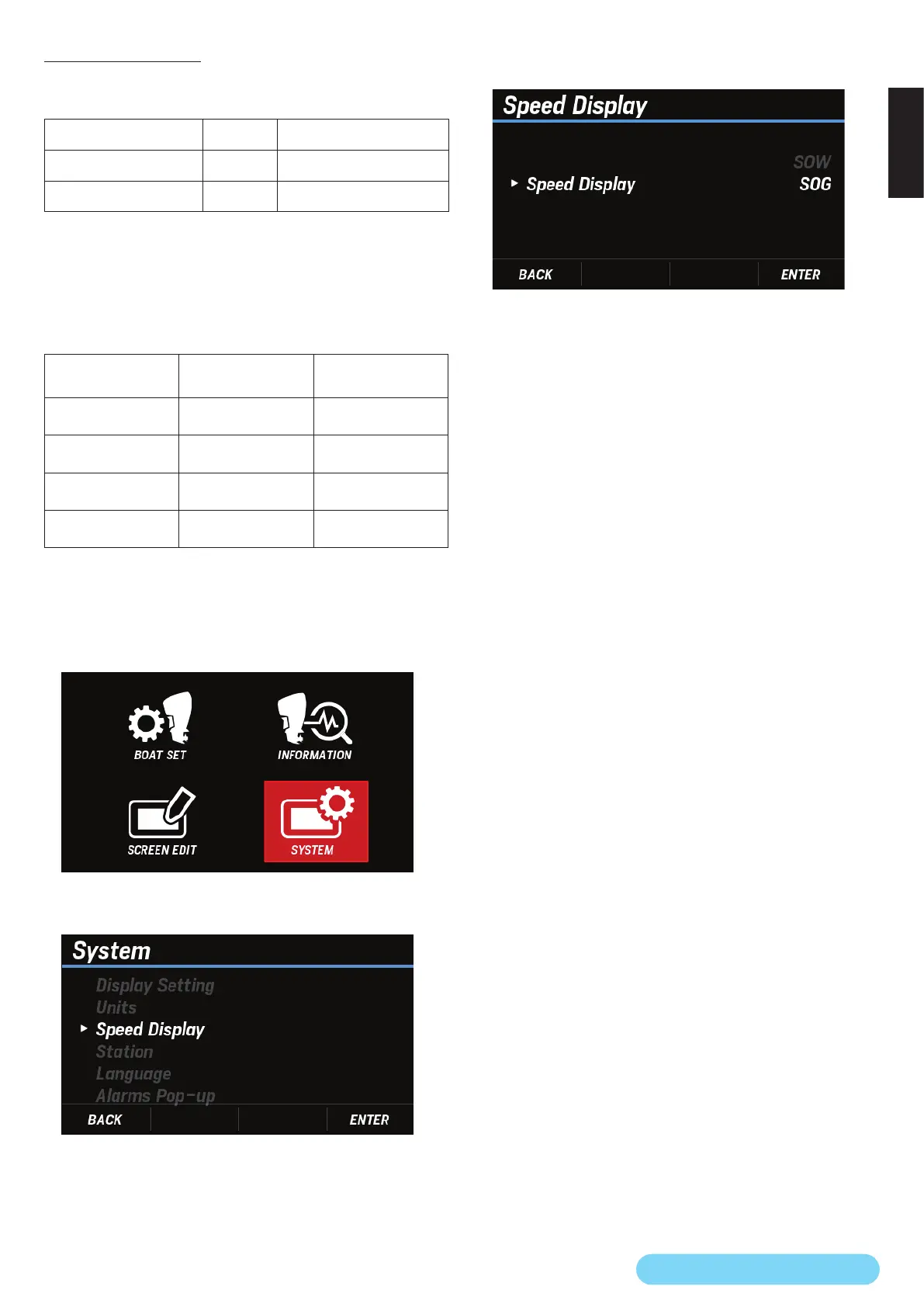
(22) Speed Display
You can select the boat velocity to be displayed on the screen
from the following two patterns:
Setting item PGN DATA
SOG (speed over ground) 129026 Speed Over Ground
SOW (speed over water) 128259 Speed Water Referenced
* Each boat velocity represents the data received by NMEA2000 as
shown above.
* To display the speed over ground, GPS signals must be received.
During a start-up, however, the boat velocity changes as
follows according to the connection status.
SOG (speed over
ground) data
SOW (speed over
water) data
Display boat
velocity
Available Available
SOG
(speed over ground)
Available Unavailable
SOG
(speed over ground)
Unavailable Available
SOW
(speed over water)
Unavailable Unavailable
SOG
(speed over ground)
* If there is no data, then the SOG (speed over ground) icon is
displayed, but the speed is not displayed.
1. Use the [
∧
] or [
∨
] button to select SYSTEM and press the
[ENTER] button.
2. Use the [
∧
] or [
∨
] button to select Speed Display and
press the [ENTER] button.
3. Use the [
∧
] or [
∨
] button to select any display boat
velocity setting and press the [ENTER] button.



 To Next Page