12
To “Conguring the settings” (P.8)
(4) Trim Support Setting
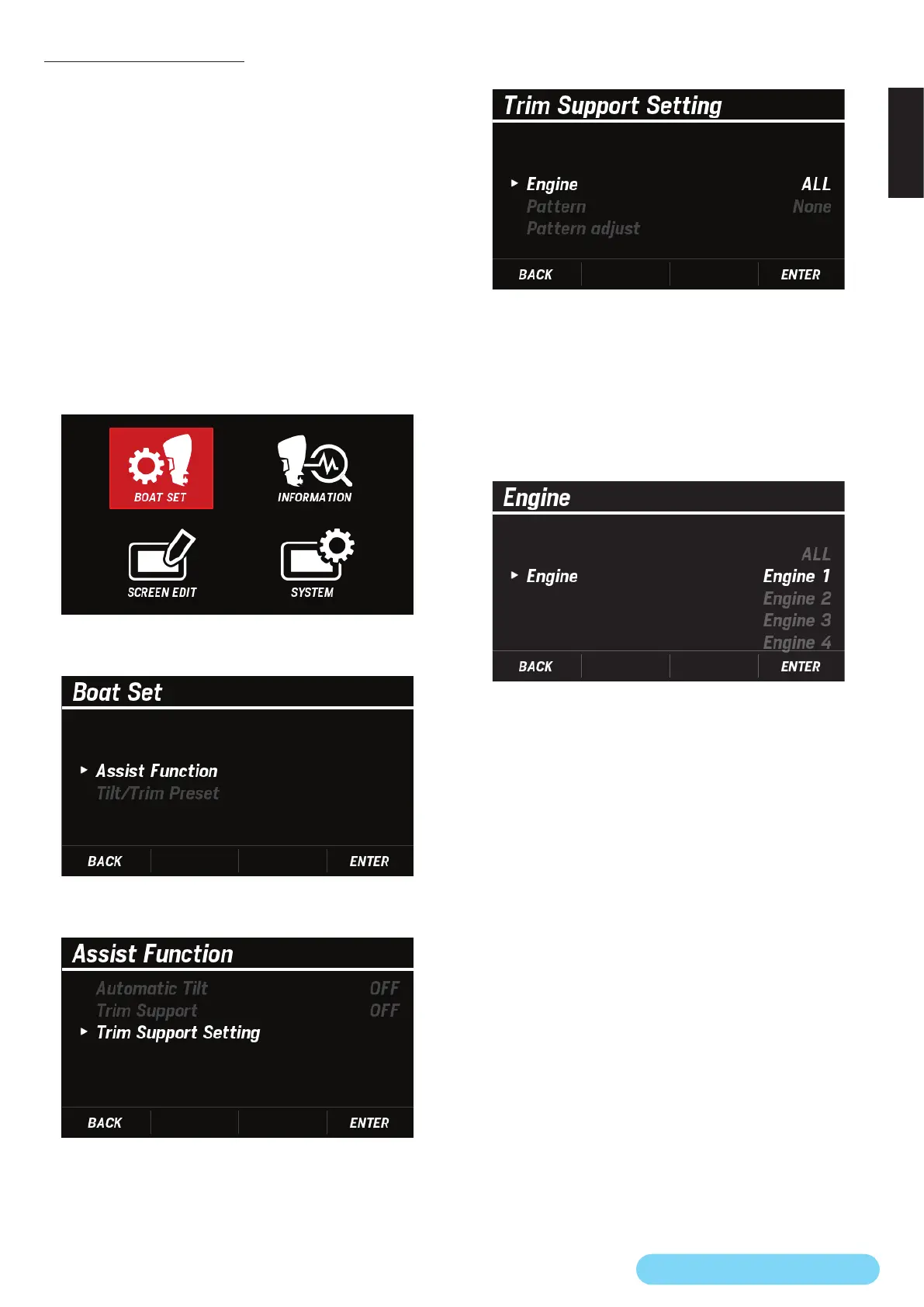
You can congure the trim support function.
●
Selecting the target engine > Pattern setting > Pattern
adjustment
You can select ALL to select all the engines for which to select
and adjust a pattern or select an engine individually. To set the
pattern to apply when using the trim support function and
adjust the pattern, select the desired engine rst.
• Under the following condition, Trim Support Setting is
grayed out and cannot be congured.
– Trim Support is ON. (P.11)
1. Use the [
∧
] or [
∨
] button to select BOAT SET and press the
[ENTER] button.
2. Use the [
∧
] or [
∨
] button to select Assist Function and
press the [ENTER] button.
3. Use the [
∧
] or [
∨
] button to select Trim Support Setting
and press the [ENTER] button.
4. Use the [
∧
] or [
∨
] button to select Engine and press the
[ENTER] button.
5. Use the [
∧
] or [
∨
] button to select the engine you want to
set and press the [ENTER] button.
• If ALL is selected, you will congure the pattern setting
to be applied when using the trim support function on all
the engines at once.
• If an individual engine is selected, you will individually
congure the pattern setting to be applied when using
the trim support function.



 To Next Page