27
To “Conguring the settings” (P.8)
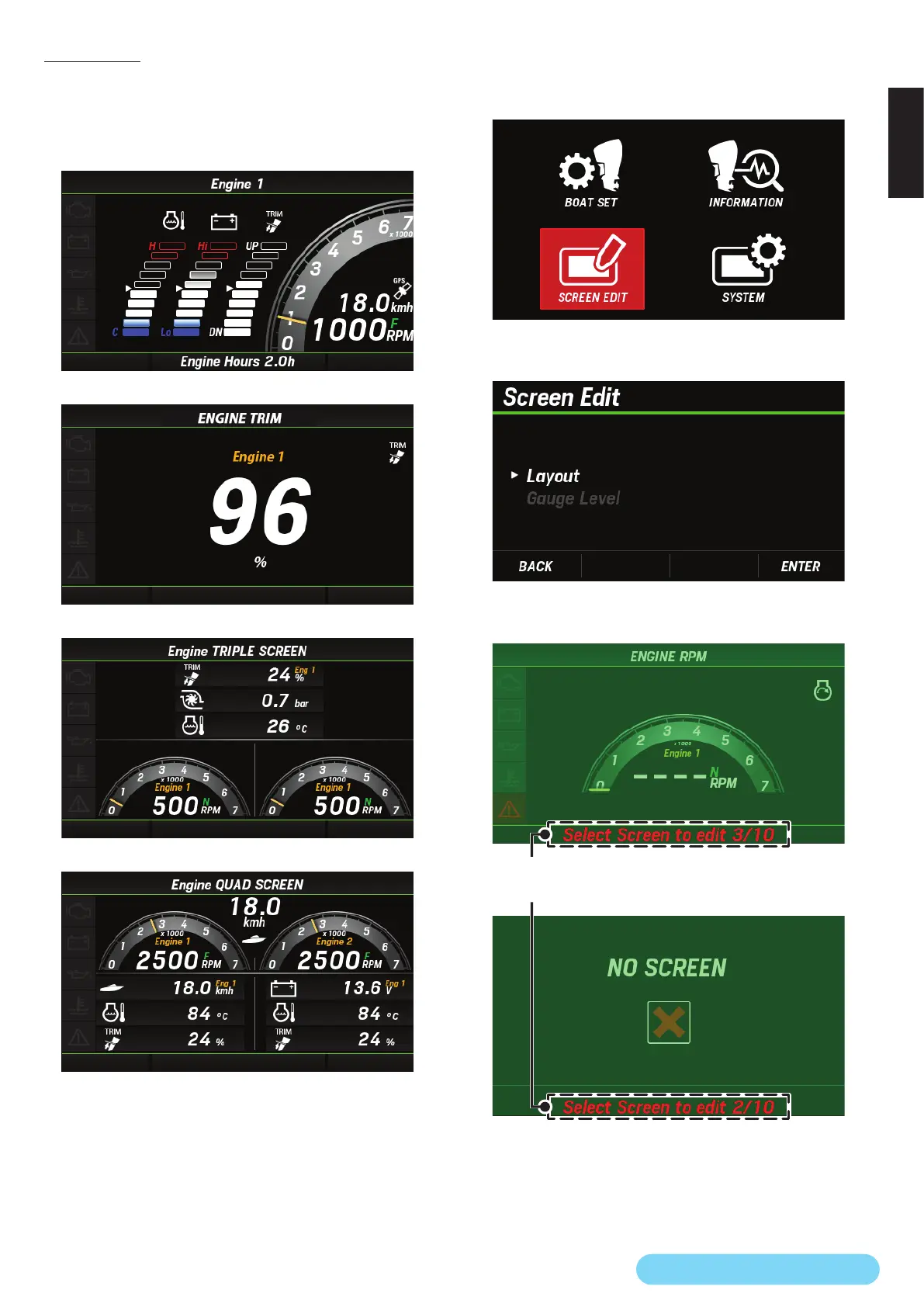
(14) Layout
You can edit the page layout of the main screen based on the
following four screen layouts.
●
Four basic layouts of the main screen
<Graph screen layout>
<Single screen layout>
<Triple screen layout>
<Quad screen layout>
* Up to 10 layouts can be saved.
* There are restrictions on each display method (analog display, bar
display, or digital display) of display information. For information
on each information display method, see "”List of display items”
(P.3)."
* In this example, the triple screen layout is selected to explain how to
edit the screen.
●
Screen edit
1. Use the [
∧
] or [
∨
] button to select SCREEN EDIT and press
the [ENTER] button.
2. Use the [
∧
] or [
∨
] button to select Layout and press the
[ENTER] button.
3. Use the [
∧
] or [
∨
] button to select the page of the main
screen you want to edit and press the [ENTER] button.
The number of the currently displayed page is shown at the
bottom of the screen.
• To add a page of the main screen, select a page to which no
layout is assigned.



 To Next Page