39
To “Conguring the settings” (P.8)
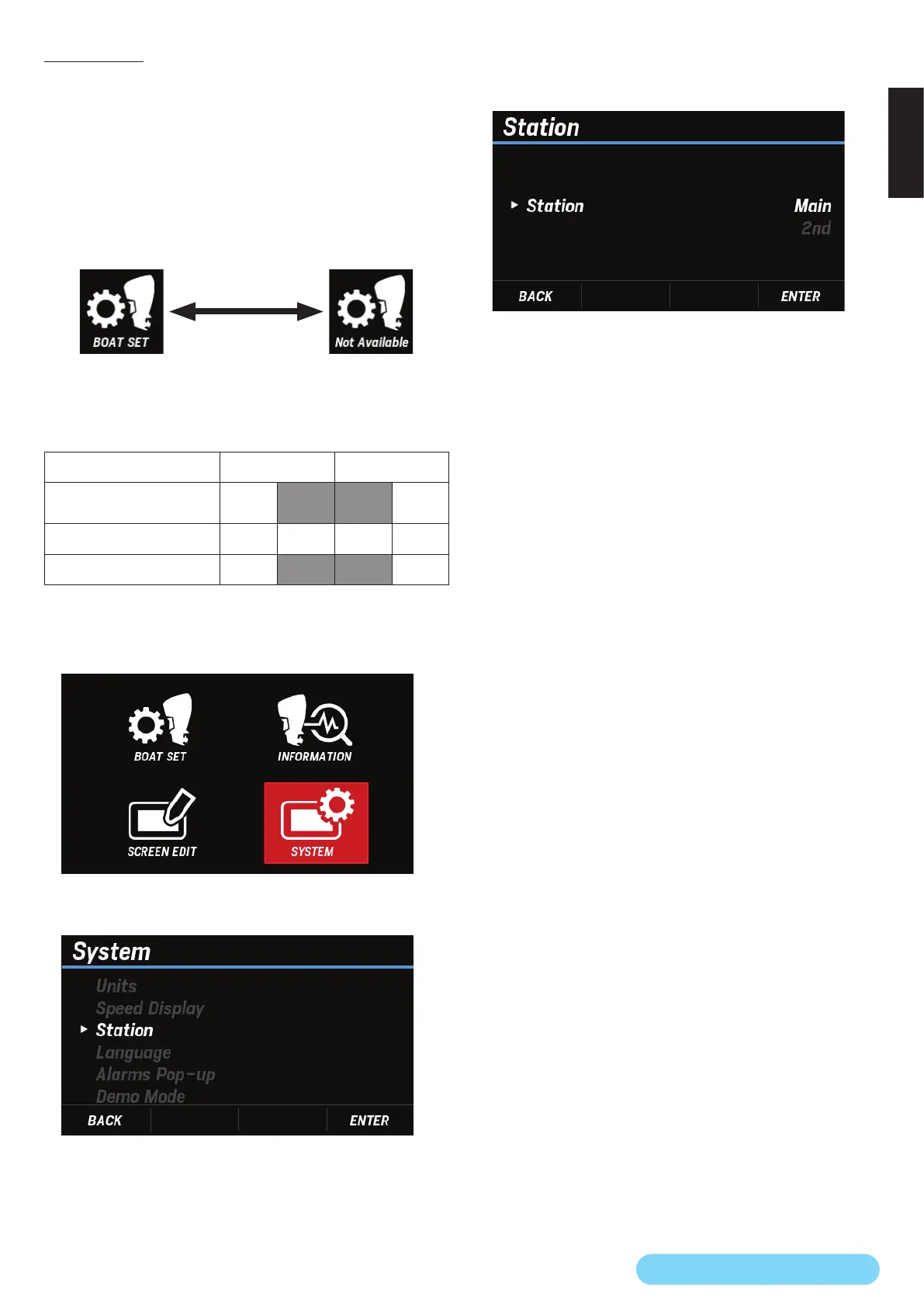
(23) Station
You can pair it with the station of the outboard motor by
selecting the position of the station at which the Multi-
Function Display is installed.
By pairing with the station of an outboard motor, Not
Available is shown on the BOAT SET icon in the inactive
station and paired Multi-Function Display, which prevents the
pilot from making unintended changes to the settings.
* For information on active mode, see the outboard motor’s Owner’s
Manual.
Active station icon Inactive station icon
However, the engine information is displayed on any station
regardless of whether it is active or inactive.
Active station Main Second
Installed station setting
(Multi-Function Display)
Main 2nd Main 2nd
Engine information display
○ ○ ○ ○
BOAT SET selection
○
× ×
○
1. Use the [
∧
] or [
∨
] button to select SYSTEM and press the
[ENTER] button.
2. Use the [
∧
] or [
∨
] button to select Station and press the
[ENTER] button.
3. Use the [
∧
] or [
∨
] button to select the station in which the
Multi-Function Display is installed and press the [ENTER]
button.



 To Next Page