uuAdjustment of Each Type of MirroruSide Camera Mirror System
224
■
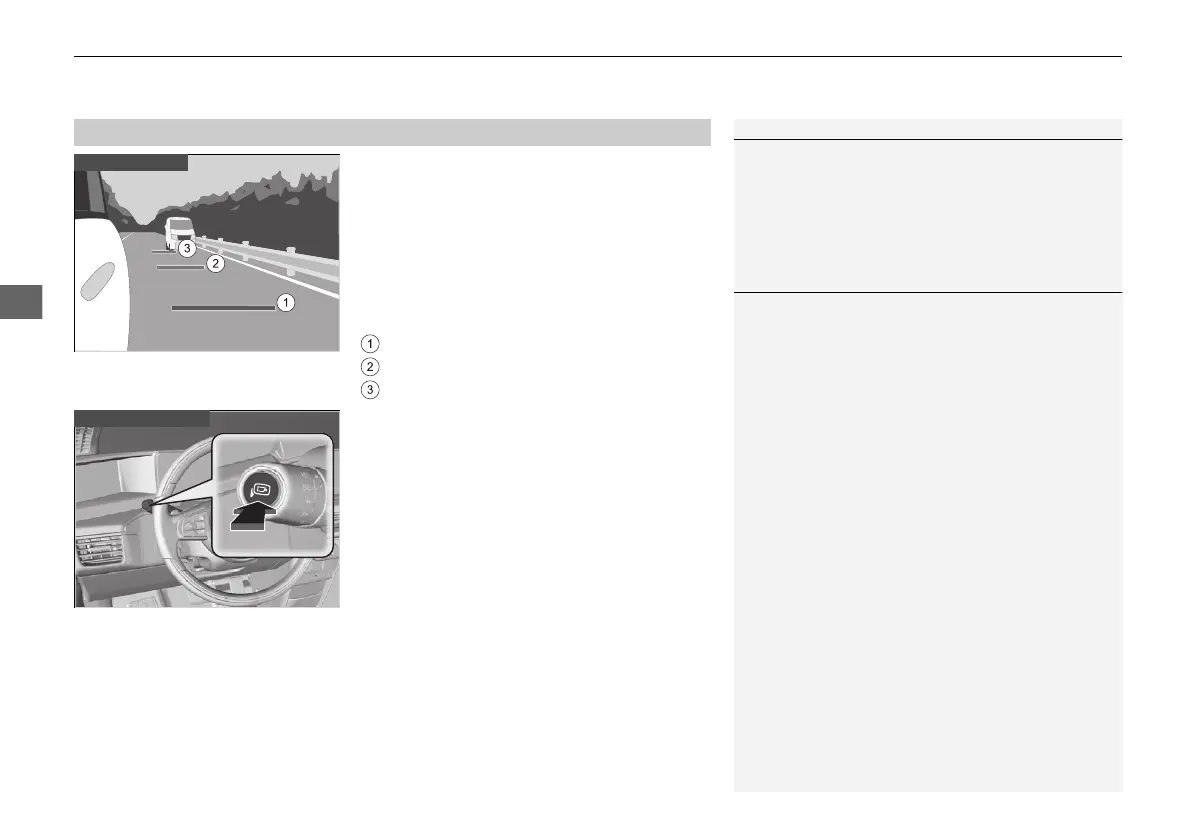
Display when moving forward
When the power mode is in ON, press the side
camera switch and the forward reference lines
will display for several seconds. Press the
switch once more while the display is on to
turn it off.
The three lines indicate the following:
: About 3 m (10 feet) from rear bumper
: About 10 m (33 feet) from rear bumper
: About 20 m (66 feet) from rear bumper
■
Reference Lines
1Reference Lines
The positioning of the reference lines may differ from
the true distance due to vehicle height or road
conditions. Please use them only as guidelines.
Visually check your surroundings when changing
lanes or reversing.
1Display when moving forward
You can change the forward reference lines so they
display together with the turn signals.
2 How to Customize the Vehicle Settings
P. 336
If you press the side camera switch while the display
is off, the displays will turn on but there will be no
reference lines.
20 2EX JSS (KE KG)-32TYF6000.book 224 ページ 2020年3月6日 金曜日 午後6時58分













 To Next Page