Web Operation | 81
800-18161V1 - A - 07/2014
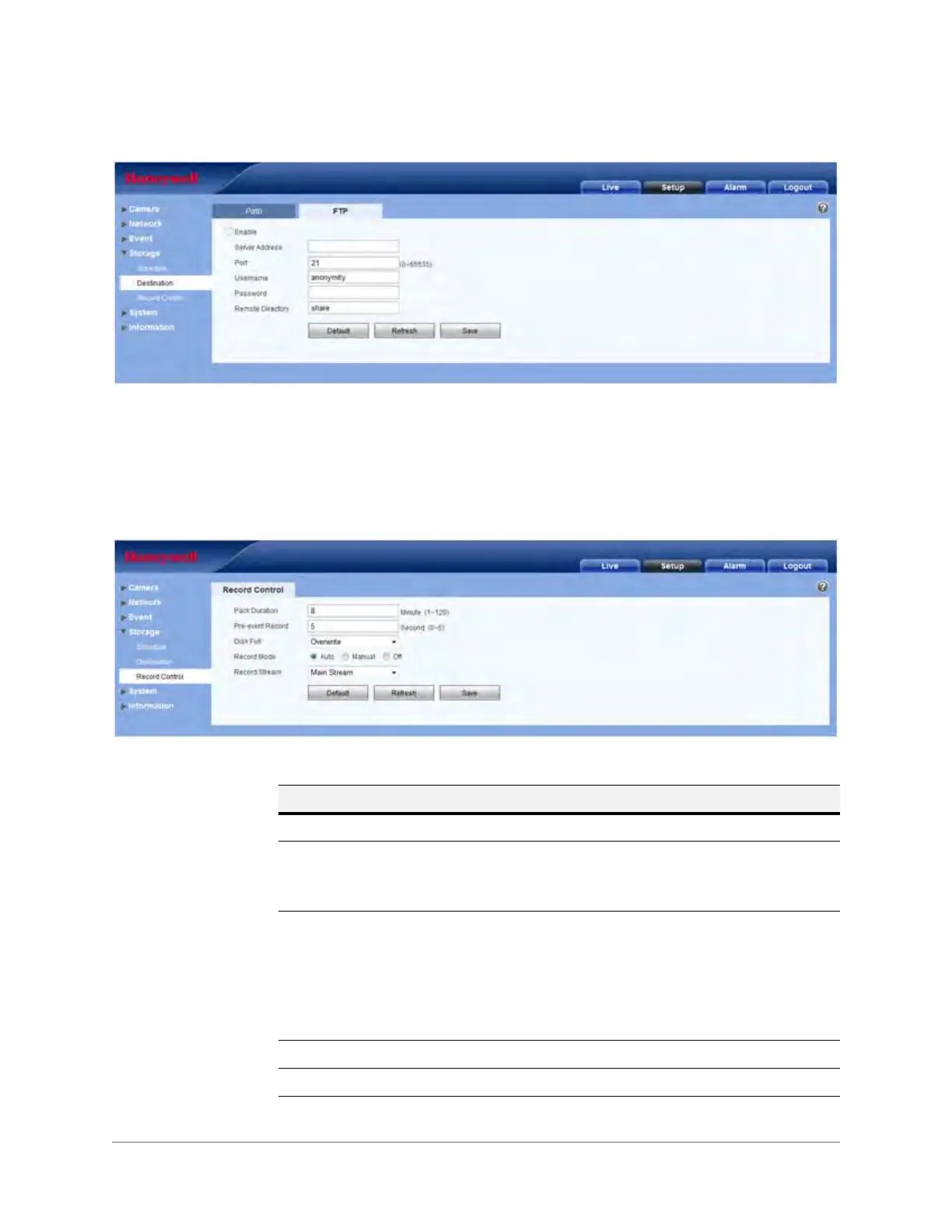
Figure 3-43 FTP Configuration Interface
Check to enable FTP. When enabled, event-triggered (either scheduled or motion detection,
depending on what you chose in Figure 3-42) video and snapshots will be saved to the FTP.
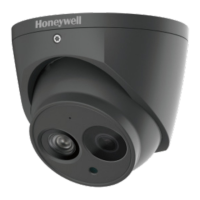
Record Control
Figure 3-44 Record Control Configuration Interface
Table 3-23 Record Control Configurations
Parameter Function
Pack Duration Select the file size. The default is 8 minutes.
Pre-event Record Enter a pre-record value.
For example, the system can record the four seconds of video in the
buffer. Recording begins five seconds before the event trigger.
Disk Full Choose from: Stop Recording or Overwrite the previous files
when the HDD is full.
Overwrite: If the current working HDD is full, then the system will
overwrite the previous file.
Stop: If the current working HDD is full or is overwriting, the system
will stop recording.
Record Mode Choose from: Auto, Manual, or Off.
Record Stream Choose from: Main Stream or Sub Stream.







 To Next Page