Plum A+
®
Infusion Systems
430-95597-001 (Rev. 06/05) 3- 5
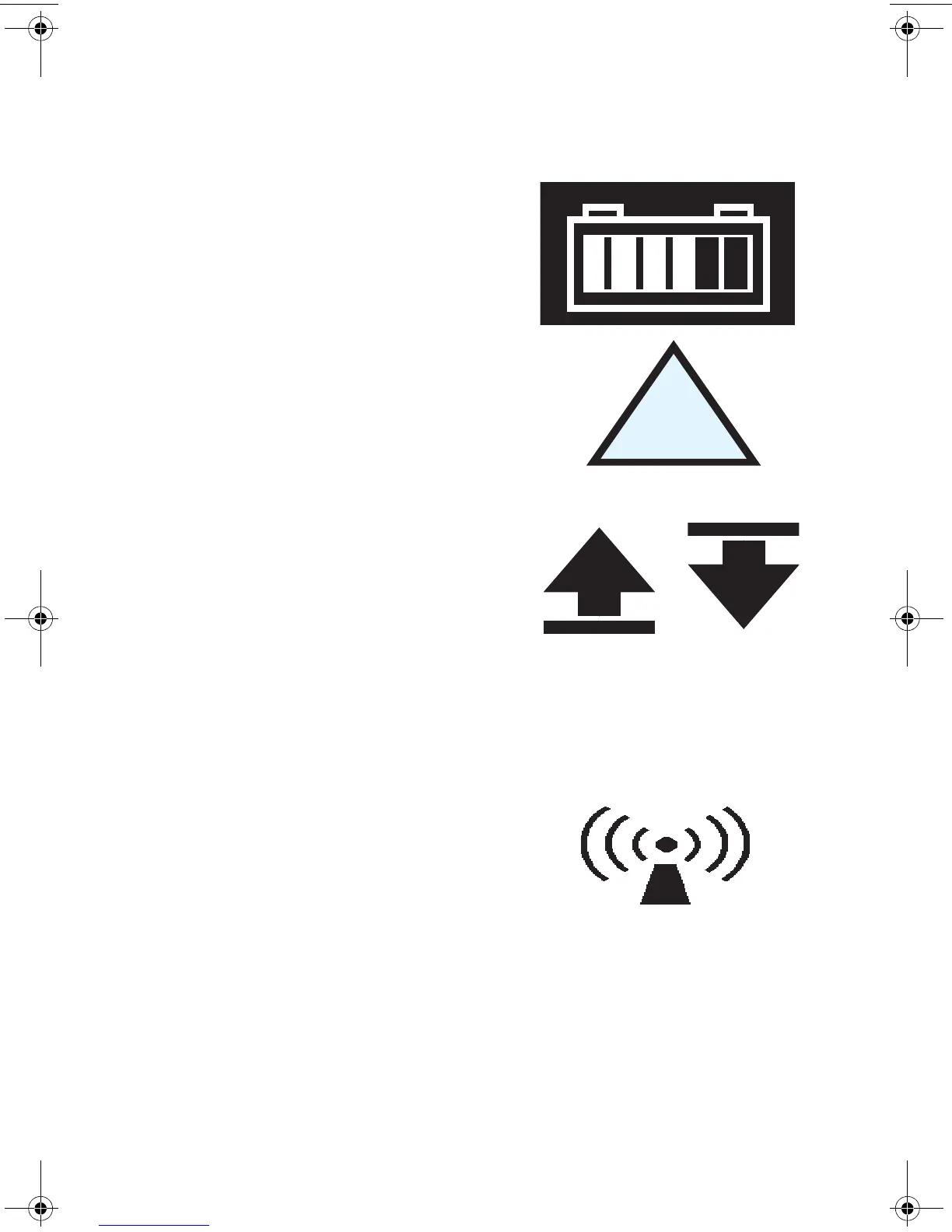
Display Symbols
Battery Capacity Symbol (located
on right side of message region on
display) indicates relative charge
with number of white boxes from
left to right.
Cautionary Symbol is displayed to
alert the user that the infuser is
being operated without rule sets
(soft or hard limits). Read the drug
package insert for information on
proper usage.
Soft Limit Override Symbol
indicates the programmed soft
limits upper (up arrow) or lower
(down arrow) have been
overridden.
NOTE: The infuser will display
the rule set icon from the first step in a situation where a 2-step
process is completed and the infuser is stopped after going to
KVO.
The "Wireless Connection
Available" icon is displayed when
the device is receiving a wireless
signal. The infuser will connect to
the network if a wireless network
access point is recognized.
sec03.fm Page 5 Wednesday, June 8, 2005 8:19 AM


 To Next Page