Suggested Setups
Here are some common setups to get the most out of Ampero Mini.
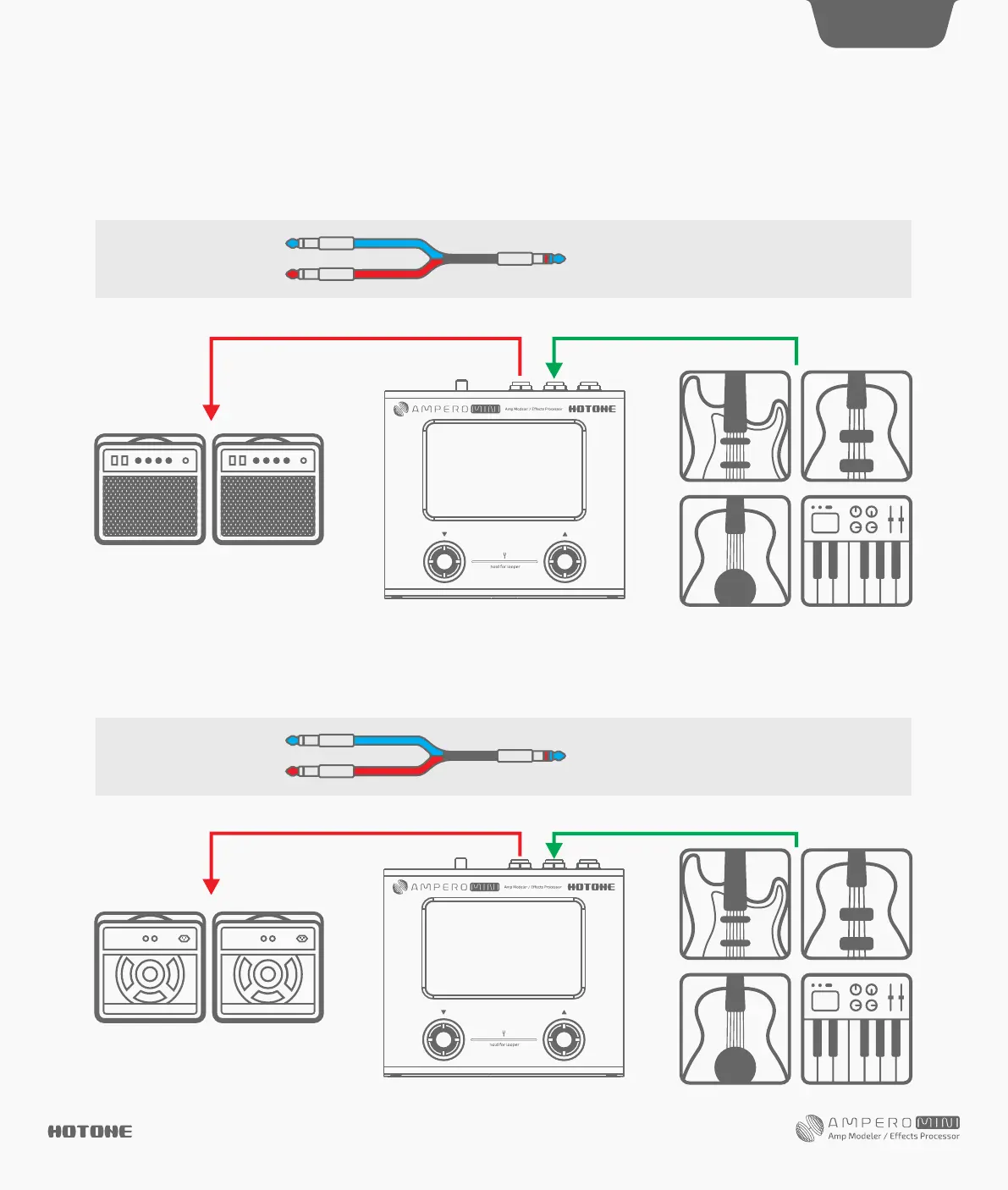
Using with your instrument and amp
Plug your instrument into the Ampero Mini instrument IN jack, and run a cable from the OUT to your amplifier (s). For stereo connection, a Y cable is
needed to split L/R output channels (Tip=Left channel, Ring=Right channel).
For best results, turn off the AMP and CAB modules on Ampero Mini.
Connect the output to your amp’s FX Loop Return input or post amp input. For stereo connection, a Y cable is needed to split L/R output channels
(Tip=Left channel, Ring=Right channel).
For best results, turn off the AMP and CAB modules on Ampero Mini.
Connecting to your amp's RETURN or Power Amp (Loudster) INPUT
DES I G N IN S P IRAT I ON
14
Left channel
Right channel
Blue stands for left channel (tip),
and red stands for right channel (ring)
Left channel
Right channel
Blue stands for left channel (tip),
and red stands for right channel (ring)


 To Next Page