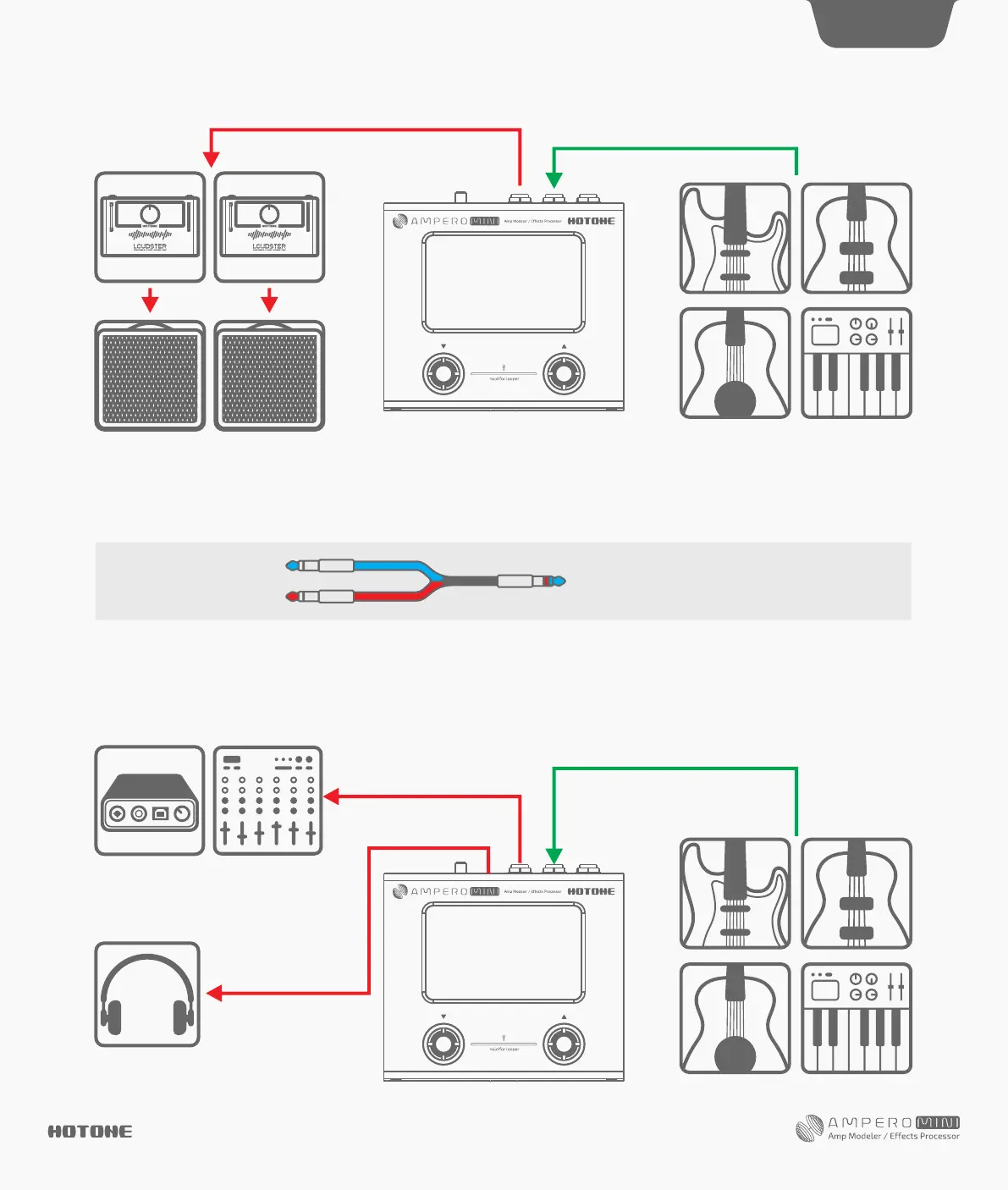
Connect Ampero Mini’s output to your mixer or audio interface’s corresponding inputs. For stereo connection, a Y cable is needed to split L/R output
channels (Tip=Left channel, Ring=Right channel).
If necessary, you can use a DI box (purchase separately) to convert the unbalanced output signal to balanced output signal for better S/N ratio or
reducing signal loss over long cable lengths. Turn on the Ampero Mini and turn the output volume all the way down before connecting mixer or
audio interface to prevent harm to your device.
Turn the Ampero Mini output volume all the way down before connecting headphones to prevent harm to your ears. Ampero Mini’s headphones out
comes with hi-fi stereo sound.
For best results with headphones, turn on Ampero Mini’s AMP and CAB modules.
Connecting your mixer, interface, headphones, and other equipment
DES I G N IN S P IRAT I ON
Suggested Setups
15
Left channel
Right channel
Blue stands for left channel (tip),
and red stands for right channel (ring)


 To Next Page