EasyManua.ls Logo

HP 5300A - Operation; Introduction; Front Panel; Rear-Panel! 2

HP 5300A
90 pages
Print Icon
To Next Page IconTo Next Page
To Previous Page IconTo Previous Page
Loading...
Model
5300A
Operation
SECTION
Ill
OPERATION
3-1.
INTRODUCTION
3-2.
Operation
of
the
5300
is
simplified
through
the
use
of
only
two
controls.
By
itself,
the
5300A
is
not
use-
able
for
measurements,
therefore
refer,
to
the
perti-
nent
operating
information
for
the
5300A
and
plug-on
used
in
Section
IX.
3-3.
ACCURACY
3-4.
The
basic
measuring
accuracy
is
determined
by
the
plug-on
module
in
use.
Refer
to
Section
IX
for
more
information
on
specific
plug-on
accuracy.
3-5.
FRONT
PANEL
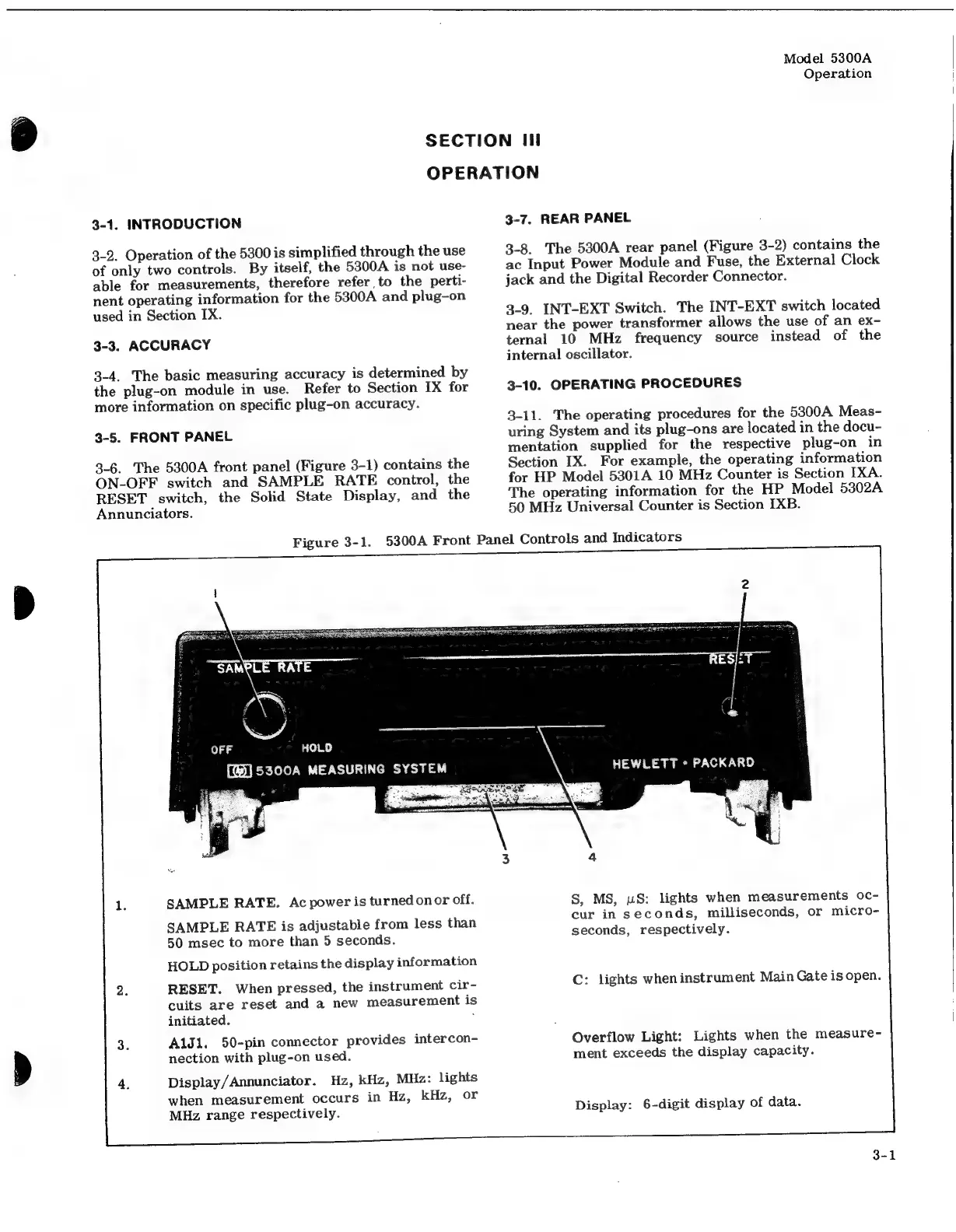
3-6.
The
5300A
front
panel
(Figure
3-1)
contains
the
ON-OFF
switch
and
SAMPLE
RATE
control,
the
RESET
switch,
the
Solid
State
Display,
and
the
Annunciators.
SAMPLE
RATE.
Ac
power
is
turned
onor
off.
SAMPLE
RATE
is
adjustable
from
less
than
50
msec
to
more
than
5
seconds.
HOLD
position
retains
the
display
information
RESET.
When
pressed,
the
instrument
cir-
cuits
are
reset
and
a
new
measurement
is
initiated.
;
AlJ1.
50-pin
connector
provides
intercon-
nection
with
plug-on
used.
Display/Annunciator.
Hz,
kHz,
MHz:
lights
when
measurement
occurs
in
Hz,
kHz,
or
MHz
range
respectively.
3-7.
REAR
PANEL
3-8.
The
5300A
rear
panel
(Figure
3-2)
contains
the
ac
Input
Power
Module
and
Fuse,
the
External
Clock
jack
and
the
Digital
Recorder
Connector.
3-9.
INT-EXT
Switch.
The
INT-EXT
switch
located
near
the
power
transformer
allows
the
use
of
an
ex-
ternal
10
MHz
frequency
source
instead
of
the
internal
oscillator.
3-10.
OPERATING
PROCEDURES
3-11.
The
operating
procedures
for
the
5300A
Meas-
uring
System
and
its
plug-ons
are
located
in
the
docu-
mentation
supplied
for
the
respective
plug-on
in
Section
IX.
For
example,
the
operating
information
for
HP
Model
5301A
10
MHz
Counter
is
Section
[XA.
The
operating
information
for
the
HP
Model
5302A
50
MHz
Universal
Counter
is
Section
IXB.
Figure
3-1.
5300A
Front
Panel
Controls
and
Indicators
S,
MS,
uwS:
lights
when
measurements
oc-
cur
in
seconds,
milliseconds,
or
micro-
seconds,
respectively.
C:
lights
when
instrument
Main
Gate
is
open.
Overflow
Light:
Lights
when
the
measure-
ment
exceeds
the
display
capacity.
Display:
6-digit
display
of
data.

Related product manuals