EasyManua.ls Logo

HP 5300A - Alternate Method

HP 5300A
90 pages
Print Icon
To Next Page IconTo Next Page
To Previous Page IconTo Previous Page
Loading...
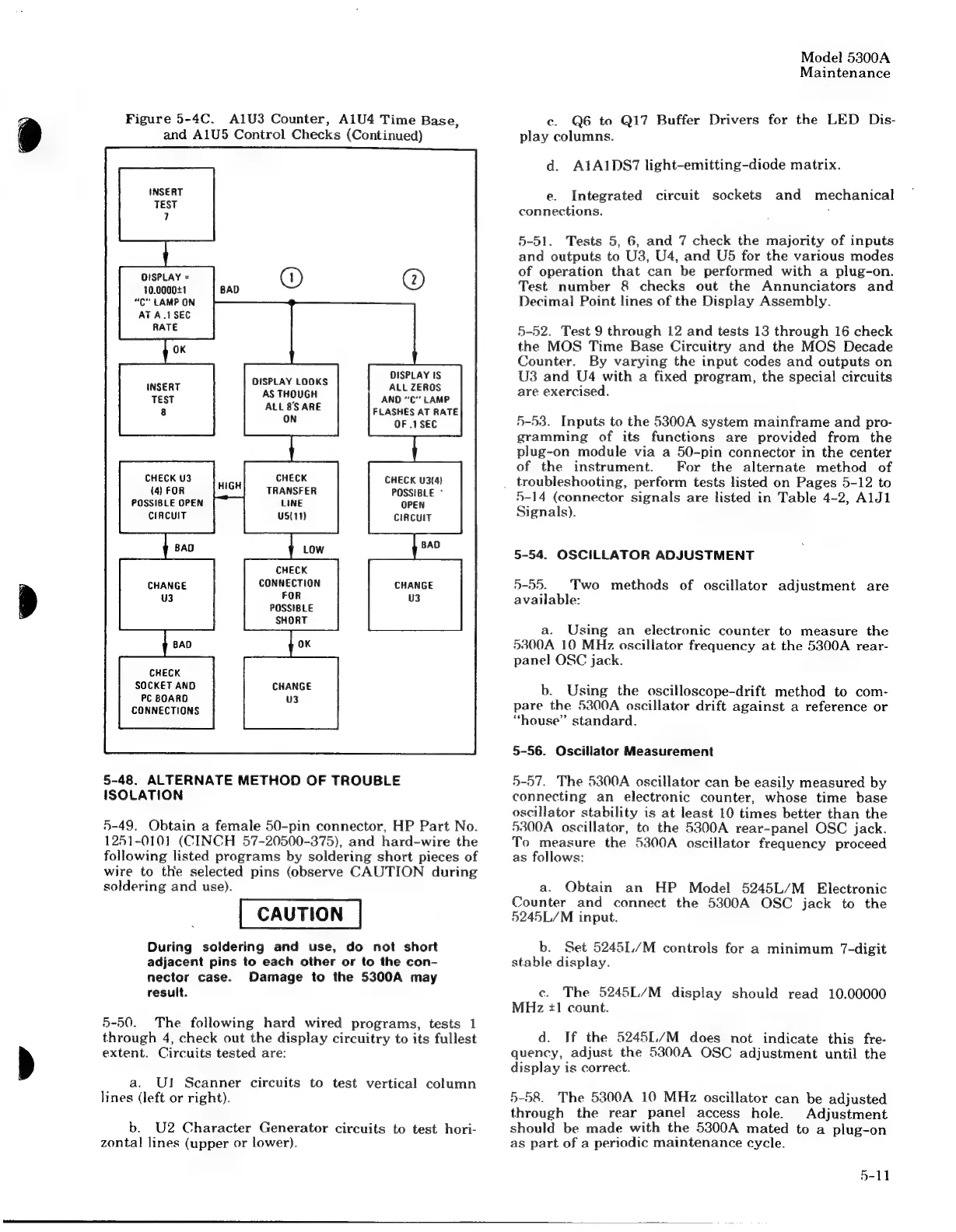
Figure
5-4C.
Al1U3
Counter,
A1U4
Time
Base,
and
A1U5
Control
Checks
(Continued)
INSERT
TEST
7
DISPLAY
=
@)
10.0000+1
“C"
LAMP
ON
AT
A.1SEC
RATE
OK
DISPLAY
IS
ALL
ZEROS
ANDO
“C*
LAMP
DISPLAY
LOQKS
MISERY.
AS
THOUGH
TEST
8
ALL
BS
ARE
FLASHES
AT
RATE
ON
OF
.1SEC
CHECK
U3
CHECK
CHECK
U3(4)
(4)
FOR
TRANSFER
POSSIBLE
°
POSSIBLE
OPEN
LINE
OPEN
CIRCUIT
us(11)
CIRCUIT
CHECK
CONNECTION
CHANGE
FOR
U3
POSSIBLE
SHORT
CHECK
SOCKET
AND
PC
BOARD
CONNECTIONS
5-48.
ALTERNATE
METHOD
OF
TROUBLE
ISOLATION
5-49.
Obtain
a
female
50-pin
connector,
HP
Part
No.
1251-0101
(CINCH
57-20500-375),
and
hard-wire
the
following
listed
programs
by
soldering
short
pieces
of
wire
to
the
selected
pins
(observe
CAUTION
during
soldering
and
use).
During
soldering
and
use,
do
not
short
adjacent
pins
to
each
other
or
to
the
con-
nector
case.
Damage
to
the
5300A
may
result.
5-50.
The
following
hard
wired
programs,
tests
1
through
4,
check
out
the
display
circuitry
to
its
fullest
extent.
Circuits
tested
are:
a.
UI
Scanner
circuits
to
test
vertical
column
lines
(left
or
right).
b.
U2
Character
Generator
circuits
to
test
hori-
zontal
lines
(upper
or
lower).
Model
5300A
Maintenance
c.
Q6
to
Q1I7
Buffer
Drivers
for
the
LED
Dis-
play
columns.
d.
A1A1DS7
light-emitting-diode
matrix.
e.
Integrated
circuit
sockets
and
mechanical
connections.
:
5-51.
Tests
5,
6,
and
7
check
the
majority
of
inputs
and
outputs
to
U3,
U4,
and
U5
for
the
various
modes
of
operation
that
can
be
performed
with
a
plug-on.
Test
number
8
checks
out
the
Annunciators
and
Decima!
Point
lines
of
the
Display
Assembly.
5-52.
Test
9
through
12
and
tests
13
through
16
check
the
MOS
Time
Base
Circuitry
and
the
MOS
Decade
Counter.
By
varying
the
input
codes
and
outputs
on
U3
and
U4
with
a
fixed
program,
the
special
circuits
are
exercised.
5-53.
Inputs
to
the
5300A
system
mainframe
and
pro-
gramming
of
its
functions
are
provided
from
the
plug-on
module
via
a
50-pin
connector
in
the
center
of
the
instrument.
For
the
alternate
method
of
_
troubleshooting,
perform
tests
listed
on
Pages
5-12
to
5-14
(connector
signals
are
listed
in
Table
4-2,
AlJ1
Signals).
5-54.
OSCILLATOR
ADJUSTMENT
5-55.
Two
methods
of
oscillator
adjustment
are
available:
a.
Using
an
electronic
counter
to
measure
the
53800A
10
MHz
oscillator
frequency
at
the
5300A
rear-
panel
OSC
jack.
b.
Using
the
oscilloscope-drift
method
to
com-
pare
the
5300A
oscillator
drift
against
a
reference
or
“house”
standard.
5-56.
Oscillator
Measurement
5-57.
The
5300A
oscillator
can
be
easily
measured
by
connecting
an
electronic
counter,
whose
time
base
oscillator
stability
is
at
least
10
times
better
than
the
5300A
oscillator,
to
the
5300A
rear-panel
OSC
jack.
To
measure
the
5300A
oscillator
frequency
proceed
as
follows:
a.
Obtain
an
HP
Model
5245L/M
Electronic
Counter
and
connect
the
5300A
OSC
jack
to
the
5245L/M
input.
b.
Set
52451./M
controls
for
a
minimum
7-digit
stable
display.
ec.
The
52451./M
display
should
read
10.00000
MHz
#1
count.
d.
If
the
52451./M
does
not
indicate
this
fre-
quency,
adjust
the
5300A
OSC
adjustment
until
the
display
is
correct.
5-58.
The
5300A
10
MHz
oscillator
can
be
adjusted
through
the
rear
panel
access
hole.
Adjustment
should
be
made
with
the
5300A
mated
to
a
plug-on
as
part
of
a
periodic
maintenance
cycle.
5-11

Related product manuals