EasyManua.ls Logo

HP 5300A - Page 45

HP 5300A
90 pages
Print Icon
To Next Page IconTo Next Page
To Previous Page IconTo Previous Page
Loading...
Model
5300A
Maintenance
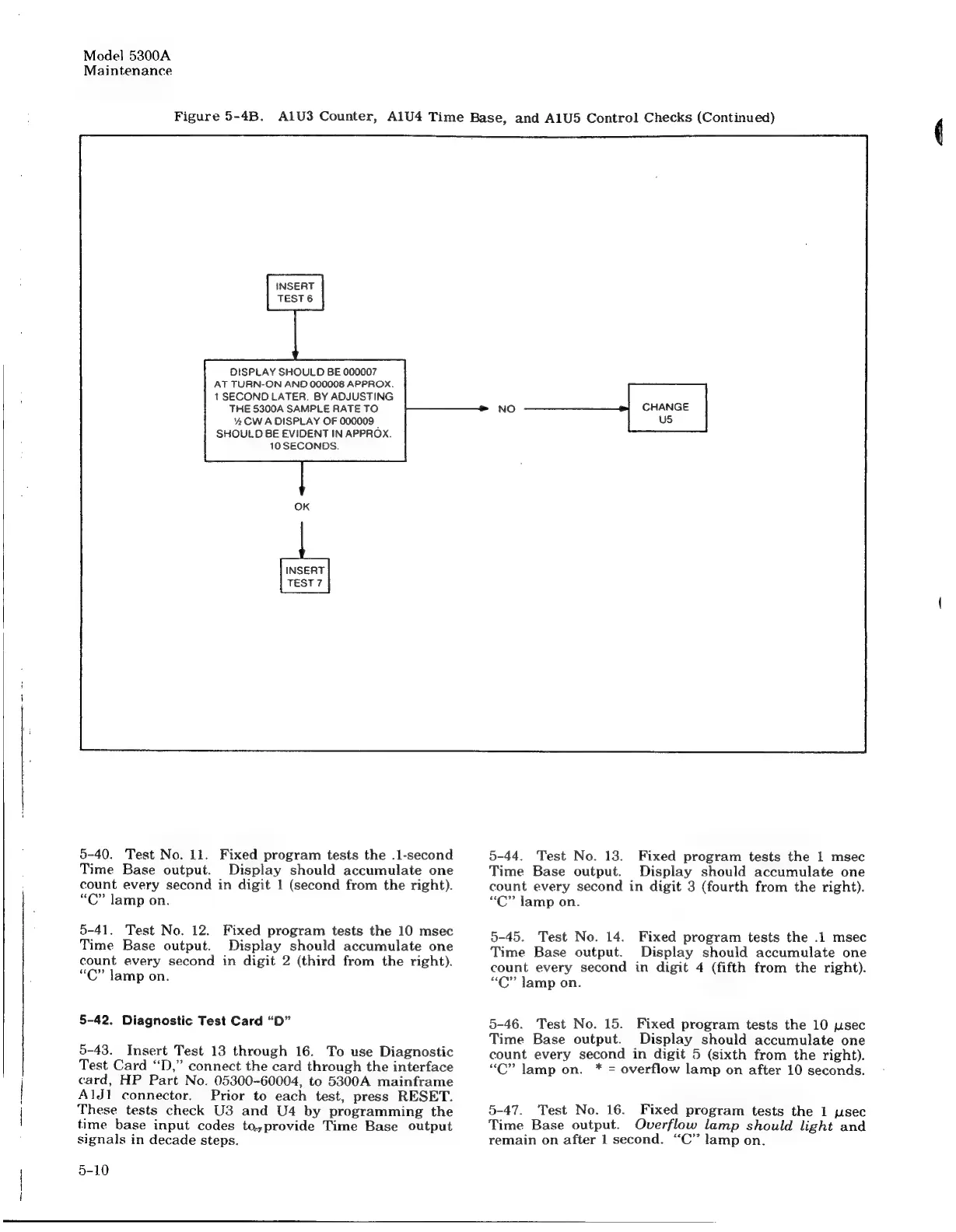
Figure
5-4B.
A1U3
Counter,
AlU4
Time
Base,
and
A1U5
Control
Checks
(Continued)
INSERT
TEST
6
OISPLAY
SHOULD
BE
000007
AT
TURN-ON
AND
000008
APPROX.
1
SECOND
LATER.
BY
ADJUSTING
THE
5300A
SAMPLE
RATE
TO
%e
CW
A
DISPLAY
OF
000009
_
SHOULD
BE
EVIDENT
IN
APPROX
10
SECONDS.
INSERT
TEST?
5-40.
Test
No.
11.
Fixed
program
tests
the
.1-second
Time
Base
output.
Display
should
accumulate
one
count
every
second
in
digit
1
(second
from
the
right).
“C”
lamp
on.
5-41.
Test
No.
12.
Fixed
program
tests
the
10
msec
Time
Base
output.
Display
should
accumulate
one
count every
second
in
digit
2
(third
from
the
right).
“C”
lamp
on.
5-42.
Diagnostic
Test
Card
“D”
5-43.
Insert
Test
13
through
16.
To
use
Diagnostic
Test
Card
“D,”
connect
the
card
through
the
interface
card,
HP
Part
No.
05300-60004,
to
5300A
mainframe
AlJ!
connector.
Prior
to
each
test,
press
RESET.
These
tests
check
U3
and
U4
by
programming
the
time
base
input
codes
to,provide
Time
Base
output
signals
in
decade
steps.
|
5-10
CHANGE
US
5-44.
Test
No.
13.
Fixed
program
tests
the
1
msec
Time
Base
output.
Display
should
accumulate
one
count
every
second
in
digit
3
(fourth
from
the
right).
“C”
Jamp
on.
5-45.
Test
No.
14.
Fixed
program
tests
the
.1
msec
Time
Base
output.
Display
should
accumulate
one
count
every
second
in
digit
4
(fifth
from
the
right).
“C”
lamp
on.
5-46.
Test
No.
15.
Fixed
program
tests
the
10
ysec
Time
Base
output.
Display
should
accumulate
one
count
every
second
in
digit
5
(sixth
from
the
right).
“C”
lamp
on.
*
=
overflow
lamp
on
after
10
seconds.
5-47.
Test
No.
16.
Fixed
program
tests
the
1
psec
Time
Base
output.
Overflow
lamp
should
light
and
remain
on
after
1
second.
“C’’
lamp
on.

Related product manuals