EasyManua.ls Logo

HP 5300A - Page 39

HP 5300A
90 pages
Print Icon
To Next Page IconTo Next Page
To Previous Page IconTo Previous Page
Loading...
Model
5300A
Maintenance
53800A
circuits.
This
is
the
preferred
and
recom-
mended
method.
This
method
enables
the
user
to
troubleshoot
the
5300A
without
a
plug-on.
c.
Alternate
Method.
This
is
the
second
prefer-
red
method.
The
user
can
hard
wire
certain
connec-
tions
on
the
5300A
50-pin
connector
and
can
trouble-
shoot
the
5300A
without
having
a
plug-on
connected.
5-17.
The
following
paragraphs
and
tables
are
pro-
cedures
and
tests
designed
to
exercise
the
various
circuits
in
the
5300A
mainframe
and
to
logically
isolate
the
defective
component(s)
or
assembly.
The
tests
are
also
designed
to
be
performed
using
a
5300A
mainframe
by
itself.
Equipment
required
for
these
tests
is
listed
in
Table
5-1.
5-18.
Subsequent
tests
are
made
using
Diagnostic
Test
Cards
A
through
D
(HP
Part
No.
05300-20011,
20012,
20013,
20014,
respectively).
These
cards
are
mated
to
a
Diagnostic
Interface
extender
card
HP
Part
No.
05300-60004.
When
a
malfunction
is
suspected
or
failure
occurs,
separate
the
5300A
mainframe
from
the
plug-on,
and
remove
the
casting
as
instructed
in
Paragraph
5-5.
5-19.
Power
Supply
Checks.
Power
Supply
voltages
may
be
checked
by
connecting
pins
50
and
25
to-
gether.
The
preferred
method,
however,
is
to
use
the
Diagnostic
Interface
Card,
HP
Part
No.
05300-60004,
and
Diagnostic
Test
Card
“B,”
HP
Part
No.
05300-
20012.
Perform
Power
Supply
Checks
and
oscillator
checks
using
Figure
5-2
troubleshooting
chart
as
an
aid.
Voltages
should
be:
+5
Vde
+.15
V
at
AlJ1(1)
-5
Vde
+.25
V
at
A1J1(2)
~17.5
Vde
#1.7
V
at
A1J1(3)
+17.5
Vde
#1.7
V
at
A1J1(26)
+24
Vdc
+2
V
at
AlJ1(25,
50)
5-20.
DIAGNOSTIC
TEST
CARDS.
Diagnostic
Test
Card
“A,”
tests
1
through
4,
check
out
the
display
circuitry
to
its
fullest
extent.
Circuits
tested
are:
NOTE
Tests
performed
with
the
“Test
Cards”
can
be
related
to
tests
on
Pages
5-12,
5-13,
and
5-14.
Ifa
failure
occurs
when
using
the
“test
cards,”
use
the
description
listed
on
Pages
5-12,
5-13,
5-14
in
conjunction
with
the
“test
cards”
to
determine
which
program
lines
are
faulty.
a.
U1
Scanner
circuits
to
test
vertical
column
lines
(left
or
right),
and
digit
address
lines
X,
Y,
and
sa
b.
U2
Character Generator
circuits
to
test
hori-
zontal
lines
(upper
or
lower).
c.
Q6
to
Qi7
Buffer
Drivers
for
the
LED
Dis-
play
columns.
d.
AlAIDS7
light-emitting
diode
matrix.
5-4
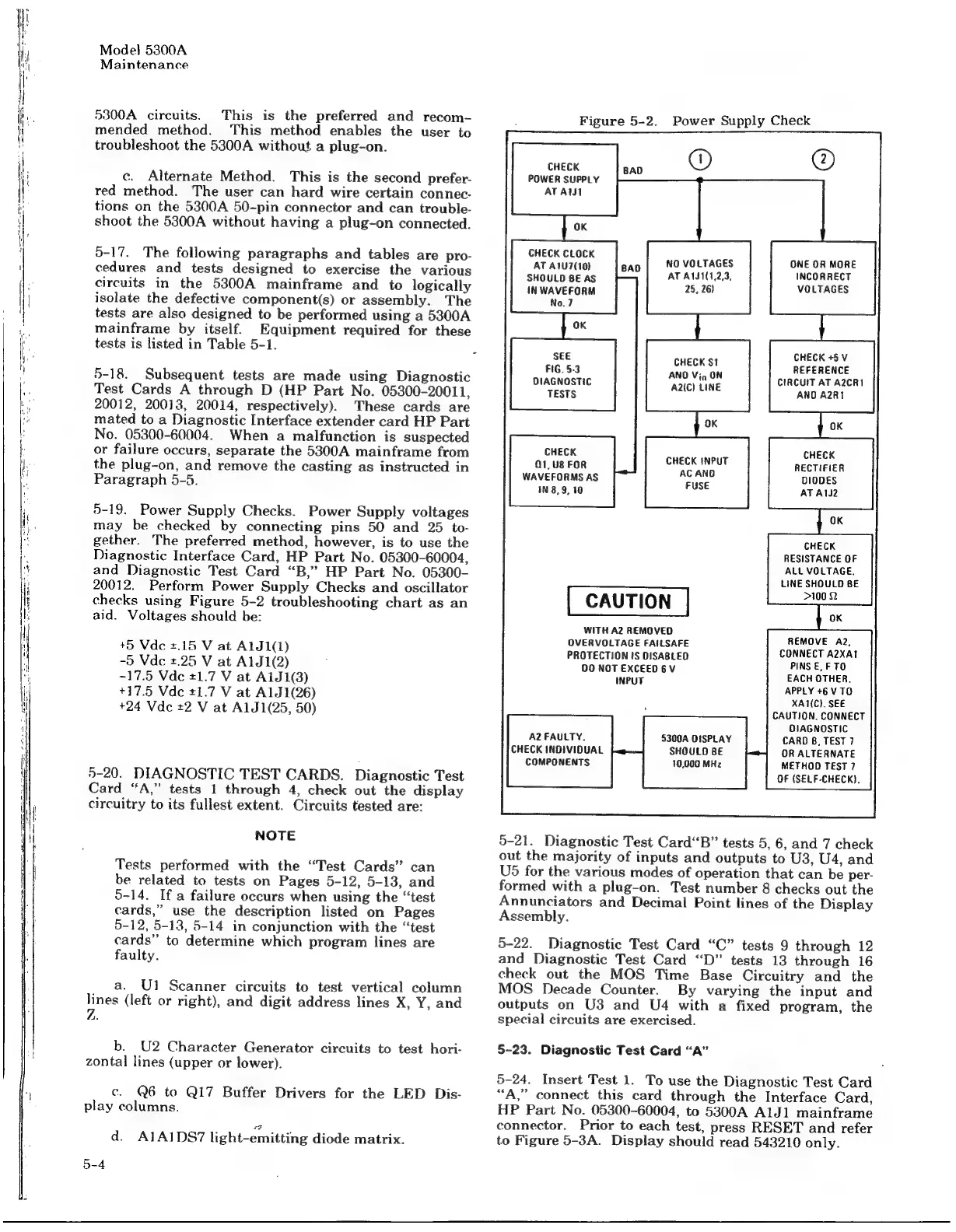
Figure
5-2.
Power
Supply
Check
CHECK
POWER
SUPPLY
ATAWI
CHECK
CLOCK
AT
A1U7(10)
SHOULD
8E
AS
IN
WAVEFORM
No.7
NO
VOLTAGES
AT
A1JS1(1,2,3,
25,
26)
ONE
OR
MORE
INCORRECT
VOLTAGES
SEE
FIG.
5-3
DIAGNOSTIC
TESTS
CHECK
+5
V
REFERENCE
CIRCUIT
AT
A2CR1
ANDO
A2R1
CHECK
$1
AND
Vig
ON
A2(C)
LINE
CHECK
Q1,U8
FOR
CHECK
INPUT
WAVEFORMS
AS
=
ce
iN
8,9,
10
US
CHECK
RECTIFIER
DIODES
AT
AI2
CHECK
RESISTANCE
OF
ALL
VOLTAGE.
LINE
SHOULD
BE
>100
2
WITH
A2
REMOVED
OVERVOLTAGE
FAILSAFE
PROTECTION
IS
DISABLED
00
NOT
EXCEED6V
INPUT
REMOVE
A2,
CONNECT
A2XAt
PINS
E,
FTO
EACH
OTHER.
APPLY
+6
V
TO
XA1(C).
SEE
CAUTION.
CONNECT
DIAGNOSTIC
CARD
6,
TEST
7
OR
ALTERNATE
METHOD
TEST
7
OF
(SELF-CHECK).
A2
FAULTY.
CHECK
INDIVIDUAL
COMPONENTS
5300A
DISPLAY
SHOULD
BE
10,000
MHz
5-21.
Diagnostic
Test
Card“B”
tests
5, 6,
and
7
check
out
the
majority
of
inputs
and
outputs
to
U3,
U4,
and
U5
for
the
various
modes
of
operation
that
can
be
per-
formed
with
a
plug-on.
Test
number
8
checks
out
the
Annunciators
and
Decimal
Point
lines
of
the
Display
Assembly.
5-22.
Diagnostic
Test
Card
“C”
tests
9
through
12
and
Diagnostic
Test
Card
“D”
tests
13
through
16
check
out
the
MOS
Time
Base
Circuitry
and
the
MOS
Decade
Counter.
By
varying
the
input
and
outputs
on
U3
and
U4
with
a
fixed
program,
the
special
circuits
are
exercised.
5-23.
Diagnostic
Test
Card
“A”
5-24.
Insert
Test
1.
To
use
the
Diagnostic
Test
Card
“A,”
connect
this
card
through
the
Interface
Card,
HP
Part
No.
05300-60004,
to
5300A
AlJdl
mainframe
connector.
Prior
to
each
test,
press
RESET
and
refer
to
Figure
5-3A.
Display
should
read
543210
only.

Related product manuals