EasyManua.ls Logo

HP 5300A - Page 41

HP 5300A
90 pages
Print Icon
To Next Page IconTo Next Page
To Previous Page IconTo Previous Page
Loading...
it.
Model
5300A
Maintenance
Table
5-2.
Character
Generator
Input
Codes
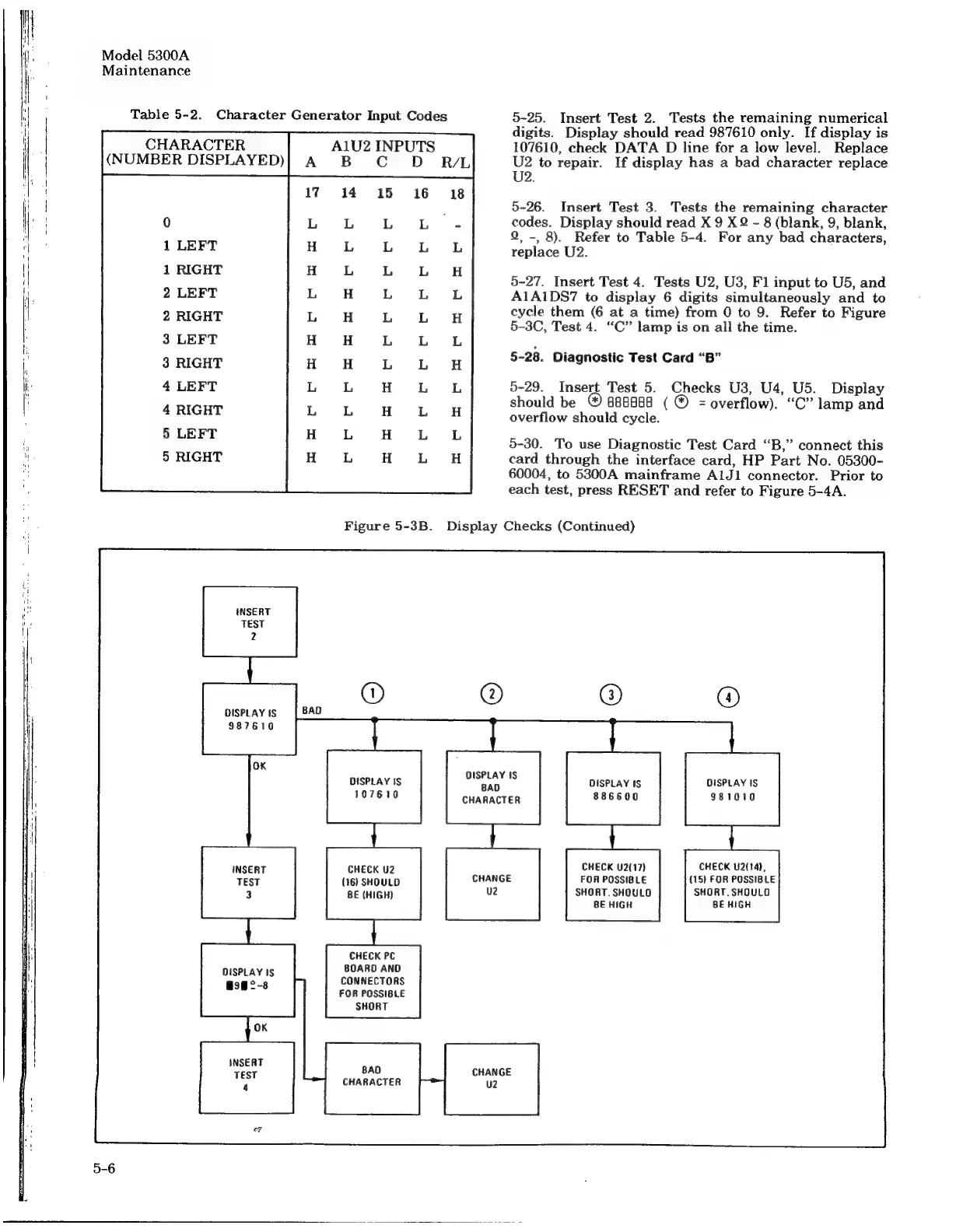
5-25.
Insert
Test
2.
Tests
the
remaining
numerical
digits.
Display
should
read
987610
only.
If
display
is
CHARACTER
Al1U2
INPUTS
107610,
check
DATA
D
line
for
a
low
level.
Replace
(NUMBER
DISPLAYED)|
A
B
CC
OD
RAL
U2
to
repair.
If
display
has
a
bad
character
replace
U2.
_
~]
roy
ry
es
on
-_
fr)
_
i<)
5-26.
Insert
Test
3.
Tests
the
remaining
character
codes.
Display
should
read
X
9
XQ
-
8
(blank,
9,
blank,
9,
-,
8).
Refer
to
Table
5-4.
For
any
bad
characters,
replace
U2.
0
1
LEFT
1
RIGHT
2
LEFT
2
RIGHT
3
LEFT
3
RIGHT
4
LEFT
4
RIGHT
5
LEFT
5
RIGHT
5-27.
Insert
Test
4.
Tests
U2,
U3,
F1
input
to
U5,
and
A1A1DS7
to
display
6
digits
simultaneously
and
to
cycle
them
(6
at
a
time)
from
0
to
9.
Refer
to
Figure
5-3C,
Test
4.
“C”
lamp
is
on
all
the
time.
5-28.
Diagnostic
Test
Card
“B”
5-29.
Insert
Test
5.
Checks
U3,
U4,
U5.
Display
should
be
@
888888
(
@
=
overflow).
“C”
lamp
and
overflow
should
cycle.
5-30.
To
use
Diagnostic
Test
Card
“B,”
connect
this
card
through
the
interface
card,
HP
Part
No.
05300-
60004,
to
5300A
mainframe
AlJ1
connector.
Prior
to
each
test,
press
RESET
and
refer
to
Figure
5-4A.
mamreormmorrertar
rrrrm
ee
eee
ee
maeoemrrrr|per
Gr
ee
TES
es
es
EE
cto
ot
neemrmteree
ere
ee
Figure
5-3B.
Display
Checks
(Continued)
INSERT
2
TEST
2
DISPLAY
IS
i
987610
DISPLAY
IS
eres
3
DISPLAY
IS
DISPLAY
IS
107610
CHARACTER
886600
981010
INSERT
CHECK
U2
CHECK
U2(17)
CHECK
U2(14),
TEST
(16)
SHOULD
FOR
POSSIBLE
(15)
FOR
POSSIBLE
3
BE
(HIGH)
SHORT.
SHOULD
SHORT.
SHOULD
BE
HIGH
BE
HIGH
CHECK
PC
DISPLAY
IS
BOARD
ANO
asm°-38
CONNECTORS
-
FOR
POSSIBLE
SHORT
oK
INSERT
TEST
BAO
CHARACTER

Related product manuals