EasyManua.ls Logo

HP 5300A - Page 51

HP 5300A
90 pages
Print Icon
To Next Page IconTo Next Page
To Previous Page IconTo Previous Page
Loading...
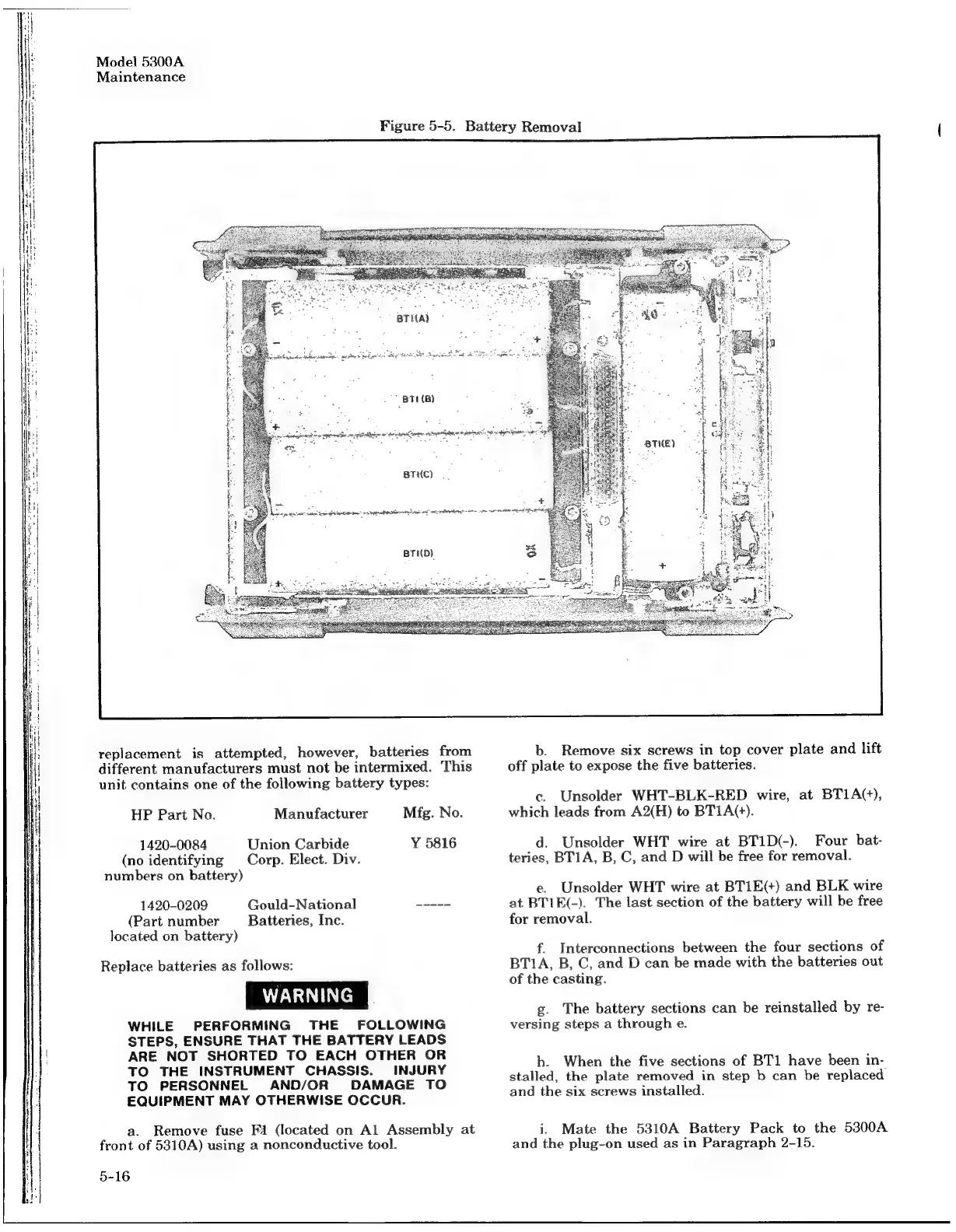
Model
5300A
Maintenance
Figure
5-5.
Battery
Removal
:
"871
(B)
caged
La
ipa
am
et
teats
ee.
seen
et
pete
ae
=
BrHc)
|.
dong
eet
ate
Se
a
tee”
nepal
a
A
a
bg
ae
tee
me
aie
et
BTID)
replacement
is
attempted,
however,
batteries
from
different
manufacturers
must
not
be
intermixed.
This
unit
contains
one
of
the
following
battery
types:
Mfg.
No.
HP
Part
Na.
Manufacturer
Union
Carbide
Y
5816
Corp.
Elect.
Div.
1420-0084
(no
identifying
numbers
on
battery)
Gould-National
Batteries,
Inc.
1420-0209
(Part
number
located
on
battery)
Replace
batteries
as
follows:
WHILE
PERFORMING
THE
FOLLOWING
STEPS,
ENSURE
THAT
THE
BATTERY
LEADS
ARE
NOT
SHORTED
TO
EACH
OTHER
OR
TO
THE
INSTRUMENT
CHASSIS.
INJURY
TO
PERSONNEL
AND/OR
DAMAGE
TO
EQUIPMENT
MAY
OTHERWISE
OCCUR.
a.
Remove
fuse
Fi
(located
on
Al
Assembly
at
front
of
5310A)
using
a
nonconductive
tool.
5-16
Sf
_-BTHED
2
of
{
|
b.
Remove
six
screws
in
top
cover
plate
and
lift
off
plate
to
expose
the
five
batteries.
c.
Unsolder
WHT-BLK-RED
wire,
at
BT1A(+),
which
leads
from
A2(H)
to
BTIA(+).
d.
Unsolder
WHT
wire
at
BT1D(-).
Four
bat-
teries,
BT1A,
B,
C,
and
D
will
be
free
for
removal.
e.
Unsolder
WHT
wire
at
BTIE(+)
and
BLK
wire
at
BTIK(-).
The
last
section
of
the
battery
will
be
free
for
removal.
f.
Interconnections
between
the
four
sections
of
BT1A,
B,
C,
and
D
can
be
made
with
the
batteries
out
of
the
casting.
g.
The
battery
sections
can
be
reinstalled
by
re-
versing
steps
a
through
e.
h.
When
the
five
sections
of
BT1
have
been
in-
stalled,
the
plate
removed
in
step
b
can
be
replaced
and
the
six
screws
installed.
i.
Mate
the
5310A
Battery
Pack
to
the
5300A
and
the
plug-on
used
as
in
Paragraph
2-15.

Related product manuals