EasyManua.ls Logo

HP 654A - Section III: Operating Instructions; 3-3. Controls, Indicators, and Connectors; 3-5. Turn-On Procedure; 3-9. Operating Instructions

HP 654A
82 pages
Print Icon
To Next Page IconTo Next Page
To Previous Page IconTo Previous Page
Loading...
Model
654A
Section
III
SECTION
III
OPERATING
INSTRUCTIONS
3-1.
INTRODUCTION.
3-2.
This
section
contains
instructions
and
information
necessary
for
the
operation
of
the
654A
Test
Oscillator.
Included
in
this
section
are identification
of
controls,
indicators
and
connectors,
turn-
on
procedure,
meter
mechanical
zero
adjustment
and
operating
instructions.
3-3.
CONTROLS,
INDICATORS,
AND
CONNECTORS.
3-4.
All
operating
controls,
indicators
and
connectors
of
the
654A
are
identified
and
described
in
Figure
3-1.
3-5.
TURN-
ON
PROCEDURE.
3-6.
OUTPUT
METER
MECHANICAL
ZERO
ADJUSTMENT.
3-7.
The
Model
654A
output
meter
is
properly
mechanically
zero-
set
when
the
meter
pointer
rests
over
the
-1
dBm
mark.
Zero-
set
the
output
meter
to
obtain
maximum
accuracy
and
mechanical
stability
in
the
following
manner.
With
LINE
switch
turned
off,
insert
pointed
object (
such
as
tip
of
ball
point
pen)
into
recess
on
adjustment
wheel,
and
rotate
wheel
until
meter
pointer
rests
exactly
over -
1
dBm
mark.
3-8.
PRIMARY
POWER
APPLICATION.
a.
Before
applying
primary
power
to
instrument,
set
115
or
230
volt
slide
switch (
S3)
to
position
which
indicates
primary
voltage
to
be
used.
b.
Connect
primary
power
to
connector
J1.
Switch
LINE
switch (
Si)
to
ON
position;
pilot
lamp
(DS1)
will
glow.
3-9.
OPERATING
INSTRUCTIONS.
a.
Zero-
set
meter (
Paragraph
3-7)
and
turn
instrument
on (
Paragraph
3-8).
b.
Set
the
FREQUENCY
RANGE
switch
and
FREQUENCY
dial (
with
VERNIER)
to
the
desired
frequency. (
Dial
reading
multiplied
by
range
setting
gives
the
frequency
in
Hz.)
c.
Connect
a
frequency
counter
to
the
rear
panel
COUNTER
OUTPUT,
if
desired.
d.
Select
the
required
output
impedance
by
pressing
the
appropriate
IMPEDANCE
pushbutton.
e.
Adjust
the
OUTPUT
LEVEL
attenuators
and
the
AMPLITUDE
control
for
the
desired
signal
output
level.
The
algebraic
sum
of
the
meter
indication
and
the
attenuator
setting
gives
the
power
level,
in
dBm,
into
a
load
equal
to
the
impedance
selected
by
the
IMPEDANCE
pushbutton.
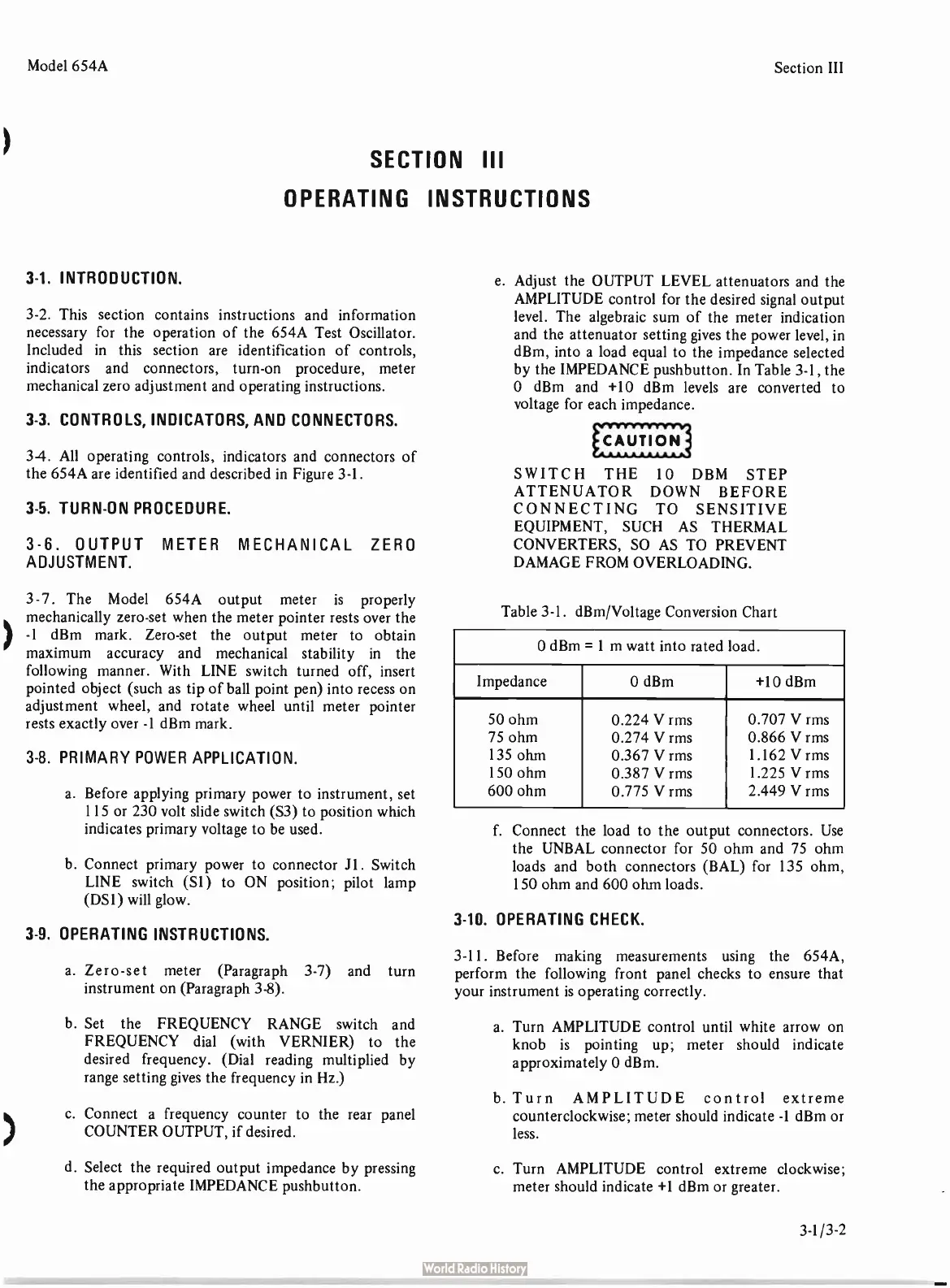
In
Table
3-1,
the
O
dBm
and +
10
dBm
levels
are
converted
to
voltage
for
each
impedance.
SWITCH
THE
10
DBM
STEP
ATTENUATOR
DOWN
BEFORE
CONNECTING
TO
SENSITIVE
EQUIPMENT,
SUCH
AS
THERMAL
CONVERTERS,
SO AS
TO
PREVENT
DAMAGE
FROM
OVERLOADING.
Table
3-1.
dBm/Voltage
Conversion
Chart
0
dBm =
1 m
watt
into
rated
load.
Impedance
0
dBm
+10
dBm
50
ohm
75
ohm
135
olun
150
ohm
600
ohm
0.224
V
rms
0.274
V
rms
0.367
V
rms
0.387
V
rms
0.775
V
rms
0.707
V
rms
0.866
V
rms
1.162
V
rms
1.225
V
rms
2.449
V
rms
f.
Connect
the
load
to
the
output
connectors.
Use
the
UNBAL
connector
for
50
ohm
and
75
ohm
loads
and
both
connectors
(
BAL)
for
135
ohm,
150
ohm
and
600
ohm
loads.
3-10.
OPERATING
CHECK.
3-11.
Before
making
measurements
using the
654A,
perform
the following
front
panel
checks
to
ensure
that
your
instrument
is
operating
correctly.
a.
Turn
AMPLITUDE
control
until
white
arrow
on
knob
is
pointing
up;
meter
should
indicate
approximately
0
dBm.
b.
Turn
AMPLITUDE
control
extreme
counterclockwise;
meter
should
indicate -
1
dBm
or
less.
c.
Turn
AMPLITUDE
control
extreme
clockwise;
meter
should
indicate +
1
dBm
or
greater.
3-1/3-2

Related product manuals