EasyManua.ls Logo

HP 654A - 5-45. Power Supply Voltage Adjustments; 5-47. Frequency Calibration Procedures

HP 654A
82 pages
Print Icon
To Next Page IconTo Next Page
To Previous Page IconTo Previous Page
Loading...
Model
654A
Section
V
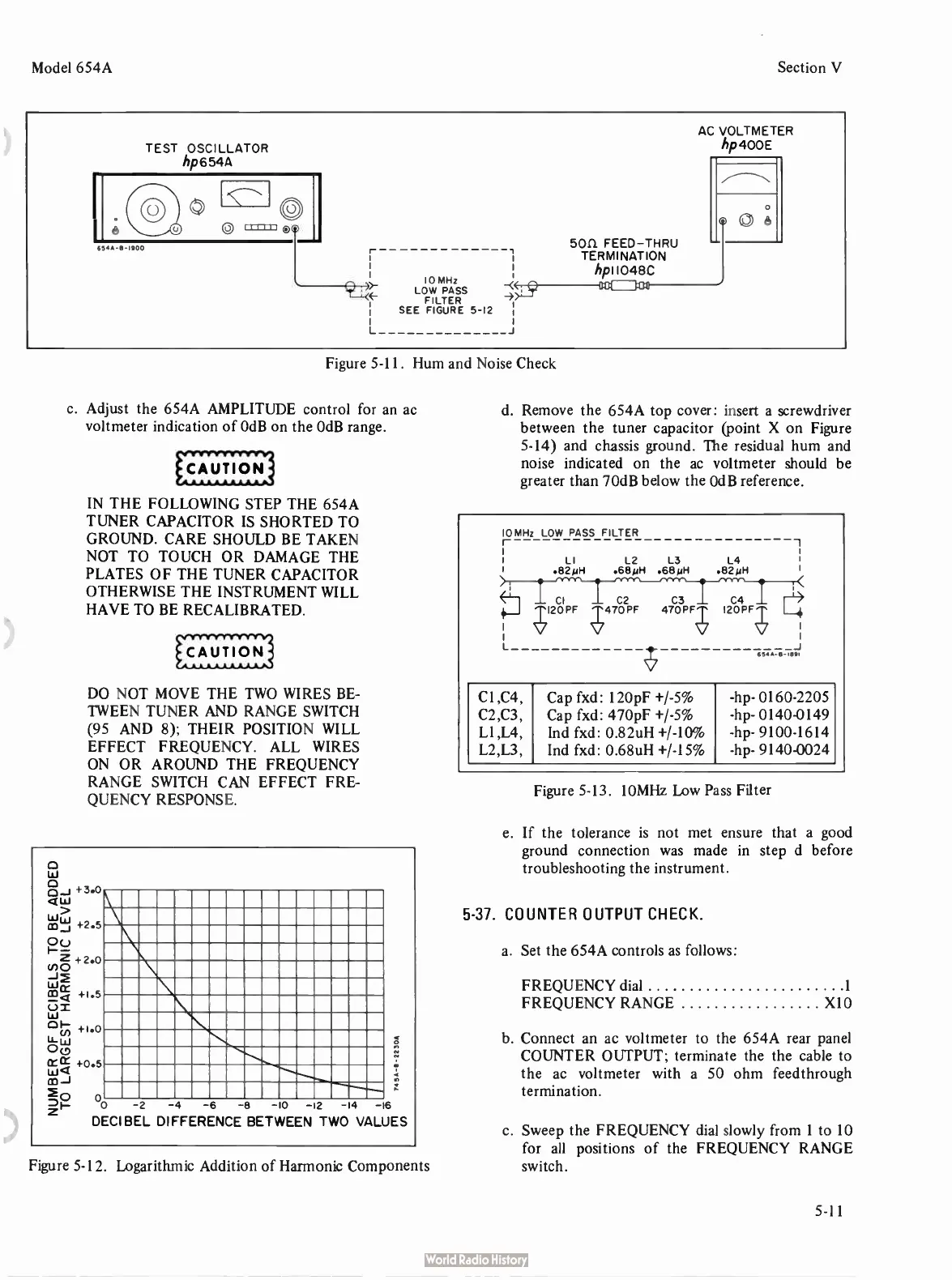
TEST
OSCILLATOR
hp6544
63.-B-1900
10 MHz
LOW
PASS
FILTER
SEE
FIGURE
5-12
AC
VOLTMETER
hp400E
5011
FEED—THRU
TERMINATION
hp11048C
Figure
5-11.
Hum
and
Noise
Check
c.
Adjust
the
654A
AMPLITUDE
control
for
an
ac
voltmeter
indication
of
OdB
on
the
OdB
range.
IN
THE
FOLLOWING
STEP
THE
654A
TUNER
CAPACITOR
IS
SHORTED
TO
GROUND.
CARE SHOULD
BE
TAKEN
NOT
TO
TOUCH
OR DAMAGE
THE
PLATES
OF THE
TUNER
CAPACITOR
OTHERWISE
THE
INSTRUMENT
WILL
HAVE
TO
BE
RECALIBRATED.
DO NOT
MOVE
THE
TWO
WIRES
BE-
TWEEN
TUNER
AND
RANGE
SWITCH
(95
AND
8);
THEIR
POSITION
WILL
EFFECT
FREQUENCY.
ALL
WIRES
ON
OR AROUND
THE
FREQUENCY
RANGE
SWITCH
CAN
EFFECT
FRE-
QUENCY
RESPONSE.
LLI
<LI
LLIt
yj
03 _
1
Z
(no
—I>
LL.Ic
r
aa
+
1.5
CO—
(/)
1:CCe
W<
+2.5
+2
0
+1.0
+0.5
r.
0
0 -
2 -4 -6 -
8 - -
2 -
4 -
16
DECIBEL
DIFFERENCE
BETWEEN
TWO
VALUES
Figure
5-12.
Logarithmic
Addition
of
Harmonic
Components
d.
Remove
the
654A
top
cover:
insert
a
screwdriver
between
the
tuner
capacitor (
point
X
on
Figure
5-14)
and
chassis
ground.
The
residual
hum
and
noise
indicated
on
the
ac
voltmeter
should
be
greater
than
70dB
below
the
OdB
reference.
Figure
5-13.
10MHz
Low
Pass
Filter
e.
If
the
tolerance
is
not
met
ensure
that
a
good
ground
connection
was
made
in
step
d
before
troubleshooting
the
instrument.
5-37.
COUNTER
OUTPUT
CHECK.
a.
Set
the
654A
controls
as
follows:
FREQUENCY
dial
1
FREQUENCY
RANGE
X10
b.
Connect
an
ac
voltmeter
to
the
654A
rear
panel
COUNTER
OUTPUT;
terminate
the
the
cable
to
the
ac
voltmeter
with
a
50
ohm
feedthrough
termination.
c.
Sweep
the
FREQUENCY
dial
slowly
from
1
to
10
for
all
positions
of
the
FREQUENCY
RANGE
switch.
5-11

Related product manuals