EasyManua.ls Logo

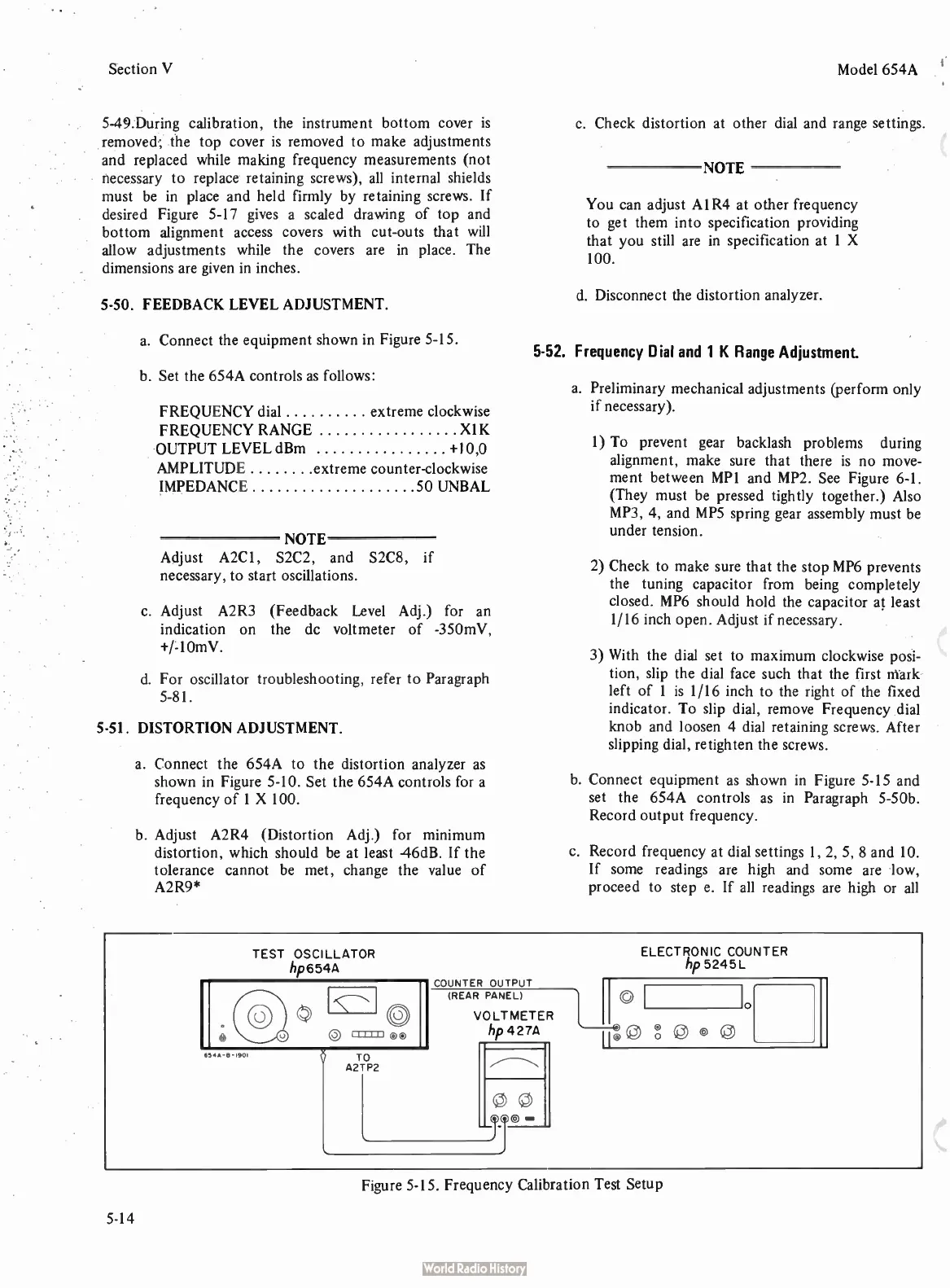
HP 654A - Frequency Calibration Test Setup

HP 654A
82 pages
Print Icon
To Next Page IconTo Next Page
To Previous Page IconTo Previous Page
Loading...
Section
V
5-49.During
calibration,
the
instrument
bottom
cover
is
removed;
the
top
cover
is
removed
to
make
adjustments
and
replaced
while
making
frequency
measurements (
not
necessary
to
replace
retaining
screws),
all
internal
shields
must
be
in
place
and
held
firmly
by
retaining
screws.
If
desired
Figure
5-17
gives
a
scaled
drawing
of
top
and
bottom
alignment
access
covers
with
cut-outs
that
will
allow
adjustments
while
the
covers
are
in
place.
The
dimensions
are
given
in
inches.
5-50.
FEEDBACK
LEVEL
ADJUSTMENT.
a.
Connect
the
equipment
shown
in
Figure
5-15.
b.
Set the
654A
controls
as
follows:
FREQUENCY
dial
extreme
clockwise
FREQUENCY
RANGE
X1K
OUTPUT
LEVEL
dBm +
10,0
AMPLITUDE
extreme
counter-
clockwise
IMPEDANCE
50
UNBAL
NOTE
Adjust
A2C1,
S2C2,
and
S2C8,
if
necessary,
to
start
oscillations.
c.
Adjust
A2R3 (
Feedback
Level
Adj.)
for
an
indication
on
the
dc
voltmeter
of -
350mV,
+/-10mV.
d.
For
oscillator
troubleshooting,
refer
to
Paragraph
5-81.
5-51.
DISTORTION
ADJUSTMENT.
a.
Connect
the
654A
to
the
distortion
analyzer
as
shown
in
Figure
5-10.
Set the
654A
controls
for
a
frequency
of
1 X
100.
b.
Adjust
A2R4 (
Distortion
Adj.)
for
minimum
distortion,
which
should
be
at
least
46dB.
If
the
tolerance
cannot
be
met,
change
the
value
of
A2R9*
Model
654A
c.
Check
distortion
at
other
dial
and
range
settings.
NOTE
You
can
adjust
A 1
R4
at
other
frequency
to
get
them
into
specification
providing
that
you
still
are
in
specification
at
1 X
100.
d.
Disconnect
the
distortion
analyzer.
5-52.
Frequency
Dial
and
1 K
Range
Adjustment.
a.
Preliminary
mechanical
adjustments (
perform
only
if
necessary).
1)
To
prevent
gear
backlash
problems
during
alignment,
make
sure that
there
is
no
move-
ment
between
MP1
and
MP2.
See
Figure
6-1.
(They
must
be
pressed
tightly
together.)
Also
MP3,
4,
and
MPS
spring
gear
assembly
must
be
under
tension.
2)
Check
to
make
sure
that
the
stop
MP6
prevents
the
tuning
capacitor
from
being
completely
closed.
MP6
should
hold
the
capacitor
at
least
1/16
inch
open. Adjust
if
necessary.
3)
With
the
dial
set
to
maximum
clockwise
posi-
tion,
slip
the
dial
face
such
that
the
first
eark-
left
of
1
is
1/16
inch
to
the
right
of
the
fixed
indicator.
To
slip
dial,
remove
Frequency
dial
knob
and
loosen
4
dial
retaining
screws.
After
slipping
dial,
retighten
the
screws.
b.
Connect
equipment
as
shown
in
Figure
5-15
and
set
the
654A
controls
as
in
Paragraph
5-50b.
Record
output
frequency.
c.
Record
frequency
at dial
settings
1,
2, 5,
8
and
10.
If
some
readings
are
high
and
some
are
low,
proceed
to
step
e.
If
all
readings
are
high
or
all
TEST
OSCILLATOR
hp654A
654A-
II-
1901
TO
A2TP2
COUNTER
OUTPUT
(REAR
PANEL)
VOLTMETER
hp
427A
ELECTRONIC
COUNTER
hp
5245L
Figure
5-15.
Frequency
Calibration
Test
Setup
5-14

Related product manuals