EasyManua.ls Logo

HP 654A - 5-28. Balance Checks

HP 654A
82 pages
Print Icon
To Next Page IconTo Next Page
To Previous Page IconTo Previous Page
Loading...
Section
V
Model
654A
5-18.
135
BAL
FLATNESS
CHECK.
a.
Perform
the
procedure
of
Paragraph
5-16
steps
a
through
g
with
the
following
changes:
In
step
a.
Set
IMPEDANCE
to
135
BAL;
In
step
b.
Use
the
135
ohm
thermal
converter
(Table
5-3)
which
should be
connected
directly
to
both
output
connectors
of
the
654A;
In
step
f.
Sweep
the
654A
over
the
frequency
range
of
10Hz
to
5MHz.
b.
If
the
tolerances
are
not
met,
first
assure
that
the
75
UNBAL
flatness
is
within
tolerance
before
troubleshooting
the
654A.
5-19.
150
BAL
FLATNESS
CHECK.
a.
Perform
the
procedure
of
Paragraph
5-16
steps
a
through
g
with
the
following
changes:
In
step
a.
Set
IMPEDANCE
to
150
BAL;
In step
b.
Use
the
150
ohm
thermal
converter
(Table
5-3)
which
should be
connected
directly
to
both
output
connectors
of
the
654A;
In
step
f.
Sweep
the
654A
over
the
frequency
range
of
10Hz
to
5MHz.
b.
If
the
tolerances
are
not met,
first
assure that
the
75
UNBAL
flatness
is
within
tolerance
before
troubleshooting
the
654A.
5-20.
600
BAL
FLATNESS
CHECK.
a.
Perform
the
procedure
of
Paragraph
5-16
steps
a
through
g
with
the
following
changes:
In
step
a.
Set
IMPEDANCE
to
600
BAL;
In
step
b.
Use
the
600
ohm
thermal
converter
(Table
5-3)
which
should
be
connected
directly
to
both
output
connectors
of
the
654A.
In
step
f.
Sweep
the
654A
over
the
frequency
range
of
10Hz
to
1MHz.
b.
If
the
tolerances
are
not
met,
first
assure
that
the
75
UNBAL
flatness
is
within
tolerance
before
troubleshooting
the
654A.
5-
21.
METER
TRACKING
ACCURACY
CHECK.
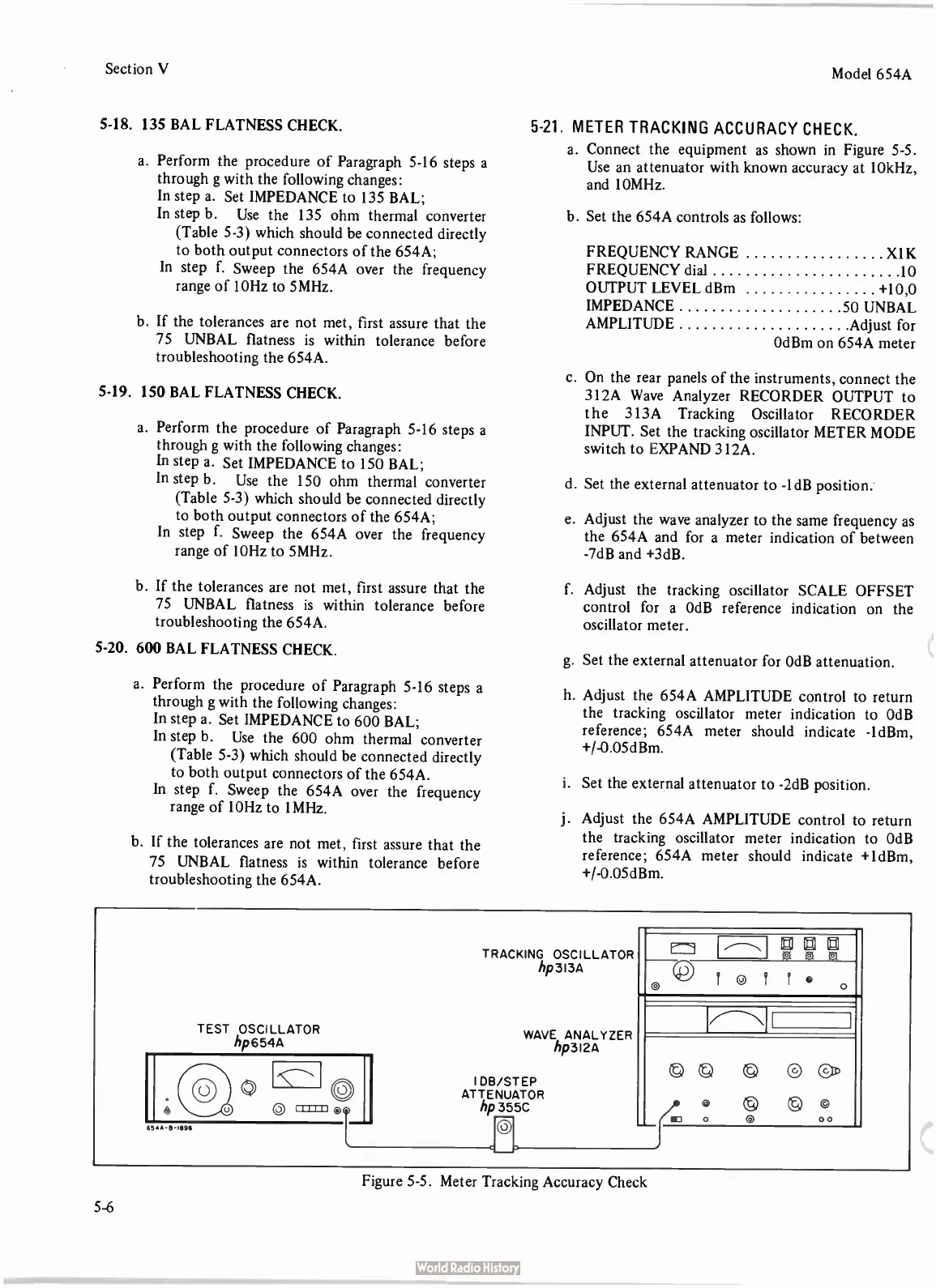
a.
Connect
the
equipment
as
shown
in
Figure
5-5.
Use
an
attenuator
with
known
accuracy
at
10kHz,
and
10MHz.
b.
Set
the
654A
controls
as
follows:
FREQUENCY
RANGE
X1K
FREQUENCY
dial
10
OUTPUT
LEVEL
dBm +
10,0
IMPEDANCE
AMPLITUDE
50
UNBAL
Adjust
for
OdBm
on
654A
meter
c.
On
the
rear
panels
of
the
instruments,
connect
the
312A
Wave
Analyzer
RECORDER
OUTPUT
to
the
313A
Tracking
Oscillator
RECORDER
INPUT.
Set
the
tracking
oscillator
METER
MODE
switch
to
EXPAND
312A.
d.
Set
the
external
attenuator
to -
1dB
position.
e.
Adjust
the
wave
analyzer
to
the
same
frequency
as
the
654A
and
for
a
meter
indication
of
between
-7dB
and +
3dB.
f.
Adjust
the
tracking
oscillator
SCALE
OFFSET
control
for
a
OdB
reference
indication
on
the
oscillator
meter.
g.
Set
the
external
attenuator
for
OdB
attenuation.
h.
Adjust
the
654A
AMPLITUDE
control
to
return
the
tracking
oscillator
meter
indication
to
OdB
reference;
654A
meter
should
indicate -
1dBm,
+/-0.05dBm.
i.
Set
the
external
attenuator
to -
2dB
position.
j.
Adjust
the
654A
AMPLITUDE
control
to
return
the
tracking
oscillator
meter
indication
to
OdB
reference;
654A
meter
should
indicate +
1dBm,
+/-0.05dBm.
TEST
OSCILLATOR
hp654A
654,6-18911
TRACKING
OSCILLATOR
hp3I3A
WAVE
ANALYZER
hp3I2A
IDB/STEP
ATTENUATOR
hp
355C
Di DI ED
ci
© ©
I ©
I f o
o
Figure
5-5.
Meter
Tracking
Accuracy
Check
5-6

Related product manuals